
SaaS & Technology Groups · Track 1 · Tutorial 2 of 2
Clear intercompany items in a SaaS group
The same items come round every month. This is how to clear each one in BrizoConsol, in the order that closes the month cleanly, with links to the accounting behind them.
1Know the items
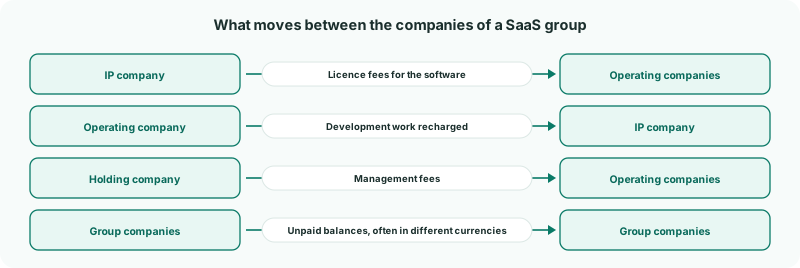
Each item is cleared under the type set up for it in Set up intercompany types for a SaaS group.
2Clear each item
| Item | Type | How to clear it | See |
|---|---|---|---|
| Licence fees from the IP company | Licence Fees | A Method 2 rule with FX: the IP company and the operating companies are usually in different currencies. | Eliminate management charges |
| Development work recharged to the IP company | Development Recharges | A rule on the recharge income and cost accounts. | Eliminate sales, purchases and services |
| Management fees from the holding company | Management Charges | A rule on the fee accounts. | Eliminate management charges |
| Unpaid licence fees and recharges | Trade Receivables / Payables | A document entry at each month end, or a rule on dedicated intercompany accounts with Method 2 and FX. | Eliminate trade receivables and payables |
| Loans to operating companies | Intercompany Loans | A rule on the loan and interest accounts. | Eliminate loans and interest |
A rule suits an item that recurs on accounts holding nothing else; see the Automate with rules track. When the accounts also hold outside business, clear the item from its invoices and bills instead.
3Close the month in order
- Load every company’s month, so the rules run on the consolidation with both sides in place.
- Enter the document entries for unpaid balances at the month end.
- Enter the GL entries for one-off items in the month: dividends, asset transfers, new loans.
- Clear Intercompany → Elimination Review, as in Work through Elimination Review.
- Check each type on Review → Month End Status, as in Check eliminations on Month End Status.
Check
On the group’s Balance Sheet and Profit & Loss with Show Entities on, every intercompany line is zero in the group column, and nothing for the month is waiting in Elimination Review.
4Read more about the accounting
The BrizoConsol blog goes through the accounting behind these items for a SaaS group, with worked examples:
5If something goes wrong
| An item is still in the group figures | Its accounts aren’t in a rule or entry, or one company booked it in another month. Check both companies’ books for the month. |
|---|---|
| The same rule waits in Elimination Review every month | Its method or tolerance doesn’t suit the usual difference. See Explain and clear intercompany differences. |
| A rule also eliminates outside business | The account isn’t only intercompany. Delete the rule and clear the item from its invoices and bills. |
Want more detail? See the documentation