
Intercompany Eliminations · Track 5 · Tutorial 2 of 9
Eliminate sales, purchases and services
A sale between group companies is income for one and a cost for the other. Neither happened as far as the group is concerned, so both come out, whether or not the invoice has been paid.
1Know what to eliminate
In October Company A sells goods to Company B for SGD 30,000 on INV-1043. Company B records AUD 33,120 on BILL-778 — SGD 29,675.52 at 0.8960.
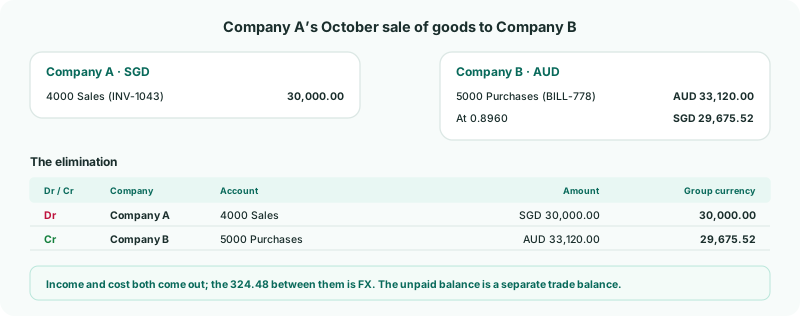
| This entry | The income and the matching cost: purchases, cost of sales or an expense such as subcontract or consulting costs. |
|---|---|
| Separately | The unpaid invoice, under Trade Receivables / Payables — see Eliminate trade receivables and payables. The profit in goods Company B still holds, under Unrealised Profit. |
2Choose how to clear it
| If the accounts | Use | See |
|---|---|---|
| Hold only sales to and purchases from the other company | A rule | The Automate with rules track |
| Also hold sales to outside customers, like Company A’s 4000 Sales | An entry built from the invoices and bills | Eliminate from invoices and bills |
| Hold a one-off sale | A GL entry | Post a GL elimination entry |
A document entry takes only the document’s lines on the account you choose, so a sale split across two income accounts is eliminated account by account.
3Know what the type accepts
Under Intercompany → Sales / Purchases / Services, an entry’s lines can use Revenue, Other Income, Expense, Other Expense, Direct Costs and Inventory accounts. A group that wants goods kept apart from services can switch on Inventory Transfers for goods: it accepts Inventory, Direct Costs and Revenue accounts. Your Group files its goods here.
Income and costs count for the period they are in, so an entry is made for each month’s sales.
4Check the month
- Open the group’s Profit & Loss for October with Show Entities on.
Check
The eliminations take SGD 30,000.00 out of Sales and 29,675.52 out of Purchases, and the outside customers’ sales stay in. The 324.48 between the two sides is in the FX account.
5If something goes wrong
| A rule also eliminates outside sales | The account isn’t only intercompany. Delete the rule and use document entries for it. |
|---|---|
| The sale is eliminated but group stock is still overstated | Company B still holds some of the goods. Eliminate the profit in them under Unrealised Profit. |
| no lines on the elimination account | None of the invoice went to the account chosen. Choose the account its lines went to. |
Want more detail? See the documentation