
Intercompany Eliminations · Track 6 · Tutorial 3 of 5
Check eliminations on Month End Status
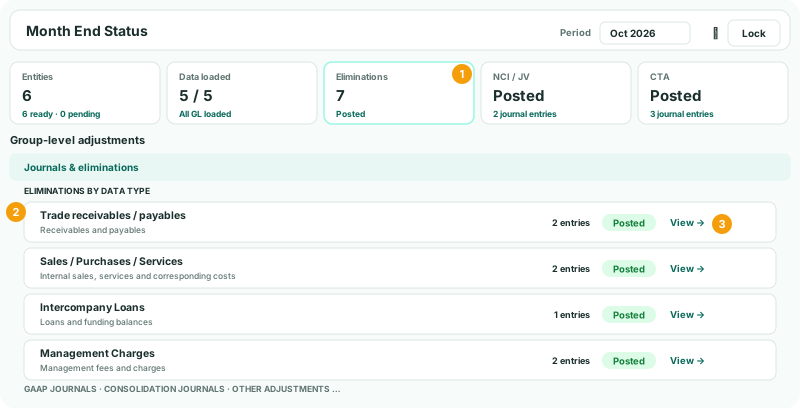
Month End Status shows, on one page, what has been posted for the month. Its eliminations section lists every intercompany type with entries that month, so a missing type stands out before you report.
1Open the month
- Select Your Group, and open Review → Month End Status.
- Choose Oct 2026 in Period, or step to it with the arrows.
2Read the Eliminations card
The Eliminations card counts the entries dated in the month, across every type. It shows Posted when there is at least one, and Pending when there are none.
Posted means entries exist, not that every item is cleared. The list below tells you which types they are.
3Check each type against your plan
Under Group-level adjustments → Eliminations by data type, each type with entries dated in the month has a row: its name, what it covers, the number of entries, and View. Entries posted by rules are counted under the type the rule carries.
| Your Group expects in October | Row |
|---|---|
| Unpaid fees between Company A and Company B | Trade receivables / payables |
| Company A’s sale of goods to Company B | Sales / Purchases / Services |
| Company A’s loan to Company C, and its interest | Intercompany Loans |
| Company A’s management fee to Company B | Management Charges |
- For each item you expect, find its row.
- Click View to open the type’s entries for the month, and check the entry is there.
A type is listed only when it has an entry dated in the month. A balance eliminated by a GL entry in an earlier month still applies, but isn’t counted again: check those balances on the Balance Sheet instead. With no entries at all, the section shows No entries.
4Check the rest of the month
- Open Intercompany → Elimination Review for October: nothing should be left under Waiting for approval or Check the difference treatment.
- On the group’s Balance Sheet and Profit & Loss for October, with Show Entities on, the intercompany lines are zero in the group column.
Check
Every item in your plan is in its type’s list for October, and nothing is waiting in Elimination Review.
5If something goes wrong
| A type you expect isn’t listed | Nothing of that type is dated in October. A rule may have sent the month to Elimination Review, or a manual entry is dated in another month. |
|---|---|
| An item is under the wrong type | It was entered there, or its rule carries that type. Edit the rule’s Intercompany Type, or delete the entry and enter it under the right one. |
| The rows show N/A | A company is selected, not the group. Select Your Group. |
Want more detail? See the documentation