
Intercompany Eliminations · Track 6 · Tutorial 1 of 5
Explain and clear intercompany differences
The two sides of an intercompany item rarely agree to the cent. Most differences have one of three causes, and each is cleared differently. Decide the treatment once on the rule, and handle the exceptions in Elimination Review.
1Know where differences come from
| Cause | What happened | Cleared as |
|---|---|---|
| Exchange rates | The companies keep different currencies, or converted at different rates. Company A’s SGD receivable and Company B’s AUD payable never translate to exactly the same SGD. | FX |
| Timing | One company has booked something the other hasn’t yet — Company A invoiced October’s fees, Company B records them in November. | Timing |
| Small, no one will chase | Rounding, a bank charge on a settlement. | Write off |
| A mistake | Wrong amount, wrong account, a missing entry. | Not cleared: fix it in the company’s books and reload. |
Only the first three are differences to treat. A mistake treated as FX disappears from view while the group figures stay wrong.
2Set the treatment on the rule
Only Method 2 clears each side at its own amount and treats what is left. Methods 1 and 3 don’t create a difference to treat.
- Open Intercompany → Elimination Rules, and edit the rule for the fees Company B owes Company A.
- Choose Method 2, and set Default residual treatment.
- For FX or Write off, choose the Treatment account — a profit and loss account.
- For Timing, choose what happens under Timing difference.
- Enter a Default justification, and click Confirm.
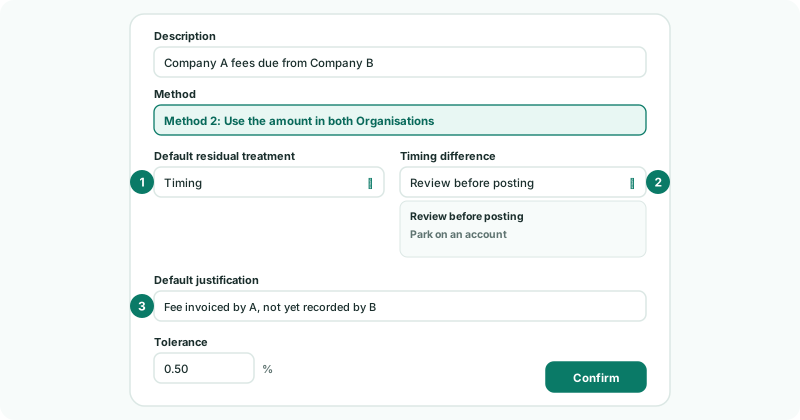
| Review before posting | The month’s elimination isn’t posted. It waits in Elimination Review until someone approves it. Use it when a timing difference should be looked at every time. |
|---|---|
| Park on an account | The elimination is posted, and the difference goes to the account you choose under Park the difference on — any account, such as an intercompany suspense account — until the other company records it. |
For Your Group: the unpaid fees rule was set up with FX in Method 2: use both amounts and treat the difference. Change it to Timing with Review before posting when the usual cause is Company B booking late, so a late booking isn’t posted to FX unseen. The management fee rule stays on Method 1: its tolerance lets the small exchange difference post, as in Set the tolerance, and only a larger difference is held for review.
Every Method 2 difference is also listed in Elimination Review, whatever the treatment, so it can be checked and changed there.
3Work through Elimination Review
- Open Intercompany → Elimination Review, and choose October 2026.
- Read each row’s Difference and any warning under it, and click Review and post on a held row, or Change treatment on a posted Method 2 row.
- Find the cause, adjust the treatment if needed, and post: Approve & Post, or Confirm & Replace for a Method 2 difference.
- If the elimination shouldn’t happen at all, click Reject, then Reject again to confirm.
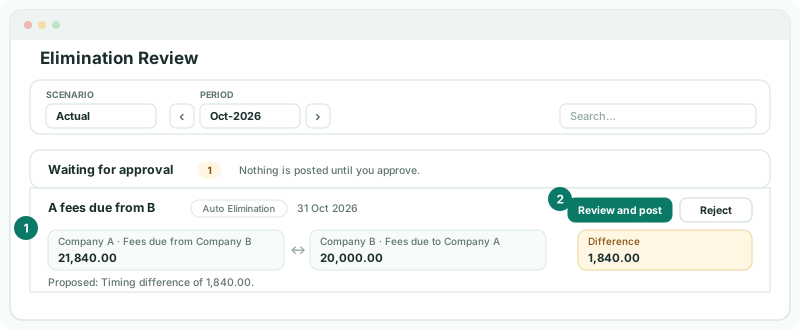
In October the fees row is held with a difference of 1,840.00: Company A invoiced a fee Company B hasn’t recorded. If Company B records it this month, reload Company B — the rule then posts on its own. If it won’t until November, approve the elimination with the difference as Timing.
4Treat differences on manual entries
A GL or document entry whose two sides don’t balance in the group currency opens Allocate Difference Treatment when you click Next or Confirm. Allocate the difference to FX difference, Timing difference or Write off — split across more than one if it has more than one cause — with the company, account, amount and a justification, until Remaining is 0.00.
5Check the differences are explained
- Open the group’s Profit & Loss and Balance Sheet for October with Show Entities on.
- Open Review → Elim. & Journals Report for October.
Check
Every intercompany line is zero in the group column. Nothing for October is left waiting in Elimination Review. The FX and write-off accounts hold only small amounts, each traceable to a rule or entry with its justification.
A large FX amount is almost never an exchange difference. Drill into it: it is usually a missing or wrong entry on one side.
6If something goes wrong
| The same rule is held in Elimination Review every month | Its treatment is Timing with Review before posting, or Method 1 with too tight a tolerance. If the difference is always exchange, change the rule to Method 2 with FX. |
| A difference is posted to FX but should be timing | Open the row in Elimination Review, change the treatment, and post it again. |
| Remaining won’t reach 0.00 | The allocations don’t add up to the difference. Adjust the amounts. |
| An entry can’t be changed | Its month is locked. Ask an administrator to unlock it on Month End Status. |
Want more detail? See the documentation