
Intercompany Eliminations · Track 6 · Tutorial 2 of 5
Work through Elimination Review
Elimination Review is where a month’s eliminations wait for a person: entries a rule prepared but didn’t post, differences a rule posted that someone should check, and entries dated outside a company’s time in the group. Clear it before you report the month.
1Open the month
- Select Your Group, and open Intercompany → Elimination Review.
- Keep Scenario on Actual, and choose Oct-2026 with the arrows beside Period.
Elimination Review is in the Intercompany menu while a Method 4 rule is active or something is waiting for a decision. Reviews are kept per scenario: a budget scenario has its own.
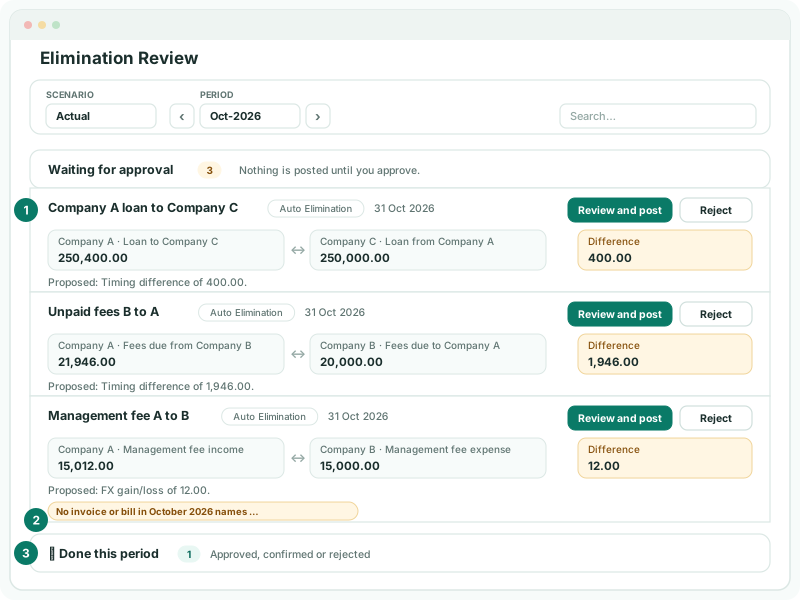
2Know why each row is here
| The row | What happened | Posted yet? |
|---|---|---|
| A Method 4 rule | The rule prepared the month’s entry for approval. | No |
| A Method 2 rule with Timing and Review before posting | The two sides differed. | No |
| Warning: The grouped scope exceeds the rule tolerance. | A Method 1 rule’s sides differed by more than its tolerance. | No |
| Warning: No invoice or bill in October 2026 names … | The rule names the other company, and no document that month did. | No |
| A Method 2 rule with FX or Write off | The rule posted the month, with the difference on the treatment account. It is listed so the treatment can be checked. | Yes |
| Warning: … has an elimination before acquisition date … or … on or after disposal date … | A manual entry is dated outside the company’s time in the group. The row is marked Warning and has no buttons. | Yes |
Rows with a warning show it in an amber label under the row. Type in Search… to find a description, type or warning.
3Approve or adjust a row
- Read the row’s Difference and any warning under it, and find the cause in the companies’ books.
- Click Review and post, or Change treatment on a Method 2 row already posted. The prepared entry opens: Review and Post Elimination for Method 4, Review Auto Elimination for the others.
- Check each company, account and amount, and correct any line that is wrong. If the sides differ in the group currency, say what the difference is, as on a manual entry.
- Click Approve & Post, or Confirm & Replace. The row shows Posted; for a Method 2 row, the reviewed entry replaces the one the rule posted.
Treating differences is covered in full in Explain and clear intercompany differences. If the cause is a missing or wrong booking, correct it in the company’s books and reload the month instead: the row is prepared again from the new figures, and the old one shows Invalid.
4Reject a row
- Click Reject on the row, then Reject in Reject Review.
The proposal is not posted, and an entry a Method 2 rule generated is removed. The row shows Rejected, and the rule leaves that month alone when the group is consolidated again, as long as the figures don’t change. Eliminate the month by hand if it needs a different entry.
5Handle warnings on manual entries
A manual entry dated before a company was acquired, or on or after it was sold, is still posted. Open the entry under its type and check its date: in Your Group, an entry for Company F dated in August, before its acquisition in September 2026, should be moved to September or deleted. The warning clears when the date is inside the company’s time in the group.
6Keep a copy
- Click Export to Excel, the icon at the top of the page. The rows on screen are exported with their date, description, type, companies, accounts, difference, warning and last update.
Check
No October row is left under Waiting for approval or Check the difference treatment. Every row is Posted, Rejected, Invalid or a Warning you have dealt with.
7If something goes wrong
| Elimination Review isn’t in the Intercompany menu | Nothing is waiting for a decision and no Method 4 rule is active. |
|---|---|
| Nothing to review in Oct-2026 | The month has no rows in this scenario. Check Scenario. |
| Period Oct 2026 is locked. Contact administrator. | The reviewed entry’s date was moved into a locked month. Keep the row’s own month, or ask an administrator to unlock the month you moved it to. |
| The same rule is listed every month | Its treatment or tolerance doesn’t suit the usual difference. See Explain and clear intercompany differences. |
Want more detail? See the documentation