
E-commerce Groups · Track 3 · Tutorial 1 of 1
Read an e-commerce group’s cash flow
Profit doesn’t tell an e-commerce group whether it can pay for next season’s stock. The cash flow does, as long as payment provider balances and stock are mapped the same way in every company.
1Know where an e-commerce group’s cash goes
An e-commerce group can be profitable and still short of cash: it pays for stock before it sells it, and waits for payment providers and marketplaces to pay out. The operating rows of Reports → Cashflow show where the cash went:
| Row | In an e-commerce group |
|---|---|
| Change In Inventory | Stock bought and not yet sold, mostly at the fulfilment company. An increase is cash going out. |
| Change In Accounts Receivable | Money not yet received, such as balances held by payment providers and marketplaces, if they are mapped to ACCOUNTS RECEIVABLE. |
| Change In Accounts Payable | Credit from suppliers. An increase is cash kept in the group. |
| Change In Taxes Payable | Sales tax collected and not yet paid over. |
| Change In Fixed Assets | Under investing: warehouse and fulfilment equipment bought. |
Each row reads the movement of a section of your Common COA, so the mapping decides which row a balance is on.
2Map the balances that decide the rows
Payment provider and marketplace balances are the ones most often mapped differently between companies. Decide once, for the whole group:
| Mapped to | On the Cashflow |
|---|---|
| BANK | Part of Opening Bank and Closing Bank: counted as cash. |
| ACCOUNTS RECEIVABLE | In Change In Accounts Receivable: money still to come in. |
- Open Settings → Global Settings → Account Mapping, and choose each trading company in turn.
- Map each payment provider and marketplace account to the group account you chose, and click Save.
Map sales tax collected to a TAXES PAYABLE account in every company, so it is on Change In Taxes Payable. See Map every company to one group chart of accounts.
3Read the group and each company
- Select Your Group, and open Reports → Cashflow for 2026.
- Turn on Show Entities, and read the Oct-2026 figures.
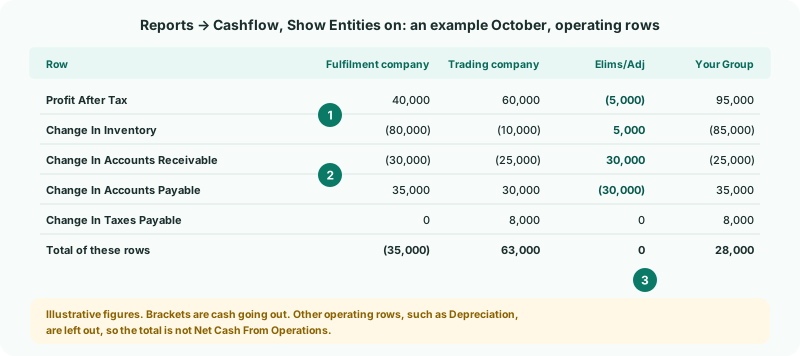
| Each company’s column | Where its own cash went. In the example, the fulfilment company is 35,000 down because its profit went into stock and into what the trading company owes it. |
|---|---|
| Elims/Adj | Intercompany items cancel here. The month-end unrealised profit entry lowers Profit After Tax and Change In Inventory moves by the same amount the other way; the receivable and payable between the companies are removed together. |
| Your Group | The cash the group really generated: the stock it bought from outside, and the money outside customers and payment providers still owe it. |
Click a figure to see the accounts and entries behind it, as in Drill from any figure to its source.
4Check the statement
- Open Reports → Balance Sheet for Oct-2026.
Check
Closing Bank on the Cashflow equals the bank on the Balance Sheet. Effect of Exchange Rate Changes on Cash is small, and close to nothing if every company keeps its books in the group currency.
How the exchange line is worked out, and what to expect, is in Read the translation effect in the cash flow. To add a row of your own, such as free cash flow, see Customise the cash flow.
5If something goes wrong
| What you see | What to do |
|---|---|
| Payment provider balances appear as cash in one company and as receivables in another | They are mapped to different sections. Map them all to the same group account. |
| Change In Inventory moves in Elims/Adj | That is the unrealised profit entry. Profit After Tax moves by the same amount the other way. |
| A company’s figures look too large or small | It is in another currency and its figures are translated. Compare them with its own Cashflow in its currency. |
| Effect of Exchange Rate Changes on Cash is large in one month only | A rate is missing or wrong for that month. Check Exchange Rates, as in Manage closing and average exchange rates. |
Want more detail? See the documentation