
Read and Customise Reports · Track 2 · Tutorial 3 of 4
Customise the cash flow
The built-in Cashflow report is built from the balance sheet’s movements, so more of its rows are formulas than in the other statements, and some are hidden. Know which rows hold it together before you change it.
1Know how the rows fit together
- Open Reports → Cashflow, click Override Report, and choose Row/column report.
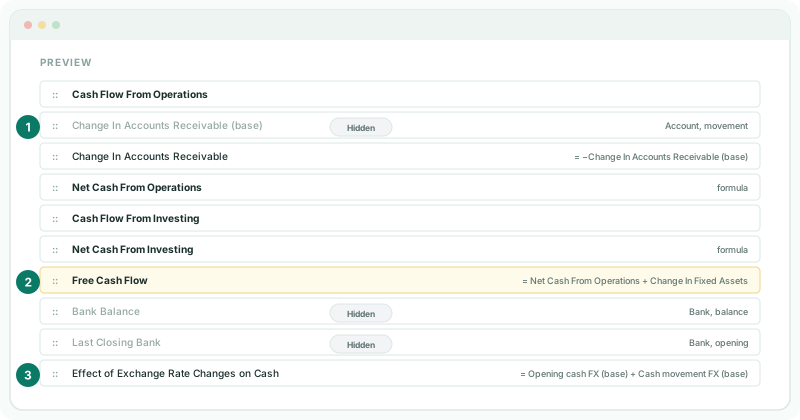
| Rows | What they do |
|---|---|
| Hidden rows ending (base) | Read an account section’s movement, leaving out the CTA, NCI and fiscal-year-alignment postings, which move no cash, such as Change In Accounts Receivable (base). A visible formula row shows it with the cash sign, such as Change In Accounts Receivable = −Change In Accounts Receivable (base). |
| Non-cash consolidation profit adjustment | Takes the profit from those postings back out of Profit After Tax, so the operating section starts from profit that moves cash. |
| Net Cash From Operations, Investing, Financing | Formulas adding each section’s rows. |
| Net Cash Flow | The three sections added together. |
| Bank Balance, Last Closing Bank (hidden) | The bank at the end of the period, and at the end of the period before it. |
| Effect of Exchange Rate Changes on Cash | Opening cash FX (base) + Cash movement FX (base), both hidden: the change in the opening bank from the rate moving, plus the period’s bank movements at the closing rate less the same movements at the average rate. |
| Opening Bank, Closing Bank | The two bank balances shown. |
| Cash FX Reconciliation | The two parts of the exchange effect, then Cash Flow Reconciliation Difference: Closing Bank − Opening Bank − Net Cash Flow − the exchange effect. It is 0 when the sections account for every movement in the bank. |
| Non-cash consolidation exclusions | For information only: the profit and the non-current asset movement left out because they move no cash. |
A hidden row shows Hidden in the editor. Leave the hidden rows in place: the visible rows are formulas on them, and the report can’t be saved while a formula uses a deleted row.
This changes the built-in Cashflow for everyone. To build your own report beside it from an empty one, follow Row/Column Reports.
2Add free cash flow
- Click the first blank row — click to configure — and choose Formula, then Custom Formula.
- In Description, type Free Cash Flow.
- Build Net Cash From Operations + Change In Fixed Assets from Add Row and the operators.
- Under Text style, click B Header and B Data, click Add Row, and drag it to just under Net Cash From Investing.
Change In Fixed Assets is already shown with the cash sign — money spent on fixed assets is negative — so it is added, not subtracted. Free Cash Flow is a line to read, not part of a total: don’t add it to Net Cash Flow.
3Save and check
- Click Save, then View, and open the group’s Balance Sheet for the same period.
Check
Free Cash Flow equals Net Cash From Operations plus Change In Fixed Assets. Closing Bank equals the bank on the Balance Sheet, and Cash Flow Reconciliation Difference is the same as before the override.
To go back to the built-in Cashflow, open the override again and click Restore default.
4If something goes wrong
| Cash Flow Reconciliation Difference changed after the override | A row was taken out of one of the Net Cash formulas, or a new row was added to one, so the sections no longer match the bank. Restore the rows, or restore the default. |
| Invalid Formula when you save | A row a formula uses was deleted, such as a hidden (base) row. Restore the default and make your change again. |
| Closing Bank no longer equals the bank | Bank Balance was changed or deleted. Restore the default. |
The accounting-standard cash flow statements, such as Consolidated Statement of Cash Flows, are separate reports with their own lines, filled from the CF classifications on the Accounting Standard page.
Want more detail? See the documentation