
Zoho Books Groups · Track 2 · Tutorial 1 of 3
Lock the period in Zoho, then reload
BrizoConsol keeps re-reading recent months from Zoho Books, so a journal posted late in Zoho changes your group figures overnight. Lock the month in Zoho first, then reload it once in BrizoConsol. That copy is final.
1Know why the order matters
You are closing October 2026 for Your Group: North Pte Ltd, South Pte Ltd and East Sdn Bhd, each in its own Zoho Books organisation.
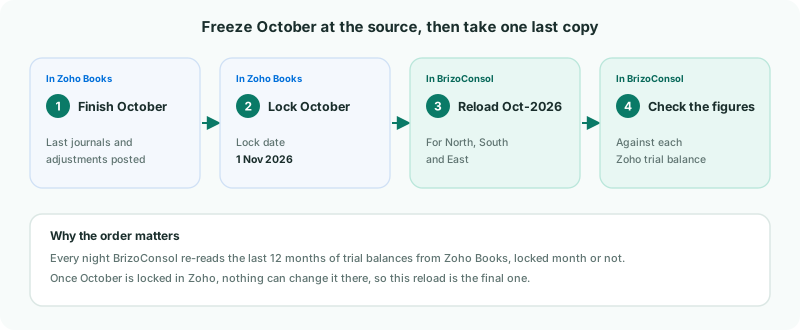
| Every night | BrizoConsol re-reads the last 12 months of trial balances from each Zoho organisation, and the last 6 months of invoices and bills. |
|---|---|
| A lock in BrizoConsol | Stops group entries — journals, eliminations, exchange rates — but not these reads. A company’s October figures still change if its Zoho books change. |
| A lock in Zoho Books | Stops the books changing. BrizoConsol doesn’t read Zoho’s lock, so it is up to you to lock there. |
2Lock October in each Zoho Books organisation
Do this once each company’s accountant has posted the last October entries.
- In Zoho Books, open North Pte Ltd’s organisation.
- Go to Accountant → Transaction Locking.
- Lock all transactions, or each module you post October entries in, with the lock date 1 Nov 2026, and enter a reason such as October 2026 group close.
- Repeat in South Pte Ltd and East Sdn Bhd.
Use 1 November, not 31 October. Zoho Books still lets you add and edit transactions dated on the lock date itself. A lock date of 31 October would leave the last day of the month open.
3Reload October in BrizoConsol
Last night’s copy may be missing entries posted today. Reload the month now that it can’t change:
- Select North Pte Ltd in the entity selector.
- Open Settings → Organisation Settings → Data Loading.
- On the Oct-2026 row, click Reload.
- GL is ticked; tick Invoices and Bills too, and click Start Load.
- Repeat for South Pte Ltd and East Sdn Bhd.
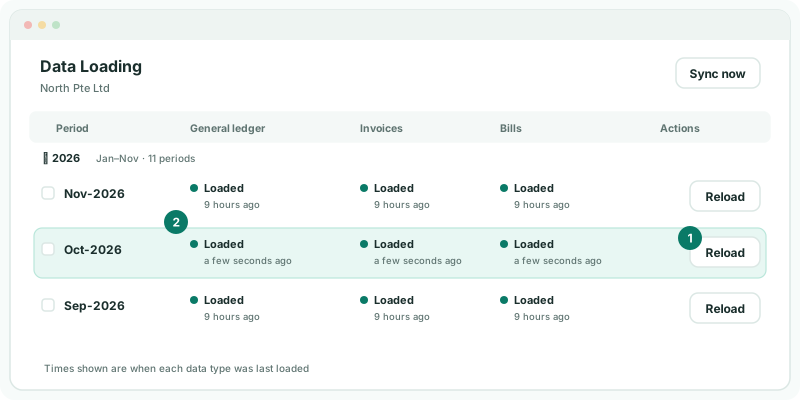
While a month reloads, its previous figures stay in place, so reports keep working until the new copy is in.
If East has Transactions from Enable additional access, tick it too, so drill-down matches the final books.
4Check each company against Zoho
- Select North Pte Ltd, and open Reports → All Reports → Trial Balance for Oct-2026.
- Compare total assets, total liabilities and net profit with North’s trial balance in Zoho Books at 31 October.
- Repeat for South and East. East’s report is in MYR, as in Zoho.
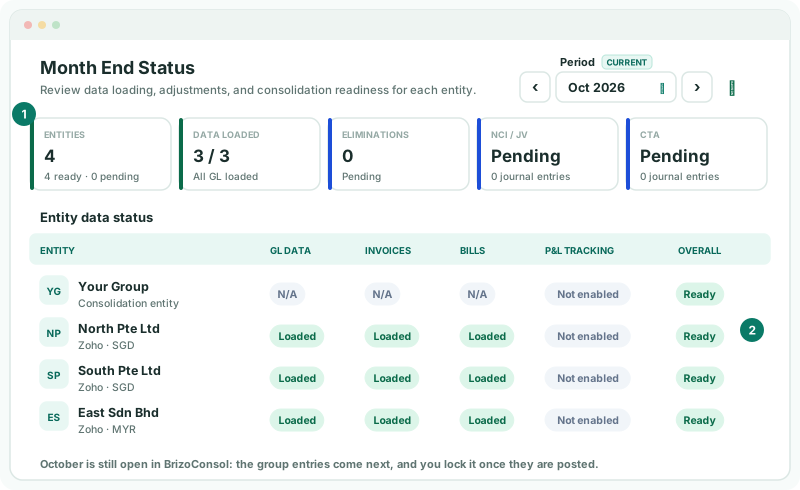
Then open Review → Month End Status for the group, on Oct 2026.
Check
Each company’s trial balance matches Zoho Books, and Month End Status shows 3 / 3 under Data loaded with every company Ready.
October is still open in BrizoConsol: the eliminations come next. Lock it there once the group entries are posted, as in Review everything before you report.
5If October has to change later
Unlock in the same order you locked:
- In Zoho Books, unlock October, or partly unlock it for the dates you need, and post the correction.
- Lock it again in Zoho.
- Reload Oct-2026 in BrizoConsol for that company, and check it again.
A correction posted in Zoho reaches BrizoConsol with the next nightly read even if you don’t reload — reloading just brings it in now, so you can check it.
6If something goes wrong
| A company’s figures differ from Zoho | Entries were posted after the last load, or on 31 October with a lock date of 31 October. Lock from 1 November and reload the month. |
|---|---|
| Group figures changed after the close | Someone changed the books in Zoho, and the nightly read brought it in. Check the Zoho lock, and the Data Loading page for when October was last loaded. |
| Reload failed - previous data retained | The reload stopped; the figures from the earlier load are still in place. Click Reload again. |
| The month stays Not loaded | Check the connection on Data Loading — a Token expired badge means it needs Reconnect Now. Reconnect, then load the month. |
| New accounts appeared in October’s load | Map them before going on, or their balances are left out of the group. See Build the group chart from a Zoho company. |
Want more detail? See the documentation