
E-commerce Groups · Track 2 · Tutorial 1 of 2
Remove returns between group companies
Stock sent back from a trading company to the fulfilment company is still a transaction inside the group. Unless the return is eliminated with the sale, group revenue and returns are both misstated.
1Know what to remove
In October the fulfilment company sells stock to a trading company for 120,000 and books it to 4100 Sales – group companies. The trading company sends back 8,000 of it. The fulfilment company books the return to 4150 Returns – group companies; the trading company takes it off 5100 Purchases – group companies.
| Between group companies | The sale and its return are both inside the group. IFRS 10 (paragraph B86(c)) requires intragroup income and expenses to be eliminated in full, so the net 112,000 comes out of group revenue and purchases. |
|---|---|
| From outside customers | A refund to a customer is a real reduction of group revenue and stays in. Under IFRS 15 (paragraphs B20–B27), revenue is shown net of the returns the group expects. |
If the return is left out of the elimination, the group shows 8,000 of returns that never left the group, and its revenue looks 8,000 lower than it is.
2Add the returns account to the rule
If the stock is cleared with a rule, as in Clear intercompany items in an e-commerce group, put the returns account on the same side as the sales account.
- Open Intercompany → Elimination Rules, and click Edit on the fulfilment company’s stock rule, or click Add an Auto Elimination Rule for a new one.
- Keep the Intercompany Type Inventory Transfers and the Method Method 1: Use the amount in the ‘From Organisation’ only.
- Under Leg Scope (Entity + Multiple Accounts), with the fulfilment company as From Organisation and 4100 under From Accounts, click + Add Account and choose 4150.
- Keep the trading company’s 5100 under To Accounts. If it books returns to an account of their own, add that account the same way.
- Click Confirm.
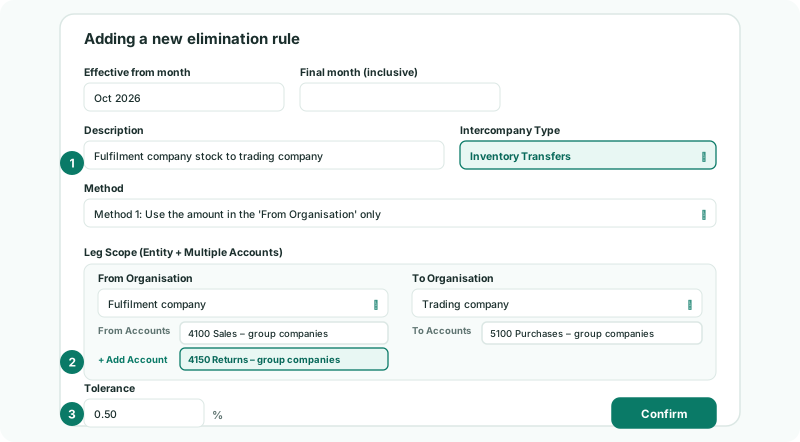
The rule adds each side’s accounts together before it compares them: 120,000 sales less 8,000 returns is 112,000 on the From side, against the trading company’s net 112,000. Both accounts are eliminated in full, so the returns line is cleared as well as the sales line.
Saving recalculates the group, so every month in the rule’s effective period is cleared again, with the returns included. More on adding accounts is in Build rules with several legs.
3Clear a credit note that a rule can’t take
When the returns account also holds returns from outside customers, a rule on it would remove those too. Clear the group return on its own instead.
- Open Intercompany → Inventory Transfers for Oct-2026, and click Add a new Elimination Entry.
- Keep GL entry, and enter an Elimination ID such as RET-F-T-2026-10 and a Description.
- Under Debit Lines, choose the trading company and 5100, 8,000.00. Under Credit Lines, choose the fulfilment company and 4150, 8,000.00.
- Click Confirm.
Each line reverses what the company booked: the return is a debit in the fulfilment company’s books, so the elimination credits it. A credit note can’t be picked from Documents: it is listed as credit notes are not supported yet, so use a GL entry for it, as in Post a GL elimination entry.
4Keep both companies in the same month
A return booked by the fulfilment company on 31 October and by the trading company in November leaves October 8,000 apart, 7.1% of the From side. That is beyond the rule’s tolerance, so October isn’t posted: it waits in Intercompany → Elimination Review with The grouped scope exceeds the rule tolerance.
Have the trading company book the return in October, reload its month, and the rule posts. If returns are often booked a month apart, see Explain and clear intercompany differences.
Returned stock is no longer held by the trading company, so it drops out of the month-end unrealised profit entry, which is worked out from the trading companies’ closing stock: see Remove unrealised profit in inventory.
5Check the month
- Open Reports → Profit & Loss for Oct-2026 with Show Entities on.
Check
Elims/Adj takes out the fulfilment company’s 120,000 of sales and 8,000 of returns to the trading company, and the trading company’s 112,000 of purchases, so the group column shows nothing on the intercompany sales, returns and purchases lines. Returns from outside customers are still in the group figures.
6If something goes wrong
| What you see | What to do |
|---|---|
| Group returns still show in the group column | The returns account isn’t in the rule or a GL entry. Add it to the From side, or post a GL entry for the credit note. |
| The grouped scope exceeds the rule tolerance. | One company booked the return in another month. Book it in the same month and reload, or clear the month in Elimination Review. |
| credit notes are not supported yet | The credit note can’t be eliminated from Documents. Post a GL entry for it. |
| Leg 1: both sides post to the same group account | An account on the From side and one on the To side are mapped to the same group account. Map the intercompany accounts to separate group accounts. |
Want more detail? See the documentation