
Intercompany Eliminations · Track 4 · Tutorial 1 of 5
Post a GL elimination entry
A rule clears the same accounts every month. For a one-off item, or one no rule covers, you enter the elimination yourself: each company’s side on its own account, in its own currency, translated at the rate you give.
1Know what you are eliminating
In October 2026, Company A lends Company C SGD 85,600. Company A records it on 1300 Loan to Company C in SGD. Company C, which keeps its books in GBP, records GBP 50,000 on 2400 Loan from Company A. At the October closing rate of 1.7200, Company C’s side is SGD 86,000.
| Each line is a company’s own account | The entry is recorded at subsidiary level: you choose the company and one of its accounts, and BrizoConsol posts it to the group account that account is mapped to. |
|---|---|
| Each line has its own currency and rate | Enter the amount as the company booked it, and the rate that translates it into the group currency. The line’s base amount is the amount times the rate. |
| The sides must agree in the group currency | If they don’t, you say what the difference is before the entry can be confirmed. Here it is 400.00, and it is an exchange difference. |
The loan is a one-off in Your Group’s plan, so it is cleared by hand. If it stays on both books month after month, a rule suits it better — see the Automate with rules track.
2Open the entry
- Select Your Group, and open Intercompany → Intercompany Loans.
- Keep the scenario on Actual, and move to Oct-2026 with the period arrows.
- Click + Add entry. Adding a new elimination entry opens with GL entry selected at the top.
Open it from the type the item belongs to. The type decides where the entry is listed, and which accounts its lines accept: for Intercompany Loans, current and non-current assets and liabilities, interest income and interest expense.
3Enter both sides
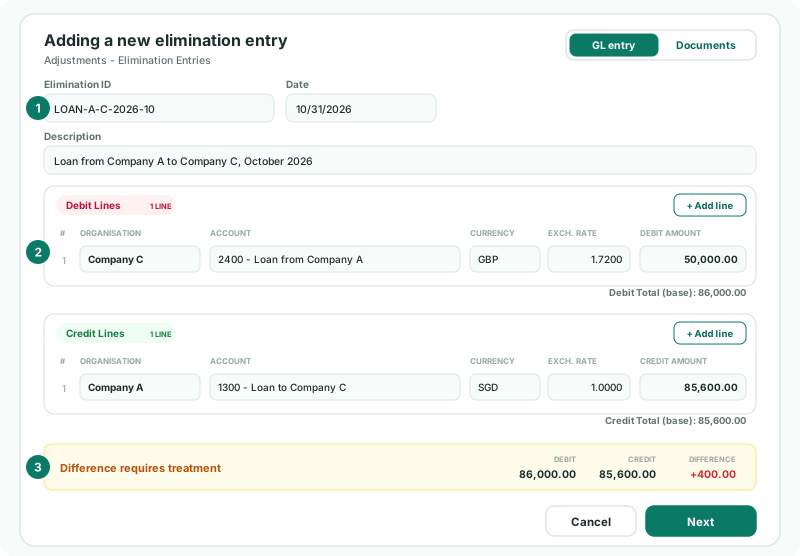
- Enter the Elimination ID LOAN-A-C-2026-10. The Date starts at the end of the month you are on: keep 31 October 2026.
- Enter the Description Loan from Company A to Company C, October 2026.
- Under Debit Lines, choose Company C, 2400 - Loan from Company A, GBP, the Exch. Rate 1.7200 and the Debit Amount 50,000.00.
- Under Credit Lines, choose Company A, 1300 - Loan to Company C, SGD, 1.0000 and 85,600.00.
| Debit or credit | Reverse each company’s balance. Company C’s loan is a liability, a credit in its books, so the elimination debits it; Company A’s is an asset, so the elimination credits it. |
|---|---|
| Exch. Rate | It starts at 1.0000 and doesn’t change when you pick a currency: type the rate. Use the rate the group translates that account at — the closing rate for a balance, the average rate for income and expenses. |
| Account list | Only the company’s accounts that are mapped to the group and accepted by the type are listed. |
| More lines | Click + Add line for an item split across accounts, such as a loan and its accrued interest. Two lines can’t post to the same group account. |
4Allocate the difference
The summary under the lines shows Difference requires treatment: debit 86,000.00, credit 85,600.00, difference +400.00. The button now says Next.
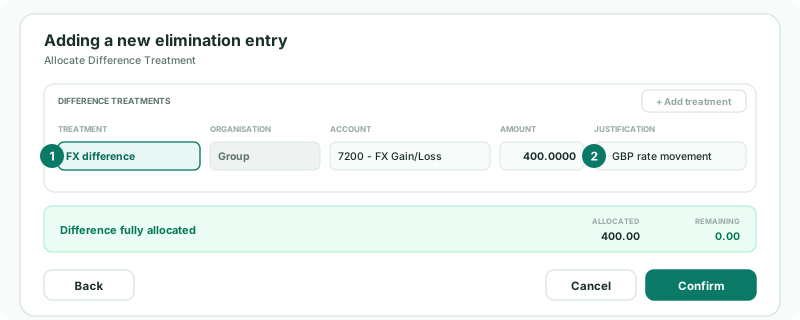
- Click Next. The dialog moves to Allocate Difference Treatment, with one treatment for the whole difference.
- Keep FX difference. The organisation is Group; choose the account, here 7200 FX Gain/Loss.
- Keep the amount, 400.0000, and enter a Justification, such as GBP rate movement.
- When the summary shows Difference fully allocated and Remaining 0.00, click Confirm.
An FX difference or a write-off posts to a profit and loss account of the group, which can’t be one the entry’s lines already use. Which treatment fits which cause, and how to split a difference, is covered in Allocate a difference on a manual entry. Back returns to the lines. If the two sides agree, there is no treatment step: the button says Confirm straight away.
5Check the elimination
- Find LOAN-A-C-2026-10 in the list on Intercompany Loans for Oct-2026.
- Open the group’s Balance Sheet and Profit & Loss for October with Show Entities on.
Check
In the group column, the accounts 1300 and 2400 are mapped to are zero, and 7200 FX Gain/Loss holds the 400.00.
To change the entry, use its edit button in the list; to remove it, its delete button. An entry posted by an elimination rule can’t be edited here: it is rebuilt on every consolidation.
6If something goes wrong
| + Add entry can’t be clicked | The group has no Common Chart of Accounts yet. |
|---|---|
| No account of this entity is mapped to the group, so nothing entered here would appear in consolidation. | Map the company’s accounts under Account Mapping first. |
| … cannot be used in this elimination type. Allowed account types: … | The account isn’t one the type accepts. Use the right account, or open the entry from the type the item belongs to. |
| Each debit and credit line amount must be greater than zero. | Enter every amount as a positive number. Remove a line you don’t need. |
| Both lines post to the same group account (…). An elimination cannot carry two legs on one account. | Two lines are mapped to the same group account. Combine them, or check the mapping. |
| Each difference treatment requires a justification. | Enter why the difference arose. |
| FX account must be different from debit and credit lines. | Choose a profit and loss account the lines don’t use. |
| The difference is much larger than an exchange difference | A rate or an amount is wrong. Check each line’s rate against the group’s rates for the month, and each amount against the company’s books. |
| This period is locked. Change the date or ask an administrator to unlock it. | October is locked. Ask an administrator to unlock it on Month End Status. |
Want more detail? See the documentation