
Intercompany Eliminations · Track 2 · Tutorial 7 of 8
Build rules with several legs
One rule can cover more than two accounts. Add accounts to a side when a company books the same item to several accounts, or give a Method 3 rule several lines to clear a whole relationship. Either way the rule is listed, edited, retired and deleted as one.
1Know the two ways
A rule can hold more than one account in two ways:
| Way | Methods | What it does |
|---|---|---|
| + Add Account under Leg Scope | 1, 2 and 4 | One pair of companies, with several accounts on a side. Each side’s accounts are added together, and the rule compares the two totals. |
| + Add Line under Elimination lines | 3 | Several lines, each with its own two companies and accounts, each compared on its own. |
2Add accounts to a side
Company B books part of what it owes Company A to 2150 Due to Company A, and its share of a shared-service bill to a second payable account. Both are owed to Company A, so both belong in the fees-due rule.
- Edit the Method 2 rule Company A fees due from Company B.
- Under To Accounts, click + Add Account and choose the second payable account.
- Click Confirm.
Each month, the rule compares Company A’s 1250 with the total of Company B’s two accounts. Where the rule clears the To side at the From side’s amount — Method 1 — that amount is spread over the To accounts in proportion to what each holds. Remove takes an account off a side; each side keeps at least one.
3Know when to use elimination lines
Only Method 3 has Elimination lines. Group lines in one rule when:
| Method 3 suits every line | All the pairs should be cleared up to the lower amount, with no difference posted. |
|---|---|
| They belong together | Your team thinks of them as one item: a fee and the balance it leaves, or the same charge to several companies. |
| One description and type fit all | Every line posts under the rule’s Description and Intercompany Type. |
If a pair needs another method — FX treatment, a tolerance check, monthly approval — give it a rule of its own.
As an example, suppose your team would rather clear everything between Company A and Company B for the management fee in one Method 3 rule, instead of the Method 1 and Method 2 rules from the earlier tutorials.
4Add the lines
- Open Intercompany → Elimination Rules and click Add an Auto Elimination Rule.
- Enter the Description Company A management fee with Company B, and choose Management Charges.
- In Method, choose Method 3: Use the lowest amount in both Organisations (no FX gain/loss).
- On Line 1, choose Company A and 4900 as the From side, and Company B and 6420 as the To side.
- Click + Add Line. On Line 2, choose Company A and 1250 Due from Company B, and Company B and 2150 Due to Company A.
- Click Confirm.
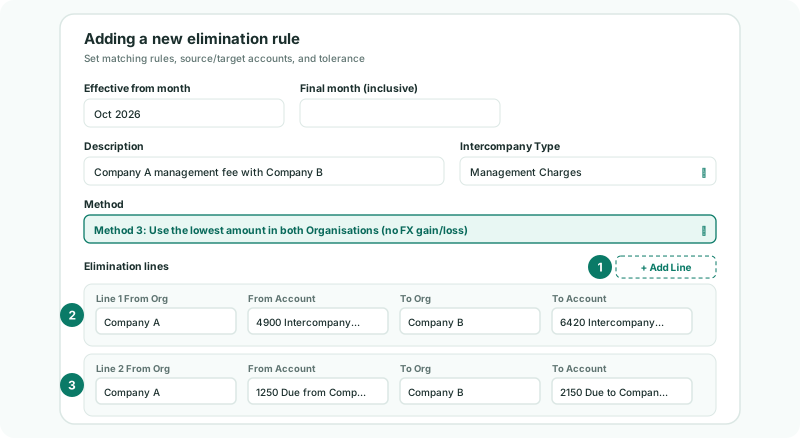
Each line can name any two different companies in the group, so one rule can also clear the same charge from Company A to Company B on one line and to Company C on the next.
If you replace existing rules this way, retire the old ones with a final month just before the new rule’s Effective from month: two rules on the same accounts in the same month eliminate the same amounts twice.
5Arrange or remove lines
| Move Up / Move Down | Change the order of the lines. Line numbers follow the order. |
|---|---|
| Remove Leg | Take a line out of the rule. A rule keeps at least one line, so the button is unavailable when only one is left. |
6Know how the lines are posted
| Each line on its own | Every line is compared and posted separately, month by month, exactly as a one-line rule would be. A month with nothing on Line 1’s From account still posts Line 2. |
|---|---|
| Its own entry | Each line posts its own elimination, described as the rule’s description followed by (Leg 1), (Leg 2) and so on. |
| Its own group accounts | Each line’s two sides must map to different group accounts, or the rule is refused with the line’s number. |
| Name criterion | If the rule has one, each line is checked against the invoices and bills of its own two companies. |
Check
The Elim. & Journals Report for October shows two entries for the rule, Company A management fee with Company B (Leg 1) and (Leg 2), one clearing the fee and one the balance.
7If something goes wrong
| Leg 2 is incomplete. | A company or account on that line is empty. Fill it in, or remove the line. |
| Leg 2: From and To Organisation cannot be the same. | Both sides of the line are one company. Choose the other company on one side. |
| Leg 2: both sides post to the same group account | That line’s accounts are mapped to one group account. Fix the mapping. |
| Some amounts are eliminated twice | Another rule also covers one of the lines in the same months. Retire it before this rule starts, or take the line out of this rule. |
| There is no + Add Line button | The rule is not Method 3. Use + Add Account under Leg Scope instead. |
Want more detail? See the documentation