
Foundations · Track 3 · Tutorial 1 of 6
Buy a new subsidiary
When the group buys a company, it joins the group figures from the month of the purchase — not before. Add it, bring in its figures, and record the acquisition so BrizoConsol knows where to start.
1Understand what changes at the purchase
In the running example, the group buys 100% of Company D, a Singapore company on Xero, in September 2026. It pays 1,200,000; Company D’s net assets are worth 1,000,000 at fair value.
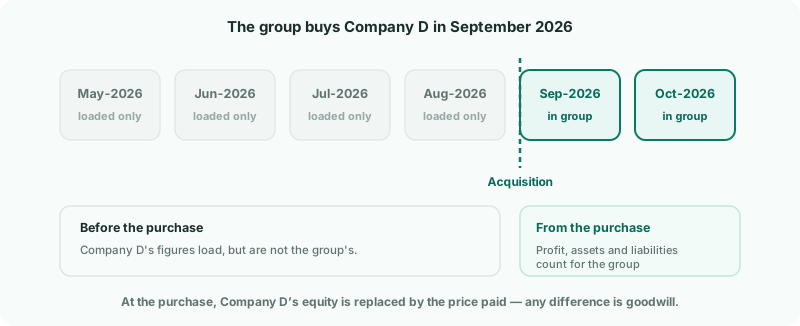
| Before September | Company D’s results belong to its previous owners. Its figures still load into BrizoConsol, but stay out of the group. |
|---|---|
| From September | Its profit, assets and liabilities are part of the group. |
| At the purchase | Company D’s equity on that date is replaced by the 1,200,000 paid. The 200,000 the group paid above the fair value of its net assets is goodwill. |
The ownership record you add in step 5 is what tells BrizoConsol all of this. Without it, Company D would count for the group in every month it has figures.
2Add the company to your hierarchy
- Open Settings → Global Settings → Organisation Hierarchy, and click your group.
- Click + Add Organisation. Check that the dialog says Under your group, enter the name, and click Add organisation.
- Click Save Changes.
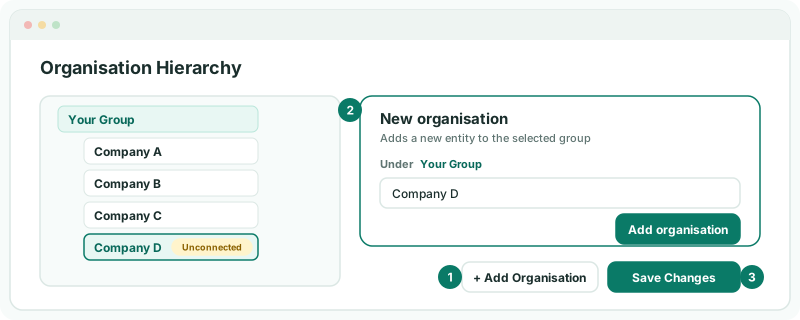
Company D appears with an Unconnected badge. If + Add Organisation is greyed out, your plan’s entity limit is reached — the counter at the top of the tree shows it.
3Bring in its figures
Click Company D in the tree and connect it to Xero in the Connection section, exactly as in Bring in each company’s numbers. Its last 24 months load — including the months before the purchase. That is fine: they are kept for comparison, and step 5 keeps them out of the group.
If Company D’s books are not in a system BrizoConsol connects to, set it up for upload and load the months from the acquisition onward.
4Map its accounts
- Open Settings → Global Settings → Account Mapping, and choose Company D.
- Use BrizoMap for the first pass, then map the rest by hand and click Save — as in Map every company to one group chart of accounts.
A new company often has accounts the group chart does not yet cover. Add them to the Common COA rather than forcing them onto a group account that does not fit.
Check
Account Mapping shows Company D fully mapped, with no account-type mismatches.
5Record the acquisition
- Open Ownership & Equity → Ownership, and click Company D in Subsidiary entities.
- On the Ownership history tab, click + Add record.
- Choose your group as Parent entity, Acquire, Sep-2026 and 100 as the % transacted, and Subsidiary.
- Enter the Investment cost (1,200,000) and Net assets at date (fair value) (1,000,000), both in the group currency.
- Click Add Record.
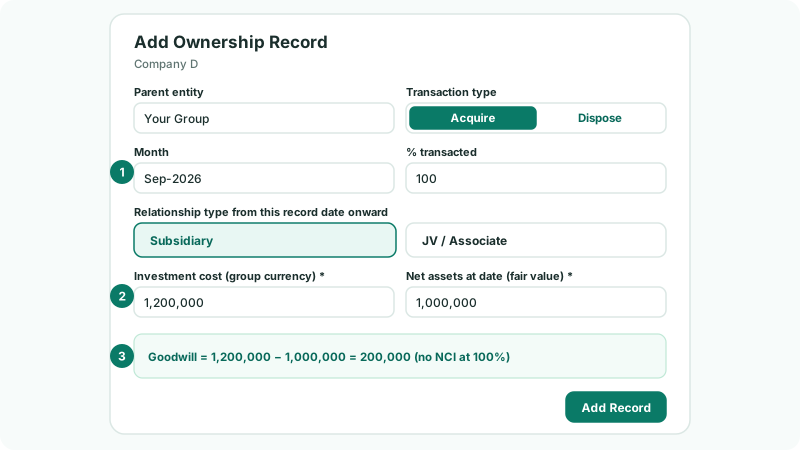
The fair value of the net assets is usually not the figure in Company D’s own books — it comes from the purchase price allocation, where property, brands or customer lists are valued. BrizoConsol posts the difference between the two to the FV Adjustment account, so choose one in NCI account setup if they differ.
Buying less than 100%? Enter the percentage bought; BrizoConsol works out the NCI as well — see Account for minority shareholders.
6Complete the acquisition details
- Open the Acquisition details tab for Company D.
- Choose the group accounts for Investment in subsidiary, Acquisition bank account and Goodwill.
- Click Save.
BrizoConsol then posts the acquisition automatically: the purchase itself (investment against bank), Company D’s equity at the acquisition date eliminated against the investment, the fair value adjustment, and the goodwill. Profit Company D made earlier in the financial year is treated as part of what the group bought, not as group profit.
Check
In Subsidiary entities, Company D shows Configuration of Ready, and Acquisition goodwill on the Acquisition details tab is 200,000.
7Check it joined from the right month
- Open Reports → Balance Sheet for Aug-2026 with Show Entities on. Company D’s column should be empty.
- Switch to Sep-2026. Company D’s assets and liabilities appear, goodwill of 200,000 appears, and the balance sheet still balances.
- Open Reports → Profit & Loss for Oct-2026. Company D’s year-to-date figures cover September and October only.
If Company D trades with your other companies, add elimination rules for it now — see Clear intercompany balances — and invite its finance team on the company itself (Invite your team).
8If something does not look right
| What you see | What to do |
|---|---|
| Company D’s months before September are in the group | Its ownership record is missing, or has the wrong month. Check Ownership history. |
| Company D shows Incomplete | Hover over it to see what is missing — usually an account on the Acquisition details tab. |
| No goodwill appears | Choose the Goodwill account on Acquisition details. If the price was below the fair value of net assets, the difference is a gain: choose the Gain on bargain purchase account in NCI account setup. |
| The balance sheet does not balance from September | Check that Company D is fully mapped, and that the FV Adjustment account is chosen if fair value differs from its book equity. |
| + Add Organisation is greyed out | The plan’s entity limit is reached. Upgrade, or remove an entity you no longer need. |
Want more detail? See the documentation