
Foundations · Track 2 · Tutorial 5 of 7
Account for minority shareholders
When the group owns less than 100% of a company, part of its profit and net assets belongs to other shareholders. Record who owns what once, and BrizoConsol shows their share every month.
1Understand what NCI shows
In the running example the group owns 80% of Company B; outside shareholders own the other 20%. Because the group controls Company B, all of its figures are consolidated — then the 20% that is not the group’s is shown separately as the non-controlling interest (NCI).
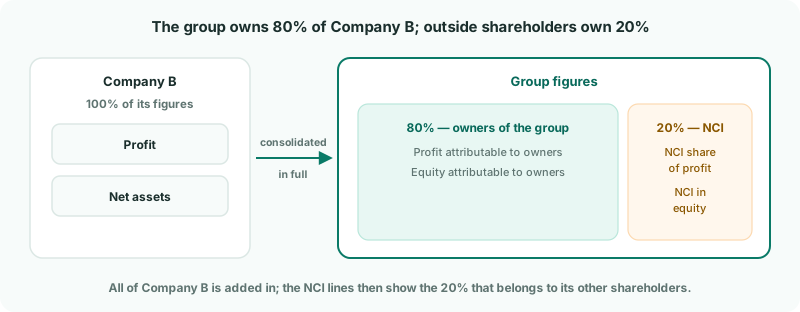
| NCI share of profit | 20% of Company B’s profit, shown in the profit and loss as belonging to outside shareholders. |
|---|---|
| NCI in equity | 20% of Company B’s net assets, shown as a separate line in group equity. |
Without NCI, the group’s profit and equity would include amounts that belong to someone else.
2Set up the NCI accounts
- Select your group, and open Ownership & Equity → Ownership. The page is titled Ownership Structure.
- In NCI account setup, choose the group account for each item — or create one from the panel.
- Click Save.
| NCI - net assets | Equity. The NCI’s share of the company’s net assets. |
|---|---|
| NCI - share of profit | Profit and loss. The NCI’s share of the year’s profit. |
| NCI - share of CTA | The NCI’s share of the currency translation reserve — needed here, because Company B has CTA enabled (see Handle foreign currency companies). |
| NCI - share of other reserves | The NCI’s share of other equity reserves, such as revaluation. |
The other accounts in the panel are for buying and selling stakes — set them when you need them. The panel stays open until everything required is saved; afterwards, reopen it with the NCI account settings icon.
3Record how much the group owns
- In Subsidiary entities, click Company B.
- On the Ownership history tab, click + Add record.
- Choose the Parent entity that bought the shares, Acquire, the Month of the purchase and the % transacted — 80.
- Choose Subsidiary as the relationship.
- Enter the Investment cost and the company’s Net assets at date (fair value), both in the group currency.
- Keep NCI measurement on Share of net assets (partial goodwill) unless you measure NCI at fair value, and click Add Record.
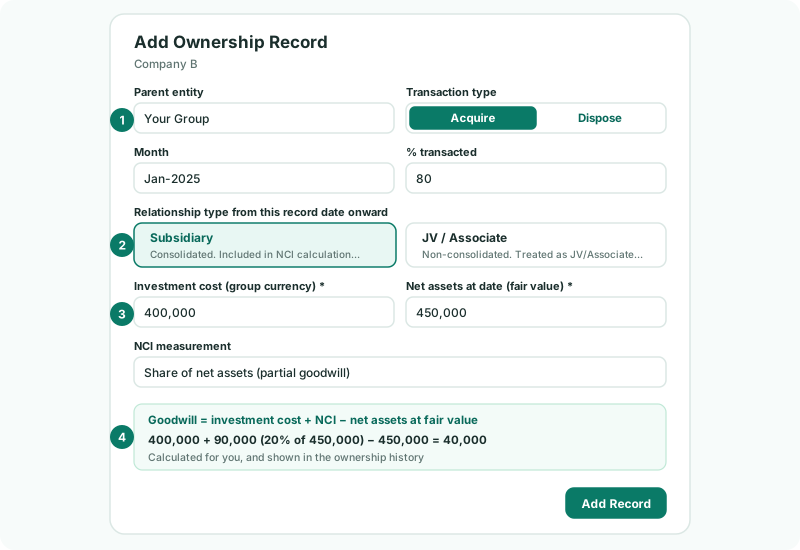
The relationship is your judgement of control at that date — BrizoConsol does not decide it from the percentage. Subsidiary means the company is consolidated and NCI is calculated; JV / Associate means it is not consolidated.
US GAAP requires the NCI at fair value: choose Fair value of NCI (full goodwill) and enter the NCI’s fair value. IFRS allows either, for each acquisition.
4Complete the acquisition details
- Open the Acquisition details tab.
- Choose the group accounts for Investment in subsidiary, Acquisition bank account and — because the purchase produced goodwill — Goodwill.
- Click Save.
The tab also summarises the ownership: total investment cost, acquisition goodwill, the direct and effective group ownership, and the Current NCI %.
Check
In Subsidiary entities, Company B shows NCI % of 20.00% and Configuration of Ready. Incomplete means an account or acquisition detail is still missing — hover over it to see which.
5Preview the NCI
Open the Calculation preview tab to see the NCI entries the current figures produce: the NCI’s share of net assets, profit, CTA and other reserves, with the totals and whether they balance.
A company owned through another company works the same way: record the purchase against its direct parent, and BrizoConsol works out the Effective group % through the chain.
6Let the NCI post
There is no button to press. BrizoConsol posts the NCI automatically, straight after the CTA, every time the group is recalculated — after each night’s load, a mapping change or an elimination rule — and whenever you save an ownership record or an NCI account. Company B’s October profit is picked up as soon as its October figures are loaded.
7Check the result
- Open Ownership & Equity → NCI Report. Choose Company B, YTD and Oct-2026.
- Open Ownership & Equity → NCI for the same month. Under Auto NCI Journals, every row’s Diff should be 0.00.
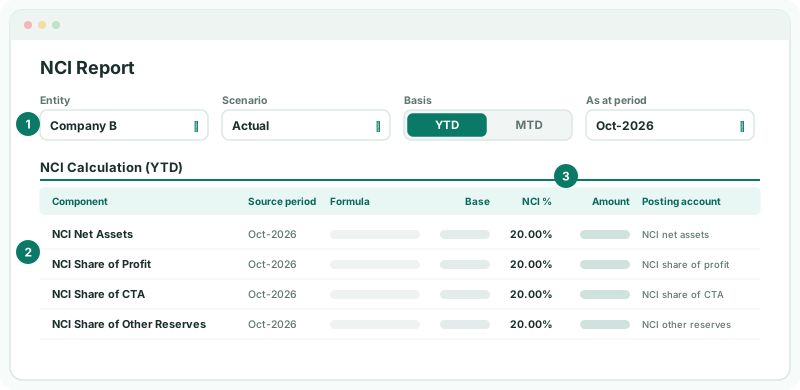
Each row shows the base it was worked out from — for example Company B’s profit for the year — the NCI % applied and the result. If the percentage is wrong, the ownership record is wrong; if the base is wrong, check Company B’s own figures.
Check
The NCI Report shows 20.00% on every line, the balance sheet still balances, and on Month End Status the NCI / JV card shows Posted.
8When the ownership changes
Never edit the original record to show a new percentage — the earlier months would then use the wrong one. Add a new record for the month of the change:
| The group buys more from the minority | Acquire the extra percentage. Control does not change, so no goodwill arises; the difference goes to the equity transaction reserve. |
|---|---|
| The group sells some, keeping control | Dispose the percentage sold and enter the amount received. |
| The group gains or loses control | Covered in the When your group changes track. |
9If something does not look right
| What you see | What to do |
|---|---|
| Complete NCI account setup first | Click Open account setup and save the required NCI accounts. |
| Company B shows Incomplete | Hover over it to see what is missing, then save it on the Acquisition details tab. |
| Investment cost is required for acquisition. | Enter the amount paid, in the group currency. |
| The NCI % is wrong for some months | Check the dates in Ownership history: each record applies from its month onward. |
| NCI share of CTA is missing | Choose the NCI - share of CTA account, and check that CTA is enabled for the company. |
| The page shows an upgrade message | NCI is not included in the Standard edition. |
Want more detail? See the documentation