
Zoho Books Groups · Track 1 · Tutorial 1 of 3
Connect each Zoho Books organisation
Each company in your group keeps its books in its own Zoho Books organisation. Connect each one once, and BrizoConsol reads its figures every night from then on.
1Understand what is connected
In this series’ running example, Your Group owns three companies that each keep their books in Zoho Books: North Pte Ltd and South Pte Ltd in Singapore dollars, and East Sdn Bhd in Malaysian ringgit.
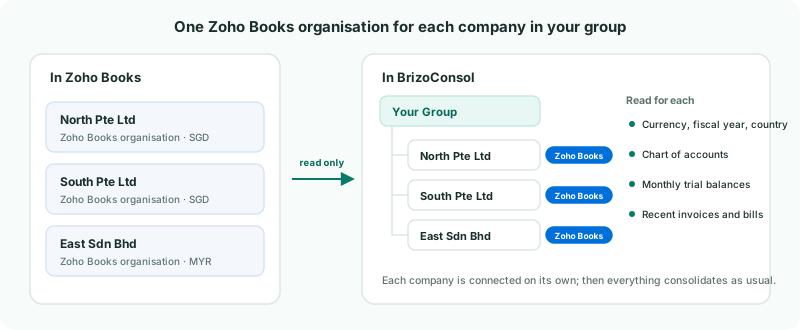
| Read from Zoho | Each organisation’s currency, fiscal year and country, its chart of accounts, its monthly trial balances, and its recent invoices and bills. |
|---|---|
| Never written | BrizoConsol only reads. Nothing you do in BrizoConsol changes your Zoho Books data. |
| The group | Your Group is not a Zoho organisation. It holds the consolidated figures BrizoConsol builds from the three companies. |
2Check the companies are in the hierarchy
- Open Settings → Global Settings → Organisation Hierarchy.
- Check North Pte Ltd, South Pte Ltd and East Sdn Bhd sit under Your Group. Add any that are missing with + Add Organisation, and click Save Changes.
A company you have just added cannot be connected until the hierarchy is saved: its Connection section says Save hierarchy first before connecting newly added entities.
3Connect a company
- Click South Pte Ltd in the tree, and in its Connection section click Connect to Zoho Books.
- Sign in to Zoho, and approve the access BrizoConsol asks for.
- Back in BrizoConsol, under Select an organisation to connect, choose South Pte Ltd.
- Check the Connection summary, and click Connect Organisation.
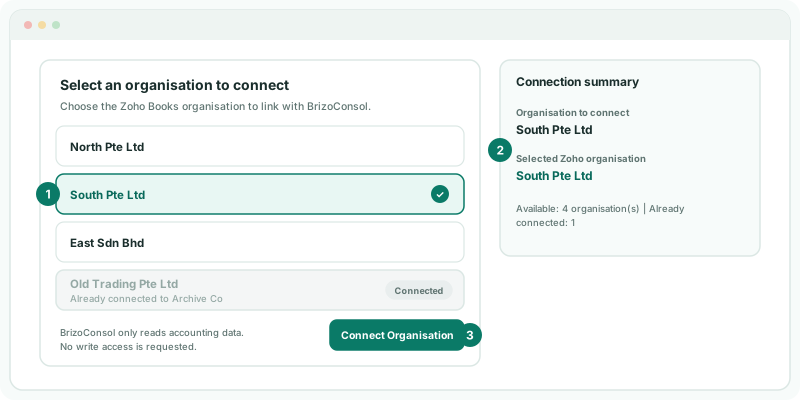
The list shows every Zoho Books organisation your Zoho login can see. One that is already linked to a company in BrizoConsol is greyed out with Already connected to and that company’s name, so the same books cannot be loaded twice.
4Let the first load finish
A Loading your Zoho Books data window shows each stage as it runs:
| Connecting to Zoho Books | Checks the connection. |
|---|---|
| Importing organisation and chart of accounts | Currency, fiscal year and country, and every account in Zoho. |
| Loading trial balances | Month by month, up to 24 months back, within what your plan keeps. |
| Loading recent invoices and bills | Last month and this month. |
| Preparing financial data | Queues the rest and refreshes the group. |
After that, the connection refreshes every night: the last 12 months’ trial balances, and recent documents. If BrizoConsol finds accounts that are not mapped yet, it offers to open Account Mapping — see Map every company to one group chart of accounts.
5Check the connection
- In the Organisation Hierarchy, click South Pte Ltd again.
Check
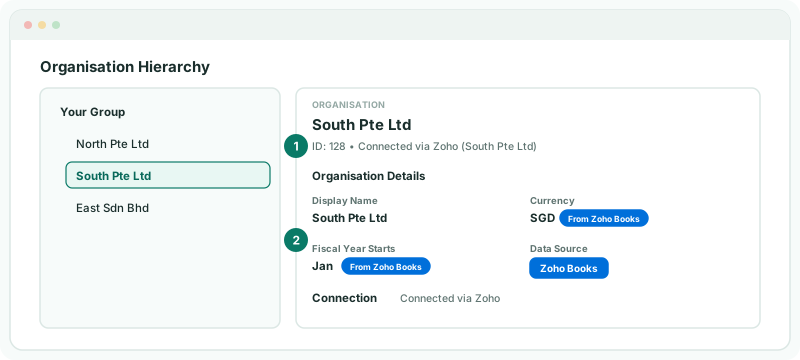
The panel says Connected via Zoho with the Zoho organisation’s name, Data Source shows Zoho Books, and Currency and Fiscal Year Starts say From Zoho Books. On Data Loading, the months are marked loaded.
Currency and fiscal year now come from Zoho and cannot be edited in BrizoConsol. If either is wrong, correct it in Zoho Books; the next load brings it in.
6Connect the others
Repeat steps 3 to 5 for North Pte Ltd and East Sdn Bhd. Each company has its own connection, so each can be signed in with a different Zoho login if your organisations are managed by different people.
East Sdn Bhd keeps its books in MYR while the group reports in SGD. That needs the Free, Pro or Premium edition: on Standard, the connection is refused because Standard consolidates in one currency. Set up its exchange rates and translation as in Handle foreign currency companies.
7If something does not look right
| What you see | What to do |
|---|---|
| A Token expired badge on a company | Zoho no longer accepts the connection. Click Reconnect Now in its Connection section and sign in again. Nothing loaded so far is lost. |
| No Zoho Books organisations are available for this account. | The Zoho login you used has no Zoho Books organisation. Sign in with one that does. |
| The organisation you want is greyed out | It is already connected to the company named under it. Disconnect it there first, or connect the right company instead. |
| This group consolidates in SGD, so a company in MYR needs the Pro edition.… | The group is on Standard, which consolidates in one currency. Upgrade from Standard to connect it. |
| The selected Zoho Books organisation is not available in this authorization. Connect again and choose it. | The Zoho login used cannot see that organisation any more. Click Connect to Zoho Books again and choose it from the list. |
Want more detail? See the documentation