
Foundations · Track 2 · Tutorial 4 of 7
Handle foreign currency companies
Companies that keep their books in another currency are translated into the group currency every month. Check the rates, set up the translation reserve once, and the balance sheet balances.
1Understand what translation does
In the running example the group reports in SGD, Company B keeps its books in AUD and Company C in GBP. BrizoConsol translates each part of their figures at a different rate:
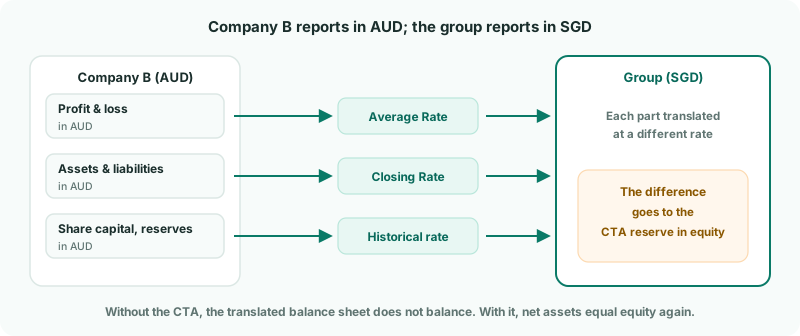
| Average Rate | Profit and loss — income and expenses happen through the month. |
|---|---|
| Closing Rate | Assets and liabilities — what they are worth at the month end. |
| Historical rate | Share capital and reserves — the rate when the money went in. |
Because the parts use different rates, the translated balance sheet no longer balances by itself. The gap is the CTA (currency translation adjustment), which goes to a reserve in equity. That is normal, not an error — it just needs somewhere to go.
2Check each company’s currency
- Select Company B in the entity selector, and open Settings → Organisation Settings → Organisation Details.
- Check that its currency matches its accounting system — AUD.
- Do the same for Company C, and for the group: its currency is the one every consolidated report is presented in.
Connected companies usually bring their currency from the accounting system; uploaded companies are set by hand. A wrong currency is the most common reason translated figures look wrong.
3Check the month’s exchange rates
- Select your group, and open Settings → Global Settings → Exchange Rates.
- Choose the Year, Average Rate or Closing Rate, and the Actual scenario.
- Check that October has a rate for AUD and GBP, in both Average Rate and Closing Rate.
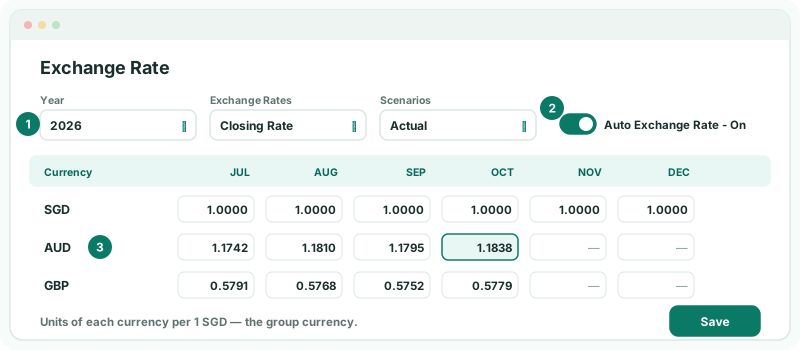
Each rate is the number of units of that currency to one unit of the group currency — here, AUD per 1 SGD. With Auto Exchange Rate - On, the Actual rates are fetched for you every night, so normally there is nothing to enter.
| To use your own rate | Type it into the cell and click Save. To load rates from a file, turn Auto Exchange Rate off and use Upload (Pro and Premium). |
|---|---|
| Budget and forecast | Rates are never fetched for them. Choose the scenario and enter the rates yourself. |
Turning Auto Exchange Rate back on overwrites your own rates for the past months it fetches. If you rely on rates you entered, keep it off.
4Choose the CTA reserve account
- Open Adjustments → Currency translation → Settings.
- Click the settings icon next to entities enabled for CTA.
- In CTA Reserve Account Settings, choose the group equity account the CTA goes to — or + Create new CTA reserve account… to add one, such as 3500 CTA Reserve.
- Click Save Reserve Account.
You do this once for the group. Every foreign company’s CTA goes to the same reserve.
5Switch on CTA for each foreign company
- In Subsidiary entities, turn on CTA enabled for Company B and Company C.
- If CTA Posting Setup Required appears, use Map Required CTA Posting Accounts: choose the group account for each listed equity account, and click Save Mapping.
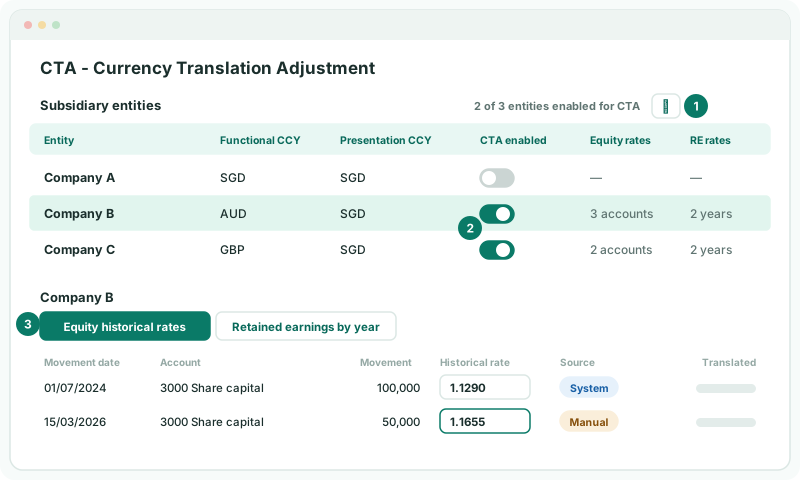
The switch is only available where a company’s currency differs from the group’s — Company A, in SGD, needs no translation.
6Check the historical rates
Click Company B’s row to see its rates.
| Equity historical rates | Each movement in share capital and reserves, with the rate it is translated at. System rates come from Exchange Rates for the movement date. |
|---|---|
| Retained earnings by year | The rate for each financial year’s retained earnings, defaulted from that year’s average. |
If you know the actual rate of a share issue — from the issue documents, say — type it into Historical rate. The source changes to Manual; Reset to System undoes it. A No FX Rate source means Exchange Rates has no rate for that date: add it there.
7Let the CTA post
There is no button to press. BrizoConsol posts the CTA automatically, one entry per month, every time the group is recalculated — after each night’s load, a mapping change or an elimination rule — and whenever you change a CTA setting. New rates and new months are picked up on their own.
8Check the result
- Open Reports → Balance Sheet for Oct-2026. NET ASSET should equal EQUITY, and CTA is not configured. should no longer appear.
- Open Adjustments → Currency translation → CTA Report. Choose Company B, YTD and Oct-2026.
- Open CTA / FCTR for the same month. Under Auto CTA Journals, every row’s Diff should be 0.00.
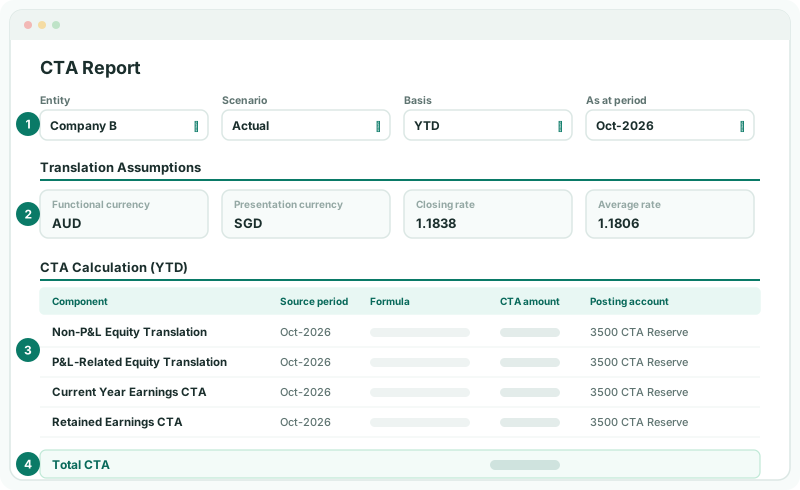
| Translation Assumptions | The closing and average rates used for the month, with the historical equity and retained earnings rates below them. If a rate looks wrong, correct it on Exchange Rates or in the CTA settings. |
|---|---|
| CTA Calculation | The CTA split into its parts — equity, the year’s earnings and retained earnings — each with the reserve account it was posted to. Total CTA is the sum of the parts for the basis you chose Total CTA is the amount in the reserve for the year to date.#8212; YTD or MTD. |
Check
The balance sheet balances for October, and on Month End Status the CTA card shows Posted.
9If something does not look right
| What you see | What to do |
|---|---|
| Presentation currency required on Exchange Rates | The group has no currency yet. Set it on the group’s Organisation Details. |
| A company’s translated figures look far too big or small | Its currency is wrong on Organisation Details, or a rate was entered the wrong way round — rates are units of the currency per 1 unit of group currency. |
| CTA is not configured. still shows | A foreign company does not have CTA enabled, or no reserve account is chosen. |
| CTA Posting Setup Required | Choose the reserve account, and map the listed equity accounts. |
| The balance sheet differs only in a budget or forecast | That scenario has no rates for the month. Enter them on Exchange Rates. |
| Exchange Rates shows an upgrade message | Exchange rates and CTA are not included in the Standard edition. |
Want more detail? See the documentation