
Multi-level groups · Track 1 · Tutorial 1 of 1
Build a group with several levels
A group can go two or three levels deep: groups inside your group, and companies that hold other companies. Choose the kind of middle level, build it in the Organisation Hierarchy, and know what each level shows.
1Know the two kinds of middle level
The tutorials in this series follow one group. Your Group reports in SGD. It holds Company A (Singapore) and 90% of Company B (Australia) through Asia Pacific, a sub-group, and 80% of Holdco UK, a company with its own books that owns 70% of UK Sub.
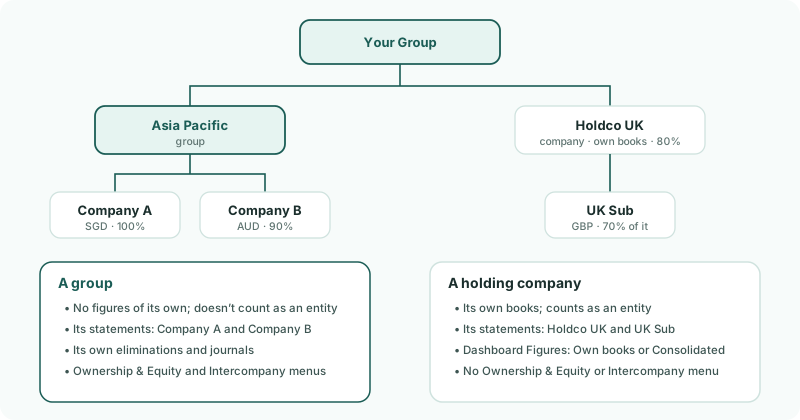
| Group (sub-group) | Has no figures of its own and adds up what is inside it. Its statements cover its companies only, and it has its own eliminations and journals. The Ownership & Equity and Intercompany menus are there when it is selected. It doesn’t count towards your entities. It reports under the top group’s standard, so to report a branch under a standard of its own, use a holding company — see Report a holding company under a different standard. |
|---|---|
| Holding company | A company with its own books and companies under it. It counts as an entity, and its books come from its own connection or file like any company’s. Its statements cover its own books and the companies under it. The Ownership & Equity and Intercompany menus aren’t there when it is selected. |
Use a group for a sub-total, such as a region or a division. Use a holding company when the company at the head of the branch keeps books of its own, as Holdco UK does.
2Build the levels
- Open Settings → Global Settings → Group Structure → Organisation Hierarchy.
- Click Your Group, click + Add Group, type Asia Pacific and click Add.
- Drag Company A and Company B onto Asia Pacific.
- Drag UK Sub onto Holdco UK.
- Click Save Changes and confirm.
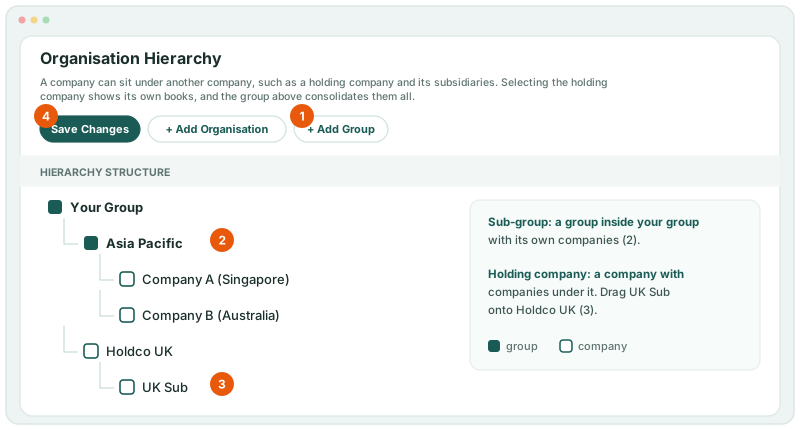
| 1 · + Add Group | Adds a group inside the group you clicked. Click Asia Pacific first to add a group inside it, for a further level. |
|---|---|
| 2 · Sub-group | Asia Pacific, with its companies inside it. |
| 3 · Company under a company | Holdco UK becomes a holding company once a company sits under it. |
| 4 · Save Changes | Nothing you add or move is kept until you save. |
3Record who owns whom
The tree decides how figures add up. How much each company is held is recorded on Ownership & Equity → Ownership, against the company that bought it:
| UK Sub | Parent entity Holdco UK, 70%. Not Your Group, and not 56%: BrizoConsol works out the group’s 56% from Holdco UK’s own record. |
|---|---|
| Holdco UK | Parent entity Your Group, 80%. |
| Company B | Parent entity Your Group, 90%. The Parent entity list has Your Group and the companies, not the sub-groups. |
How to record each purchase is in Hold companies through other companies.
4Read each level
Choose the level in the entity selector. Each level’s reports and dashboard cover what is inside it:
| Your Group | Every company, with every level’s eliminations, journals, CTA and NCI. |
|---|---|
| Asia Pacific | Company A and Company B, with the eliminations, journals, CTA and NCI posted on Asia Pacific. Not Your Group’s own eliminations and journals, and not another sub-group’s. |
| Holdco UK | Its reports cover Holdco UK’s own books and UK Sub, with the CTA and NCI posted on Holdco UK. Its dashboard shows Own books until you choose Consolidated in the figures selection in the header. |
Check
In the Organisation Hierarchy, Company A and Company B sit inside Asia Pacific, and UK Sub under Holdco UK. On Ownership & Equity → Ownership, UK Sub’s group % is 56%.
5If something goes wrong
| What you see | What to do |
|---|---|
| UK Sub’s group % is 70%, the same as its direct % | Its record’s Parent entity is Your Group. Edit it and choose Holdco UK. |
| The structure is back as it was | The changes weren’t saved. Make them again and click Save Changes. |
| There is no Intercompany menu | A company is selected. Select the group the elimination belongs to — see Eliminate at the right level. |
Want more detail? See the documentation