
Multi-level groups · Track 2 · Tutorial 3 of 5
Eliminate at the right level
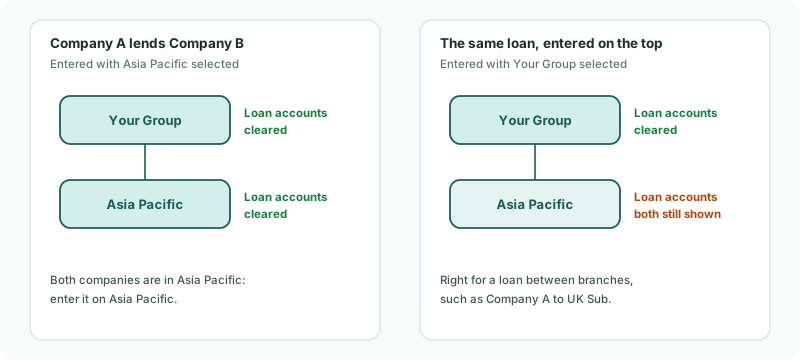
An elimination belongs to the group it is entered on. Its statements, and those of every group above it, are cleared; a group below or beside it still shows both sides.
1Choose the group to enter it on
An elimination belongs to the group selected when it is entered. That group’s statements and those of every group above it are cleared; a group below or beside it still shows both sides. So enter each elimination on the lowest group that has both companies in it:
| Between | Enter it on |
|---|---|
| Company A and Company B | Asia Pacific: both are in it. |
| Company A and UK Sub | Your Group: the only group with both. |
| Holdco UK and UK Sub | Your Group. A holding company has no Intercompany menu, so Holdco UK’s own statements show both sides. |
2Enter the loan on Asia Pacific
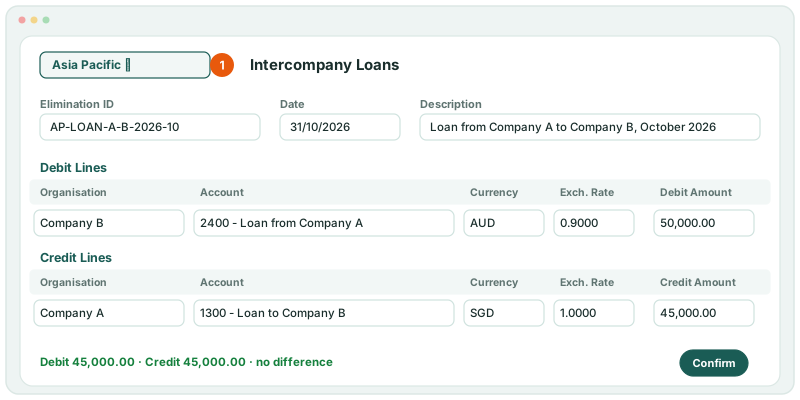
In October 2026, Company A lends Company B 45,000. Company A records SGD 45,000 on 1300 Loan to Company B. Company B records AUD 50,000 on 2400 Loan from Company A, which is SGD 45,000 at the October closing rate of 0.9000.
- Select Asia Pacific in the entity selector.
- Open Intercompany → Intercompany Loans, keep Actual, and move to Oct-2026.
- Click + Add entry.
- Enter the Elimination ID AP-LOAN-A-B-2026-10, keep the date 31 October 2026, and enter the Description Loan from Company A to Company B, October 2026.
- Under Debit Lines, choose Company B, 2400 - Loan from Company A, AUD, the Exch. Rate 0.9000 and the Debit Amount 50,000.00.
- Under Credit Lines, choose Company A, 1300 - Loan to Company B, SGD, 1.0000 and 45,000.00.
- Click Confirm.
Lines, rates and differences work as on the top group — see Post a GL elimination entry.
3Use rules on the right group too
An elimination rule belongs to the group it is created on, in the same way. For a balance that recurs between Company A and Company B, select Asia Pacific before you open Intercompany → Elimination Rules and add the rule. A rule created on Your Group clears the balance on Your Group’s statements only. How to build a rule is in Method 1: eliminate at the From side’s amount.
4Check each level
- Select Asia Pacific, and open Reports → Balance Sheet for Oct-2026.
- Do the same with Your Group selected.
Check
On both balance sheets, the group accounts 1300 and 2400 are mapped to show nothing for the loan. AP-LOAN-A-B-2026-10 is listed on Intercompany Loans when Asia Pacific is selected.
5If something goes wrong
| What you see | What to do |
|---|---|
| Asia Pacific’s balance sheet still shows the loan | The entry or rule is on Your Group. Delete it there and enter it with Asia Pacific selected. |
| There is no Intercompany menu | A company is selected. Select the group. |
Want more detail? See the documentation