
Multi-level groups · Track 2 · Tutorial 5 of 5
Report a holding company under a different standard
Available on ProPremium
A holding company can present its consolidated statements under its own standard, such as UK GAAP inside an IFRS group. A sub-group can’t: it is a folder, and follows the top group’s standard.
1Know which classifications each level reads
Your Group reports under IFRS. Holdco UK must also publish consolidated statements — itself and UK Sub — under UK GAAP (FRS 102).
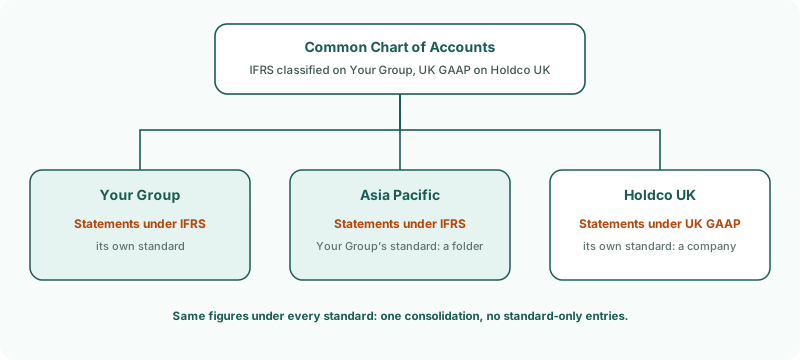
| Level | Reports under |
|---|---|
| Your Group | IFRS, with the Common COA’s IFRS classifications, set on Your Group’s Accounting Standard page. |
| Holdco UK | UK GAAP, its own standard, with the Common COA’s UK GAAP classifications. Its consolidated figures are on the Common COA, like the group’s, so its Accounting Standard page lists the Common COA, and you classify it there. |
| Asia Pacific | Your Group’s standard. A sub-group is a folder with no books of its own: its Accounting Standard page shows Your Group’s standard, and it can’t be changed there. |
The figures are the same under both standards: there is one consolidation, and no UK GAAP-only entries. Only the presentation changes.
2Set Holdco UK’s standard and classify
- Select Holdco UK in the entity selector.
- Open Settings → Organisation Settings → Accounting Standard. The page says Applies to: Holdco UK.
- Under Enabled Standard, choose UK GAAP.
- Under Account Classifications, classify the equity accounts on their lines, as in Switch on UK GAAP and classify equity. The accounts listed are Your Group’s Common COA: the page says Your Group’s chart is what this organisation’s consolidated statements read.
- Click Save Changes.
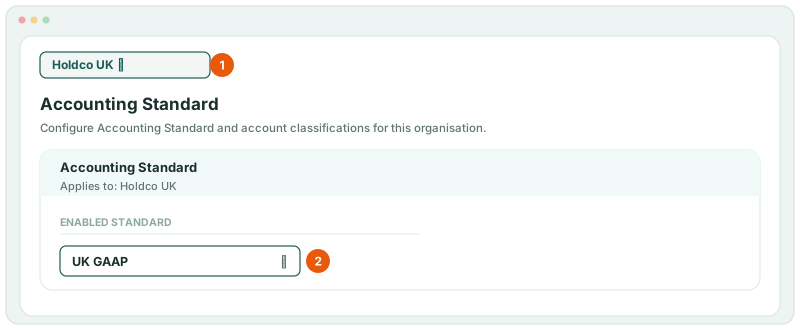
Classify every equity account the branch uses, including 3500 CTA Reserve and the NCI accounts: Holdco UK’s statements carry the CTA and NCI posted on Holdco UK.
The UK GAAP classifications are kept on the Common COA. If another holding company in the group also reports under UK GAAP, it uses the same ones.
3Read Holdco UK’s UK GAAP statements
- Select Holdco UK, and open Reports → All Reports → Consolidated Balance Sheet for Oct-2026.
- Open Reports → Balance Sheet for the same month.
Check
Total Capital and Reserves on the Consolidated Balance Sheet equals the equity total on Holdco UK’s Balance Sheet, and equals NET ASSETS. The statement includes UK Sub, with its goodwill and the NCI posted on Holdco UK. With Your Group selected, the IFRS statements are unchanged.
4If something goes wrong
| What you see | What to do |
|---|---|
| The UK GAAP statements aren’t in All Reports with Holdco UK selected | UK GAAP isn’t enabled on Holdco UK, or it isn’t saved. Select Holdco UK, choose UK GAAP and click Save Changes. |
| Total Capital and Reserves doesn’t equal NET ASSETS | An equity account isn’t classified under UK GAAP — often the CTA reserve or an NCI account. Select Holdco UK, open the Accounting Standard page, and put it on its line. |
| The standard can’t be changed on a sub-group | That is how a sub-group works: it follows Your Group’s standard. Put a holding company at the head of the branch instead. |
| Holdco UK’s statements leave out UK Sub | UK Sub isn’t under Holdco UK in the Organisation Hierarchy. |
Want more detail? See the documentation