
Intercompany Eliminations · Track 4 · Tutorial 3 of 5
Eliminate from invoices and bills
When an account mixes intercompany with outside trade, a rule can’t pick out the intercompany part. The invoices and bills can: build the elimination from the documents themselves, and the entry keeps them as its evidence.
1Know what a document gives the elimination
In October, Company A sells goods to Company B for SGD 30,000 on INV-1043. Company A’s 4000 Sales also holds its sales to outside customers, so a rule on 4000 would eliminate those too. Company B records the purchase in AUD on BILL-778.
What BrizoConsol takes from a document depends on the type you post under:
| Type | Amount taken | Documents listed |
|---|---|---|
| Trade Receivables / Payables | What is still outstanding on the document at the entry date. | Dated up to the entry date, from the 90 days before it, so older unpaid invoices can be picked. |
| Sales / Purchases / Services, Management Charges, Inventory Transfers | The document’s lines on the account you choose — only the part of the invoice that went to that account. | Dated in the entry’s month. |
Within a month and a type, what earlier entries took from a document can’t be taken again, so a document can be eliminated in parts, but never twice. A trade balance entry is reversed at the start of the next month, so its documents can be used again then for what is still unpaid — see Eliminate outstanding trade balances from documents.
2Choose the documents
- Select Your Group, open Intercompany → Sales / Purchases / Services, keep Actual and Oct-2026, and click + Add entry.
- Click Documents at the top of the dialog.
- On the invoice side, choose Company A and the Elimination account 4000 Sales. On the bill side, choose Company B and 5000 Purchases.
- Search by reference, contact or date, and tick INV-1043 and BILL-778.
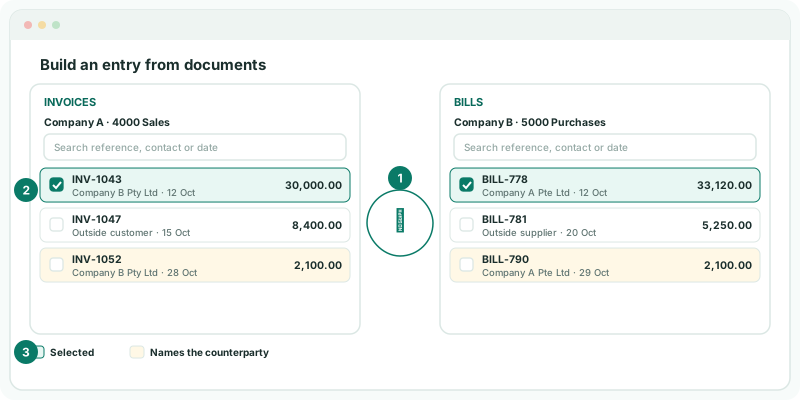
A tinted row is a document whose contact is the other company — the outside customer’s invoice isn’t tinted. Only posted documents are listed; Company A’s invoices to outside customers are there too, so read the contact before you tick.
3Let BrizoConsol match them
With many documents, click the match button between the lists instead. It tries three rules in order:
| 1. Reference | Both documents carry the same reference, of at least four letters and digits. |
|---|---|
| 2. Name, amount and date | The contact is the other company, the totals agree, and the dates are within 30 days. |
| 3. Amount and date | The totals agree and the dates are within 30 days. |
Totals are compared in the group currency, and agree within 1%, so an SGD invoice and an AUD bill for the same sale match. Each document is used once, and where two fit equally well, neither is ticked rather than guessed. Check what it ticked, and tick anything it left.
4Review the entry
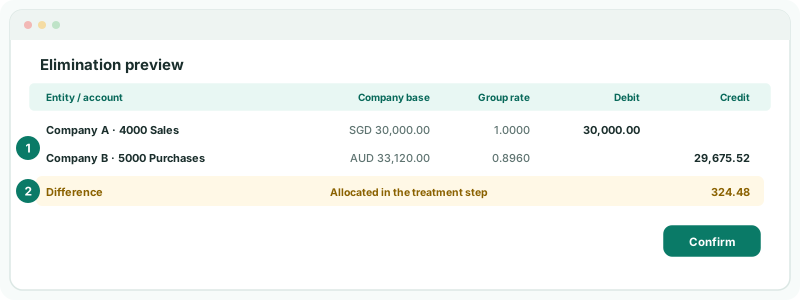
Under Review the entry, the Elimination preview shows each side in its company’s currency, the group rate, and the debit or credit. Company B’s AUD 33,120.00 at 0.8960 is SGD 29,675.52, so the two sides differ by 324.48.
- Click Confirm.
- In the treatment step, allocate the 324.48 to FX difference and its account, and confirm.
Which treatment to choose, and why, is in Explain and clear intercompany differences.
5Know what happens when a document changes
The entry records the documents it was built from and their amounts. If one is changed in the source system afterwards — a line corrected, a part paid — reopening the entry shows Changed since the entry was saved, with the document’s original and current amount and the difference.
Decide whether the elimination should follow the document. If it should, adjust the entry and save it again; anyone drilling into the elimination later still sees which invoice and bill it removed.
Check
On the group Profit & Loss for Oct-2026 with Show Entities on, the eliminations take SGD 30,000.00 out of Sales and 29,675.52 out of Purchases, and the outside customers’ sales stay in.
6If a document is unavailable
A document that can’t be used is listed as Unavailable, with the reason:
| already eliminated in full by another entry | Another entry of the same month and type has taken all of it. Open that entry if it is the wrong one. |
| no lines on the elimination account | None of the document is on the account chosen. Choose the account its lines went to. |
| account does not suit this elimination type | The account’s type doesn’t fit the type you are posting under — a sales account under Trade Receivables / Payables, for example. |
| credit notes are not supported yet | Eliminate a credit note with a GL entry. |
| not posted in the source system | It is a draft. Approve it in the accounting system and reload the month. |
| payment history is missing or out of date | For trade balances, the payments behind the outstanding amount aren’t loaded. Reload the month with invoices and bills. |
If Documents isn’t offered at all, the type doesn’t take documents, the scenario isn’t Actual, or the subscription is on Standard. Post a GL entry instead.
Want more detail? See the documentation