
Intercompany Eliminations · Track 3 · Tutorial 2 of 2
Let BrizoElim suggest rules and find missing eliminations
BrizoElim works in two ways. It suggests rules for the intercompany pairs that recur every month, and it scans a range of months for intercompany balances nothing has eliminated yet. Use the first to set up, the second to catch what slips through.
1Know the two ways BrizoElim works
| Mode | What it does | Where |
|---|---|---|
| Suggest Rules | Reads the companies’ charts of accounts and suggests rules for pairs that look intercompany, leaving out pairs that already have one. | Intercompany → Elimination Rules |
| Detect Missing Eliminations | Scans months you choose for intercompany balances that haven’t been eliminated, and proposes an entry for each. | The Find missing eliminations button beside + Add entry |
The first time you open Intercompany → Other Eliminations, Set up BrizoElim checks your charts of accounts and recommends one: Auto-elimination rules when the accounts form reliable recurring pairs, Period-specific entries when they don’t. You can use both either way. See Set up BrizoElim and choose how it works.
Detection works on entries recorded at subsidiary level, the default. If your group records manual eliminations at group level, use Suggest Rules only.
2Get rule suggestions
- Select Your Group, open Intercompany → Elimination Rules, click Suggest Rules, then Get Suggestions.
- Read each suggestion: the From company and account, the To company and account, and the confidence.
- For each one you keep, check the Recommended method and the Intercompany Type, and read the AI reason.
- If any is on Method 2, choose the default residual treatment at the bottom, then click Confirm & Add.
| High | The codes and names match exactly. Usually right. |
|---|---|
| Medium, Low | The names are only similar. Check against how the companies actually use the accounts before you keep it. |
| Already exists | A rule already covers the pair. Shown for reference, and not ticked. |
BrizoElim sees account names, not what is posted to them. In Your Group it suggests 1250 Due from Company B with 2150 Due to Company A, and 4900 Management fee income with 6420 Management fees — both right. Choosing a method is covered in Clear intercompany balances, and the residual treatment in Explain and clear intercompany differences.
3Scan for missing eliminations
- Open Intercompany → Other Eliminations, and click Find missing eliminations beside + Add entry.
- Under Company pairs, add Company A with Company B, and Company A with Company C.
- Keep Actual, keep the Materiality Amount at 0.50, and choose Start Period Jul-2026 and End Period Oct-2026.
- Click Run Detection.
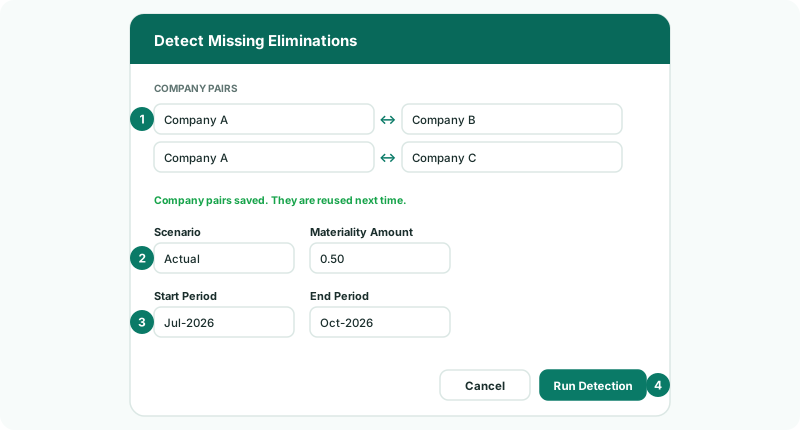
The pairs are saved and reused next time. A summary says how many pairs and months were scanned, how many intercompany accounts were found, and how many items were left out because they were already handled or below materiality.
4Confirm or reject each suggestion
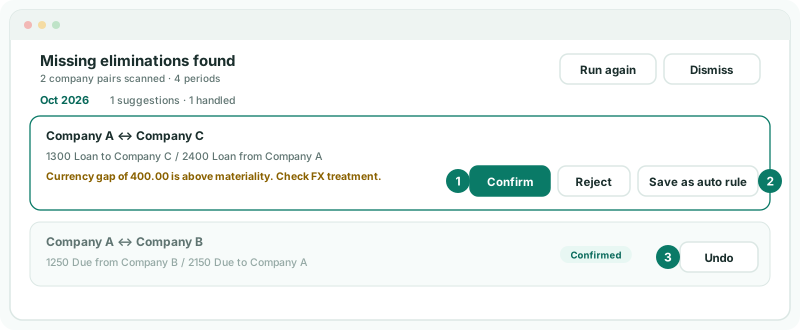
Missing eliminations found lists each month’s suggestions, with any note — here, that the loan’s two sides differ by more than the materiality and need an FX treatment. Where invoices or bills name the other company, those names are shown as support.
| Confirm | Check or adjust the proposed entry — its lines, accounts, currencies and any difference treatment — and click Confirm. The entry is posted. |
|---|---|
| Reject | Choose why — Not intercompany, Already handled, Mapping needs review or Amount not valid — and click Reject. Nothing is posted. |
| Undo | On a confirmed or rejected suggestion, sends it back for review. |
5Turn a recurring one into a rule
The loan between Company A and Company C will be there every month until it is repaid, so a rule should clear it.
- On its suggestion, click Save as auto rule.
- In Save as Auto Rule, check the detected relationship, and enter the Description, Method, tolerance and residual treatment.
- Click Save Rule.
Check
Click Run again. For every month from July to October, nothing is left pending, and the loan’s rule is listed on Elimination Rules.
6If something goes wrong
| Suggest Rules and Find missing eliminations can’t be clicked | The subscription is on Standard, which doesn’t include BrizoElim. |
| No new rules are suggested | Every pair that looks intercompany already has a rule, or the account names don’t identify any pairs. See Name and map intercompany accounts. |
| Detection doesn’t run | Add at least one company pair. |
| A balance you expected isn’t suggested | It is below the Materiality Amount, already eliminated, or on an account that isn’t mapped. Check Account Mapping. |
| The same suggestion comes back every month | It recurs. Save it as an auto rule. |
Want more detail? See the documentation