
Foundations · Track 2 · Tutorial 3 of 7
Post group adjustments
Some entries belong to the group but to none of its companies — a provision the auditor asks for, a cost only the group carries. Post them as group journals, once or every month.
1Decide whether it is a group adjustment
Before posting anything at group level, ask where the entry really belongs:
| If the entry… | Post it |
|---|---|
| Belongs in one company’s books — a missed accrual in Company B | In that company’s accounting system, then reload the month. A group journal would leave the company’s own figures wrong. |
| Is between two of your companies | As an elimination — see Clear intercompany balances. |
| Exists only for the group — in no company’s books | As a group journal, in this tutorial. |
In the running example there are two for October: a 5,000 warranty provision the group’s auditor has asked for, and the group audit fee, accrued at 2,000 a month and billed to no single company.
2Open Consolidation Journals
- Select your group in the entity selector.
- Open Adjustments → Consolidation Journals.
- Keep the scenario on Actual, and choose Oct-2026 with the period arrows.
The page lists the group journals already posted for the month.
If your group has more than one accounting standard enabled, GAAP Journals also appears under Adjustments. It works the same way, with journal types for standard-specific entries such as leases or impairment.
3Post a one-off journal
- Click Add Journal Entry.
- Enter a Journal ID you will recognise later. The Date defaults to the end of the month.
- Keep Journal Type as Other Consolidation Journals, and enter a Description that says why the entry exists.
- Under Debit Lines and Credit Lines, choose each group account and enter the amount. Leave Exch. Rate at 1.0000.
- When Difference shows +0.00, click Confirm.
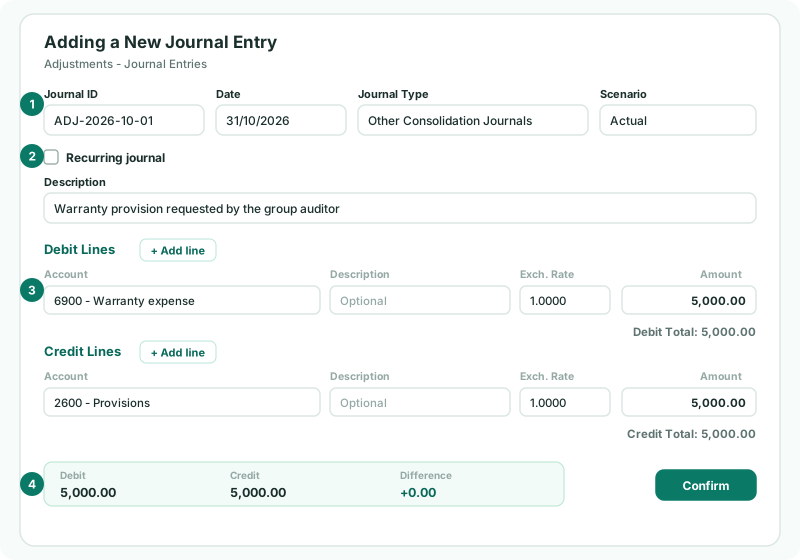
Lines use the accounts of your Common COA — a group journal belongs to the group, not to any company. Each account can appear only once per entry.
The description is what your reviewer and auditor will read. “Warranty provision requested by the group auditor” explains itself; “Adj Oct” does not.
4Set up a recurring journal
The audit fee accrual is the same every month, so post it once for the year:
- Click Add Journal Entry and fill in the entry as before.
- Tick Recurring journal, and choose the Start Period and End Period — for example Oct-2026 to the end of your financial year.
- Click Confirm.
BrizoConsol posts a copy in every month of the range, each with the month added to its Journal ID, and marks them Monthly recurring. To change the amount later, click the edit icon on the row — Edit recurring series — and the change applies to the series.
A range that includes a locked month cannot be saved. Start the range after the last locked month.
5Choose the journal type
The type groups your journals in reports and on Month End Status. Use Other Consolidation Journals for everyday adjustments like the two above. The other types have their own place in the close:
| CTA / Foreign Currency, NCI | Covered by the next two tutorials. |
|---|---|
| Acquisition, Disposal, Goodwill Impairment, Dividend to NCI | For changes to the group — covered in the When your group changes track. |
| JV / Associate | Equity accounting for joint ventures and associates. These ask for the related company. |
6Import many journals at once
If your adjustments are prepared in a spreadsheet:
- Click Import from file, and download the import template.
- Fill it in: one row per journal line, with rows that share a Journal ID forming one entry.
- Drop the file in.
The file is checked first, and nothing is posted unless every entry is valid and balances — all the problems are listed together, so you can fix the file in one go. A Journal ID that already exists is refused.
7Check the adjustments landed
- Open Review → Elim. & Journals Report for Oct-2026. It lists every journal and elimination posted for the month.
- Open Reports → Profit & Loss with Show Entities on. The adjustments appear in the eliminations and adjustments column, not in any company’s.
Check
Both October journals are in the Elim. & Journals Report, and the warranty expense and audit fee show in the group column. On Month End Status, under Consolidation Journals, Other consolidation journals shows Posted.
8If something does not look right
| What you see | What to do |
|---|---|
| Add Journal Entry is disabled | The group has no Common COA yet — see Map every company to one group chart of accounts. |
| Debit and Credit totals must be balanced before saving. | The two sides differ. Check the amounts until Difference is +0.00. |
| Duplicated account is not allowed in journal lines. | Combine the two lines for that account into one. |
| One or more selected periods are locked. | Choose an open month, or ask an administrator to unlock the month on Month End Status. |
| The adjustment went the wrong way | Debit and credit are swapped. Edit the entry and move the lines to the other side. |
| GAAP Journals is missing from the menu | It appears only when more than one accounting standard is enabled. Use Consolidation Journals. |
Want more detail? See the documentation