
Zoho Books Groups · Track 4 · Tutorial 2 of 2
Work with credits, refunds and settlements
An invoice marked paid doesn’t say how. With the additional Zoho access, BrizoConsol reads every receipt, credit note and write-off against each invoice and bill, at the rate it came in, so you can answer “how was this settled?” from one place.
1Know what is read
| Settlements | For each invoice and bill: the receipts or payments against it, the credit notes applied, any write-off, and the rates. |
|---|---|
| Credit notes and vendor credits | Each one, how much is unused, and the invoices or bills it was applied to. |
| Payments | Each customer and vendor payment, the documents it settled, and any refund of it. |
All of it comes in with each month’s Transactions, which the daily refresh keeps up to date once the additional access is approved. Without that access, an opened invoice says Payments, credits and write-offs are not authorised on this Zoho connection, with a link to enable it.
2See how an invoice was settled
South Pte Ltd invoiced Pacific Resorts USD 8,000 on 2 September 2026 (INV-000226). It is paid. Here is how:
- Select South Pte Ltd, and search for INV-000226 in Global Search. The Invoices page opens on it.
- Click the row to open it.
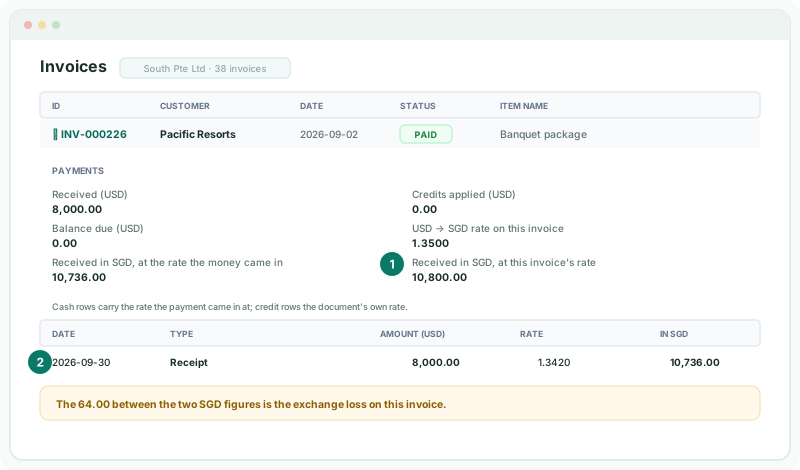
| Received / Credits applied / Balance due | In the invoice’s own currency — USD here. |
|---|---|
| The two SGD figures | The receipt in SGD at the rate the money came in (1.3420), and at the invoice’s own rate (1.3500). The difference, 64.00, is the exchange loss on the invoice. |
| The table | One row per receipt or credit note, dated. Receipts carry their own rate; credit notes carry the invoice’s rate. |
Below that, the panel restates what had been received and what was due as at the date and time the invoice last changed in Zoho. A write-off is stated on its own line, because Zoho records no date for it.
3Follow a credit note
Lim Catering returned trays, and South issued credit note CN-00012 for 1,500.00. To see where it went, open it from a drill: on South’s Accounts Receivable or Sales, the credit note’s number in the source rows is a link to the Credit notes page. Click its row to open it.
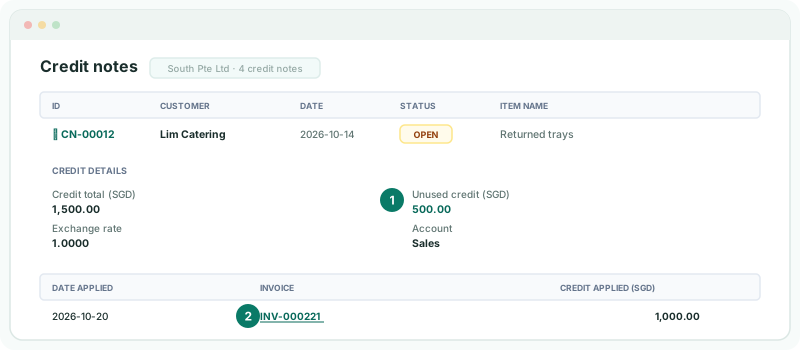
1,000.00 was applied to INV-000221; 500.00 is still unused and available to Lim Catering. Click INV-000221 to open the invoice, where the same 1,000.00 shows as a credit note in its settlement.
Vendor credits work the same way for bills, and open on the Vendor credits page.
Check
Credit applied plus Unused credit equals the credit total — unless part was refunded (step 4).
4Find refunds
| A refunded credit note | The refund reduces its Unused credit on the Credit notes page. |
|---|---|
| A refunded payment | Drill on the bank account or receivables for the month, and click the payment’s number in the source rows. It opens with the documents it settled and a Refunded table with each refund’s date and amount. A payment with neither says Settles no invoice or bill and has no refund. |
Drilling is covered in Follow a figure to the Zoho posting.
5If something goes wrong
| No payments, credits or debits recorded for this document. | Nothing has been received or credited against it in Zoho — or, if it was settled recently, the month’s Transactions haven’t been refreshed since. Load the month’s Transactions on Data Loading. |
|---|---|
| Payments, credits and write-offs are not authorised on this Zoho connection… | Click Enable additional access, or ask a data administrator to. |
| Unverified | Zoho didn’t state that figure for this document, so BrizoConsol doesn’t guess it. |
| Not posted, so it is excluded from current receivables/payables. | The document is a draft or void in Zoho. |
| The Credit notes page won’t open | It needs the Free, Pro or Premium edition. |
Want more detail? See the documentation