
Xero Groups · Track 4 · Tutorial 2 of 2
Work with credit notes, overpayments and settlements
Available on ProPremium
An invoice marked paid doesn’t say how. With additional access switched on, BrizoConsol reads the payments, credit notes, overpayments and prepayments allocated to each Xero invoice and bill, so you can answer “how was this settled?” from one place.
1Know what is read
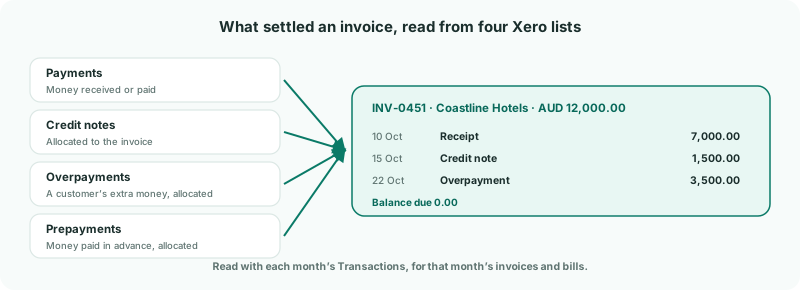
| Payments | Money received against an invoice, or paid against a bill. Deleted payments are left out. |
|---|---|
| Credit notes | The part of each credit note allocated to the invoice or bill, and when. |
| Overpayments and prepayments | Money a customer paid too much, or paid in advance, and later allocated to an invoice — or the same for a supplier and a bill. |
All of it is read with a month’s Transactions, for the invoices and bills dated in that month. It isn’t refreshed automatically.
Xero credit notes aren’t listed as documents of their own in BrizoConsol. You see them where they are used: in the settlement of the invoice or bill they were allocated to.
2Load the month’s Transactions
- Select Harbour Pty Ltd, and open Settings → Organisation Settings → Data Loading.
- Tick the month the invoice is dated in — Sep-2026 in the example — and click Load selected.
- Tick Transactions, and click Start Load.
The load shows Loading payments and credits for Sep-2026 while it reads them. Load a month again whenever its invoices are paid or credited in Xero.
3See how an invoice was settled
Harbour Pty Ltd invoiced Coastline Hotels AUD 12,000.00 on 2 September 2026 (INV-0451). It is paid. Here is how:
- Search for INV-0451 in Global Search. The Invoices page opens on it.
- Click the row to open it.
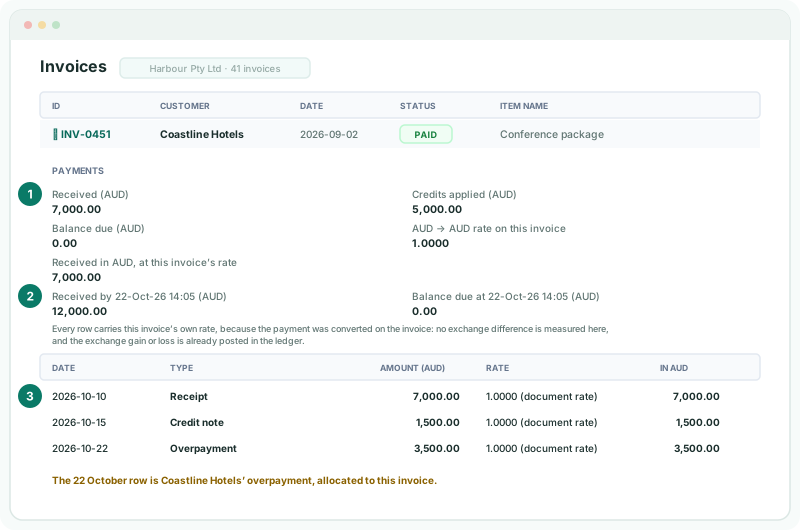
| Received / Credits applied / Balance due | In the invoice’s own currency. Credits applied counts the credit notes, overpayments and prepayments allocated to it. |
|---|---|
| Received by / Balance due at | The same position as at the date and time the invoice last changed in Xero. |
| The table | One row per allocation, dated. A payment shows as Receipt on an invoice and Payment on a bill; a credit shows as Credit note, Overpayment or Prepayment. |
Here, 7,000.00 was received on 10 October, credit note 1,500.00 was allocated on 15 October, and Coastline Hotels’ 3,500.00 overpayment from an earlier receipt was allocated on 22 October.
Check
Received plus Credits applied plus Balance due equals the invoice total — 7,000.00 + 5,000.00 + 0.00 = 12,000.00 — and Xero’s invoice shows the same three allocations.
On an invoice in a foreign currency, Xero converts a receipt at the invoice’s own rate, so the panel shows it at that rate only and notes that no exchange difference is measured there. The realised exchange difference is in Xero’s ledger: drill the exchange gain or loss account, as in Follow a figure to the Xero posting.
4Bills work the same way
Open a bill on the Bills page and its panel says Paid instead of Received. Supplier credit notes and prepayments allocated to the bill show as Credit note and Prepayment rows.
5If something goes wrong
| No payments, credits or debits recorded for this document. | Its month’s Transactions haven’t been loaded — or the invoice changed in Xero after they were, and the nightly read replaced it. Load the month again with Transactions ticked. |
|---|---|
| This Xero connection’s grant does not include payments… | Click Reconnect Xero and approve the access in Xero. |
| Enable additional access on the connection before transactions can be loaded. | The Transactions box is greyed out because additional access isn’t switched on. See Switch on additional access. |
| Not posted, so it is excluded from current receivables/payables. | The invoice is a draft or void in Xero. |
| A message about the edition instead of payments | Settlement detail needs the Free, Pro or Premium edition. |
Want more detail? See the documentation