
Xero Groups · Track 1 · Tutorial 2 of 3
Switch on additional access
The first connection reads balances, invoices and bills. Two more reads are switched on separately: the payments, credits and journal lines behind each figure, and Xero’s profit and loss by tracking category. Drill-down, settlements and tracking reports are built on them.
1Understand what the extra access adds
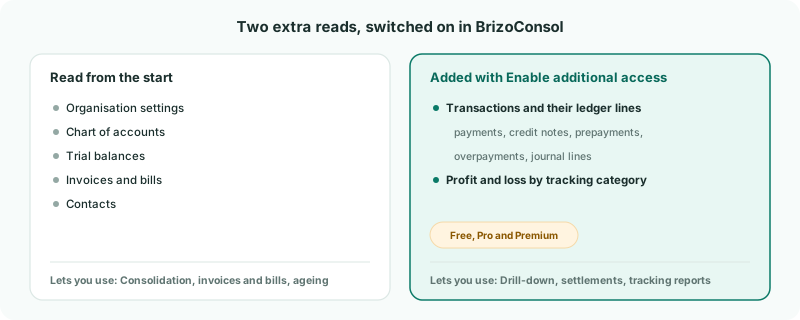
| Transactions and their ledger lines | The payments, credit notes, prepayments and overpayments behind each invoice and bill, and the journal lines behind each account’s movement — so a figure can be followed down to the Xero posting, and each document shows how it was settled. |
|---|---|
| Profit and loss by tracking category | Xero’s own profit and loss for each tracking category, for department and store reports. |
Unlike Zoho Books, Xero usually needs no second approval: the permissions were granted when you connected, and the extra reads are simply switched on in BrizoConsol.
2Check the permissions
- Select Harbour Pty Ltd, and open Settings → Organisation Settings → Data Loading.
- On the Xero permissions card at the top, click Permission details.
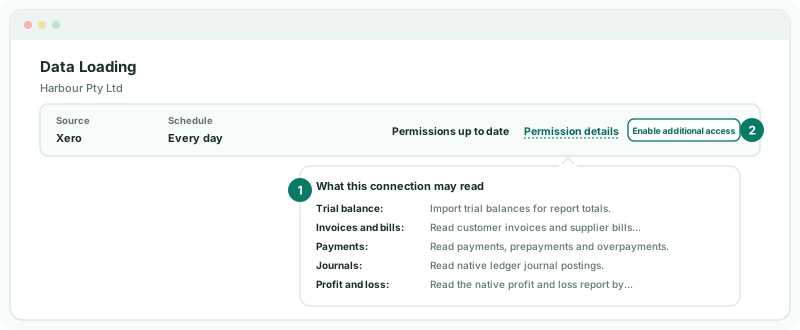
Permissions up to date means the grant includes everything BrizoConsol reads, Payments and Profit and loss among them. If the card instead says This connection has not authorised and lists Payments, the connection must be made again with that permission: open any of the company’s invoices on the Invoices page, click Reconnect Xero in its payments notice, and allow access.
3Switch it on
- Click Enable additional access.
Back on Data Loading, the message says Transactions, their ledger lines and the profit and loss by tracking category are now read for this connection. The button disappears, and the period table gains Transactions and P&L tracking columns.
Check
The card shows Permissions up to date with no Enable additional access button.
4Load the transactions
Switching on loads nothing by itself, and transactions aren’t part of the nightly refresh: you load the months you need.
- On Data Loading, tick the months you report on — for example, this financial year — and click Load selected.
- Under Data Types, tick Transactions, and click Start Load.
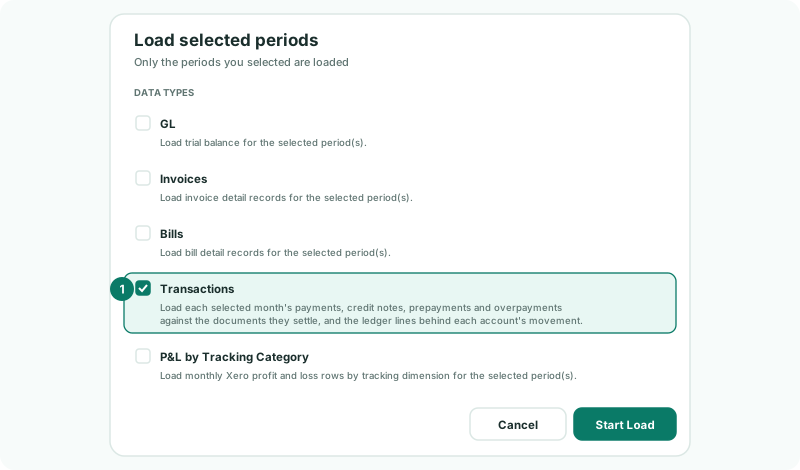
The Transactions column then shows which months are loaded. Load a month again after big changes in Xero — a late payment run, say — so its settlements and drill-down are current. Loading the tracking reports is covered in the series’ tracking category track.
5Do the same for the other companies
Repeat steps 2 to 4 for Harbour Pte Ltd and Harbour NZ Ltd. Each connection is switched on separately.
6If something does not look right
| What you see | What to do |
|---|---|
| There is no Enable additional access button | Either it is already on, or you aren’t a data administrator: the card then says A data administrator must approve the additional access on a working connection. |
| Transactions and tracking reports: Available on Free, Pro and Premium. | The group is on Standard. Upgrade to switch the reads on. |
| There is nothing left to switch on for this connection. | Both reads are already on. |
| Transactions can’t be ticked: Enable additional access on the connection before transactions can be loaded. | Switch the access on first (step 3). |
| This Xero connection’s grant does not include payments… | The connection was made without the payments permission. Click Reconnect Xero beside the message and allow access again. |
Want more detail? See the documentation