
SaaS & Technology Groups · Track 3 · Tutorial 1 of 2
Eliminate platform fees between companies in different currencies
The IP company and the operating companies keep their books in different currencies, so the two sides of a platform fee never translate to the same amount. Method 2 clears both and shows the difference as exchange.
1Know where the difference comes from
Your Group’s IP company keeps its books in SGD, the group currency, and charges the Australian operating company a platform fee of SGD 20,000 a month. The operating company books it in AUD, at the rate on the invoice date.
| Both sides are eliminated | The fee is income in one company and a cost in the other. IFRS 10 (paragraph B86(c)) requires both to be eliminated in full. |
|---|---|
| Each side is translated | BrizoConsol translates the operating company’s expense at the month’s Average Rate, so it rarely comes back to exactly SGD 20,000. |
| Exchange on the balance stays | The operating company’s gain or loss on settling an SGD invoice is a real exchange difference. Under IAS 21 (paragraph 45), it stays in group profit or loss. |
2Check the month’s rates
- Open Settings → Global Settings → Exchange Rates, and check that Oct-2026 has an Average Rate and a Closing Rate for AUD.
The rule translates the operating company’s fee at the Average Rate and its unpaid balance at the Closing Rate. See Manage closing and average exchange rates.
3Add a rule for each operating company
- Open Intercompany → Elimination Rules and click Add an Auto Elimination Rule.
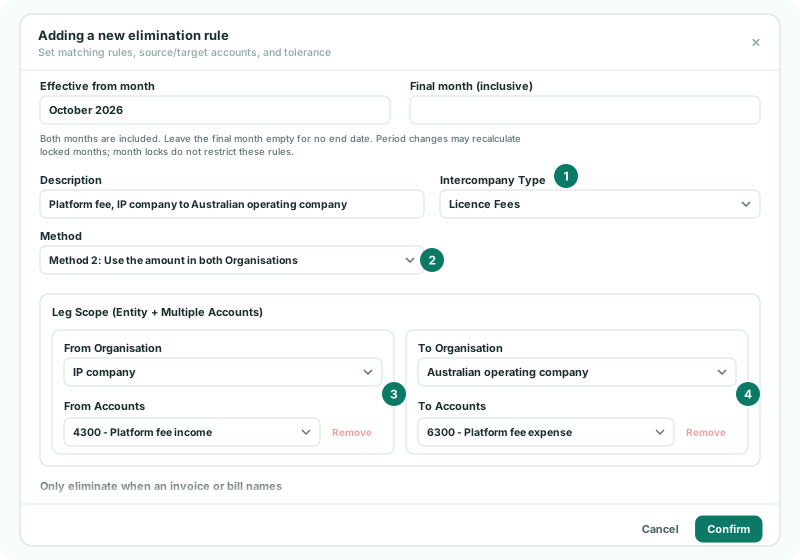
- Enter the Description Platform fee, IP company to Australian operating company, and choose the Intercompany Type Licence Fees, set up in Set up intercompany types for a SaaS group.
- In Method, choose Method 2: Use the amount in both Organisations.
- Under Leg Scope (Entity + Multiple Accounts), choose the IP company and its platform fee income account as From, and the operating company and its platform fee expense account as To.
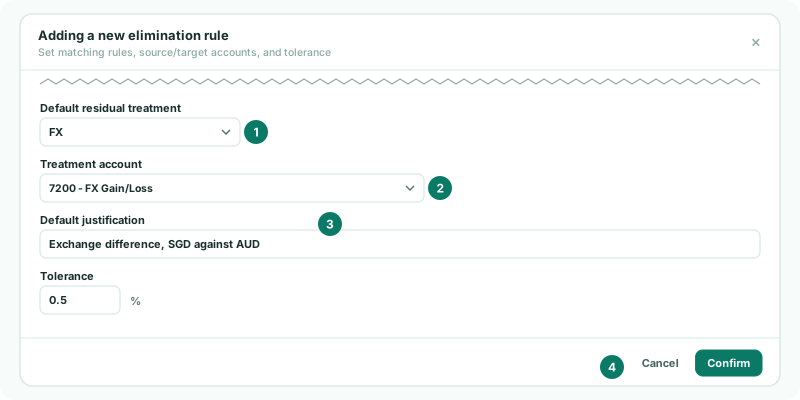
- Set Default residual treatment to FX, choose the group’s exchange gain or loss account in Treatment account, and enter the Default justification Exchange difference, SGD against AUD.
- Click Confirm.
Repeat for each operating company: a rule clears one pair of companies. Method 2 takes each side off at its own translated amount, so both fee lines clear completely, and posts the difference to the treatment account. Its Tolerance has no effect.
4Clear the unpaid fees
Fees not yet paid at the month end leave a receivable in the IP company and a payable in the operating company. Add a second Method 2 rule with FX, under Trade Receivables / Payables, on those two accounts. Balance sheet accounts are translated at the Closing Rate. See Eliminate trade receivables and payables.
5Check the month
- Open Reports → Profit & Loss for Oct-2026 with Show Entities on.
- Open Intercompany → Elimination Review for Oct-2026.
Check
The group column shows nothing on the platform fee income and expense lines, and the exchange account holds only the small difference. Elimination Review lists the rule’s October difference, with FX as its treatment and your justification.
6If something goes wrong
| What you see | What to do |
|---|---|
| FX and write-off treatments require a P&L account. | The treatment account is a balance sheet account. Choose a profit and loss account. |
| Leg 1: From and To Organisation cannot be the same. | Both sides are the same company. Choose the operating company on the To side. |
| The exchange account holds a large amount | A difference that size is rarely exchange: usually one company booked the fee in another month, or not at all. Correct its books and reload the month. |
Want more detail? See the documentation