
SaaS & Technology Groups · Track 2 · Tutorial 1 of 2
Align deferred revenue across Xero and QuickBooks companies
Deferred revenue is the subscription revenue a SaaS group has been paid for but not yet earned. With companies on Xero and QuickBooks, it arrives under different names, and the group needs one line on one schedule.
1Know what has to match
A subscription paid in advance is a contract liability under IFRS 15: deferred revenue, released as the service is provided over the subscription period. Your Group’s IP company keeps its books in Xero, and an operating company in QuickBooks. Each has its own deferred revenue account, under its own name.
| One line | Both companies’ deferred revenue on the same group account, so the group balance sheet shows one figure. |
|---|---|
| One schedule | Both companies release it the same way: over the subscription period, month by month. |
| Only outside customers | A licence one group company bills another in advance is eliminated, with the prepayment it leaves in the other company. |
2Put deferred revenue on one group account
- Select Your Group, and open Settings → Global Settings → Common COA.
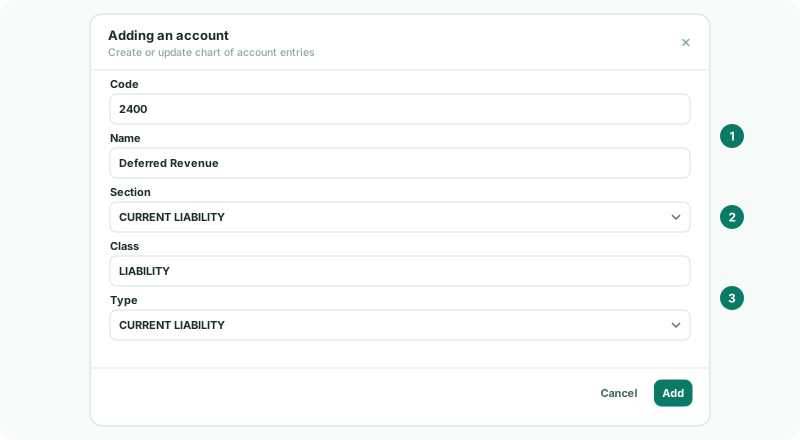
- If there is no deferred revenue account yet, add one with the + button, such as 2400 Deferred Revenue, with the section CURRENT LIABILITY.
- If some subscriptions run longer than a year and the companies split the balance, add a second account for the part due after a year, with the section NON CURRENT LIABILITY.
A contract liability is a liability, not revenue: keep it out of the REVENUE section, or it is counted as revenue.
3Map each company’s account to it
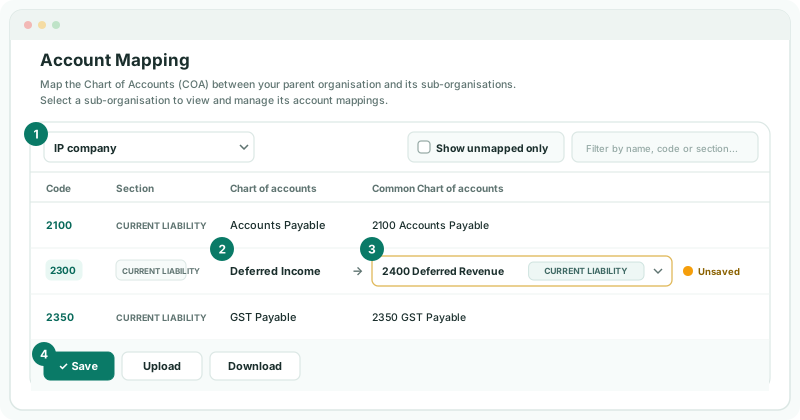
- Open Settings → Global Settings → Account Mapping, and choose the IP company.
- For its deferred revenue account — for example 2300 Deferred Income — choose 2400 Deferred Revenue in the Common COA dropdown, and click Save.
- Choose the operating company, map its account — for example Unearned Revenue — to 2400 as well, and click Save.
Saving recalculates the group in the background. If an account is mapped to a group account of a different type, a warning lists it above the table: check it before moving on.
4Check both companies release it the same way
Mapping puts the balances on one line; it doesn’t change how each company released them. Compare each company’s movement with its subscription schedule:
- Open Reports → Balance Sheet for Oct-2026 with Show Entities on, and read 2400 Deferred Revenue for each company.
- Compare each company’s balance with the unearned part of its subscriptions at 31 October.
A company whose balance is too low is recognising revenue too early, often on invoicing. Correct it in its own books, in Xero or QuickBooks, and reload the month, as in Set the lock date in Xero, then reload or Close the books in QuickBooks, then reload. Its own figures should be right too, not only the group’s.
5Eliminate deferred revenue between group companies
If the IP company bills the operating company a year’s licence in advance, the IP company holds deferred revenue and the operating company a prepayment. Both are inside the group and come out together.
- Open Intercompany → Elimination Rules and click Add an Auto Elimination Rule.
- Choose the Intercompany Type Trade Receivables / Payables: it accepts current asset and current liability accounts.
- Under Leg Scope (Entity + Multiple Accounts), put the IP company and its deferred revenue account for group companies on one side, and the operating company and its prepaid licence account on the other.
- Choose the method, as in Method 2: use both amounts and treat the difference for companies in different currencies, and click Confirm.
This works only if the intercompany part is on accounts of its own. Each side must also map to a different group account: map the prepaid licence to a current asset account, not to 2400.
6Check the balance sheet
- Open Reports → Balance Sheet for Oct-2026 with Show Entities on.
Check
2400 Deferred Revenue shows both companies on one line, each matching its subscription schedule, and the group figure is their total less the licence billed between them. The operating company’s prepaid licence is zero in the group column.
7If something goes wrong
| What you see | What to do |
|---|---|
| Deferred revenue is on two group lines | One company’s account is mapped to another group account. Map it to 2400. |
| Deferred revenue shows in the Profit & Loss | The account is mapped to a REVENUE account. Map it to 2400. |
| Leg 1: both sides post to the same group account | The deferred revenue and the prepaid licence map to the same group account. Map the prepayment to a current asset account. |
| A company’s deferred revenue is too low every month | It recognises revenue too early. Correct its books in Xero or QuickBooks and reload the month. |
Want more detail? See the documentation