
Intercompany Eliminations · Track 2 · Tutorial 2 of 8
Method 2: use both amounts and treat the difference
When two companies keep their books in different currencies, their sides never translate to exactly the same group amount. Method 2 clears each side at its own amount and says, every month, what the difference is.
1Know when to use Method 2
Method 2 takes each side off at its own translated amount, so both intercompany accounts clear completely, and posts the difference to an account you choose. Use it when both sides are right in their own books and the difference has a known cause.
Company A holds the fees due from Company B in SGD; Company B holds the payable in AUD, translated at the month’s Closing Rate. They never land on exactly the same SGD amount. With Method 1 the leftover would stay on Company B’s payable line; with Method 2 both lines clear and the leftover is posted as an exchange difference.
2Add the rule
- Open Intercompany → Elimination Rules and click Add an Auto Elimination Rule.
- Set Effective from month to the first month the balance should be eliminated, and leave Final month (inclusive) empty.
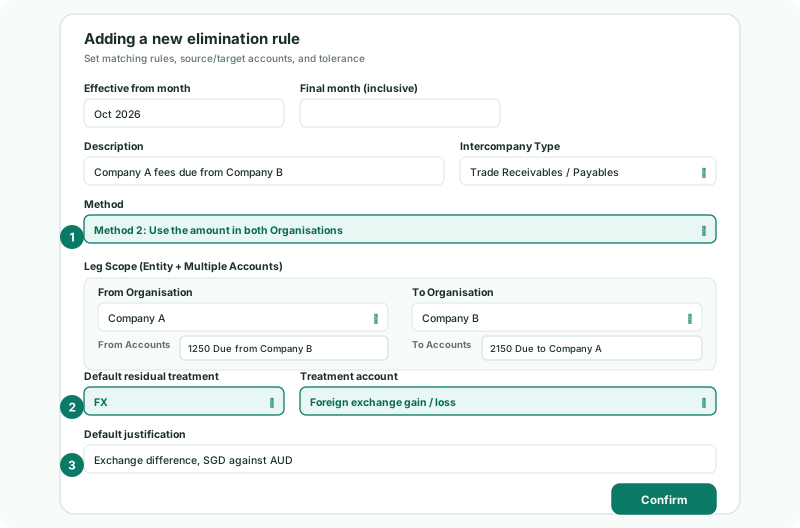
- Enter the Description Company A fees due from Company B, and choose the Intercompany Type Trade Receivables / Payables.
- In Method, choose Method 2: Use the amount in both Organisations.
- Under Leg Scope (Entity + Multiple Accounts), choose Company A and 1250 Due from Company B on the From side, and Company B and 2150 Due to Company A on the To side.
- Set Default residual treatment, Treatment account and Default justification as in step 3.
- Click Confirm.
3Choose the treatment
| Default residual treatment | Use it when | Then set |
|---|---|---|
| FX | The difference comes from exchange rates. | Treatment account: the group’s profit and loss account for exchange differences. |
| Write off | The difference is small and nobody will chase it — rounding, bank charges. | Treatment account: a profit and loss account. |
| Timing | One company books later than the other. | Timing difference: Review before posting, or Park on an account with the account under Park the difference on. |
For FX and Write off, the account list offers only the group’s profit and loss accounts. For a parked timing difference it offers every group account, such as an intercompany suspense account.
The Default justification is saved with every difference the rule posts, so whoever reads the figures later knows why it is there. Your Group enters Exchange difference, SGD against AUD.
If Company B’s payable usually differs because it books Company A’s fees late, Timing fits better than FX: Explain and clear intercompany differences sets the same rule up that way.
4See what the rule posts
| Treatment | Each month with a difference |
|---|---|
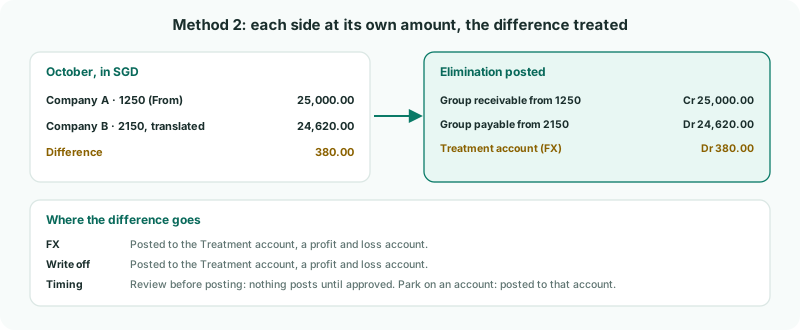
| FX or Write off | The elimination is posted with the difference on the treatment account, and the month is also listed in Elimination Review, where the treatment can be checked and changed. |
| Timing, Park on an account | The same, with the difference on the parking account until the other company books it. |
| Timing, Review before posting | Nothing is posted. The month waits in Elimination Review until someone approves it. |
Method 2 posts whatever the size of the difference: the Tolerance has no effect on it. That is why every difference is listed for review — a large one is almost never exchange, and should be looked at.
That includes a month where only one side has booked anything. If Company B records a payable to Company A that Company A has not booked, Company B’s whole amount is eliminated and posted to the treatment account as the difference. With Timing and Review before posting, such a month waits for review instead.
Check
In the October Balance Sheet with Show Entities on, the group column shows nothing on the intercompany receivable and payable lines. Elimination Review for October lists the rule’s difference, with FX as its treatment and your justification.
5If something goes wrong
| FX and write-off treatments require a P&L account. | The treatment account is a balance sheet account. Choose a profit and loss account. |
| Parking a timing difference requires an account to park it on. | Choose an account under Park the difference on. |
| The FX account holds a large amount | A difference that size is rarely exchange: usually one side is missing an entry, or only one side booked anything that month. Find it in Elimination Review, correct the company’s books, and reload it. |
| A month is not posted at all | The treatment is Timing with Review before posting. Approve it in Elimination Review, or change the rule to park the difference. |
| The account you want is not in the treatment list | For FX and Write off, only profit and loss accounts are listed. Add the account to the Common COA with a profit and loss section. |
Want more detail? See the documentation