
Read and Customise Reports · Track 1 · Tutorial 4 of 5
Show entities, eliminations and adjustments side by side
A group figure is the companies’ figures plus everything posted at group level. Show Entities lays those parts side by side, and the elimination scope chooses which group-level entries are in the figures at all. Together they answer where a number comes from.
1Know how a group figure is built
For every account and period:
| The companies | Each company’s own figure, translated into the group currency. |
|---|---|
| Elims/Adj | Everything posted on the group itself: eliminations, group and GAAP journals, CTA and NCI. It is worked out as the group figure less the companies’ figures. |
| The group | The two added together. |
So the companies always add up to the group once Elims/Adj is included. A figure that looks wrong is wrong in one of the parts, and Show Entities tells you which.
2Lay the parts side by side
- Open Reports → Profit & Loss for Your Group, Oct-2026.
- Turn on Show Entities.
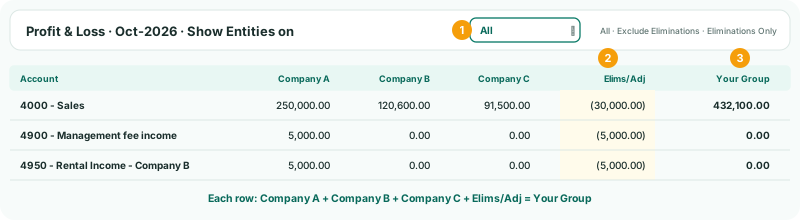
Read the Sales row across: 250,000 + 120,600 + 91,500 = 462,100 sold by the three companies, less 30,000 in Elims/Adj — Company A’s sale to Company B — gives the group’s 432,100. Company A’s management fee and rental income from Company B are in its column and taken out in full in Elims/Adj, so the group shows nothing for either.
Click any figure in Elims/Adj to see the entries behind it, as in Trace any figure back to the invoice.
3Choose what the figures include
The elimination scope, above the report, changes the figures themselves:
| Scope | Includes | Group Sales in October |
|---|---|---|
| All | Everything. The group’s reported figures. | 432,100 |
| Exclude Eliminations | Everything except elimination entries. Group journals, CTA and NCI are still in. | 462,100 |
| Eliminations Only | Elimination entries only. | (30,000) |
Exclude Eliminations is not the same as adding up the companies: a group journal — an audit fee accrual, say — is still in it. Use it to show the business before intercompany comes out. Use Eliminations Only to see the month’s eliminations account by account, and compare them with Review → Elim. & Journals Report.
4Use it to find a problem
| You see | Look at |
|---|---|
| An intercompany account isn’t zero for the group | Its Elims/Adj. If it is smaller than the companies’ total, part of the item wasn’t eliminated. |
| A line moved more than you expected | The company columns for the month before and after: the move is in one of them, or in Elims/Adj. |
| A foreign company’s figure looks too big or small | Its column. It is translated; compare it with the company’s own report in its currency. |
Check
On any row, the company columns plus Elims/Adj equal the group column, and with Eliminations Only the group’s total eliminations for October agree with the elimination entries in the Elim. & Journals Report.
5If something goes wrong
| Show Entities isn’t there | The report is a budget or forecast. Show Entities is on actual reports. |
|---|---|
| A company has no column | It has nothing in the period, and Hide Zero Columns is on, or it isn’t in the group for that month. |
| Elims/Adj has a figure on an account you never eliminated | A group journal, CTA or NCI entry is on it. Click the figure to see which. |
Want more detail? See the documentation