
Foundations · Track 4 · Tutorial 5 of 5
Trace any figure back to the invoice
When someone asks “what is in that number?”, you should not need to log in to five accounting systems. Click the figure, and follow it down to the invoice.
1Understand the trail
In the running example the board asks why group Sales for October is 432,100.
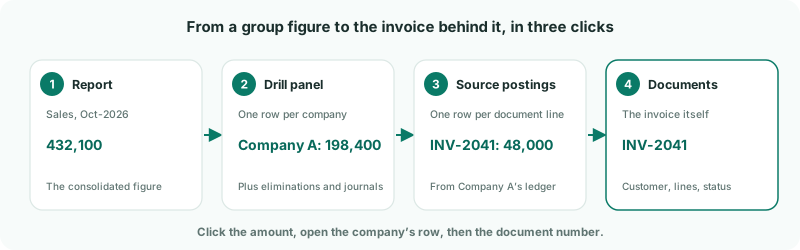
The first two levels work for every company. The last two need the company’s own documents in BrizoConsol, which only a connected accounting system provides.
| Xero | Switch on Enable additional access on Data Loading, as in See results by division or project, so transactions are read. |
|---|---|
| QuickBooks, MYOB | The ledger lines come from the connection. Load the month before as well, because the month’s movement is worked out from it. |
| Zoho Books | Load Transactions for the month on Data Loading. |
| Uploaded companies | The trail stops at the drill panel: the upload holds balances, not documents. |
2Open the drill panel
- Open Reports → Profit & Loss for Oct-2026.
- Click the October amount on the Sales row.
The drill panel opens in place, with one row for each posting behind the figure — each company’s balance, and every elimination or journal the group added. The cards at the top give the total, the number of rows, the part that is eliminations and adjustments (Elims/Adj), and the period.
| In Local | The amount in the company’s own currency — MYR for Company F. |
|---|---|
| Exchange Rate | The rate it was translated at. For profit and loss, the month’s average rate. |
| Amount | The amount in the group’s currency. The rows add up to the figure you clicked. |
3Open a company’s postings
- Click Company A’s row — rows with documents behind them show a ▸ caret.
- Read the source rows: one for each document line that posted to Sales.
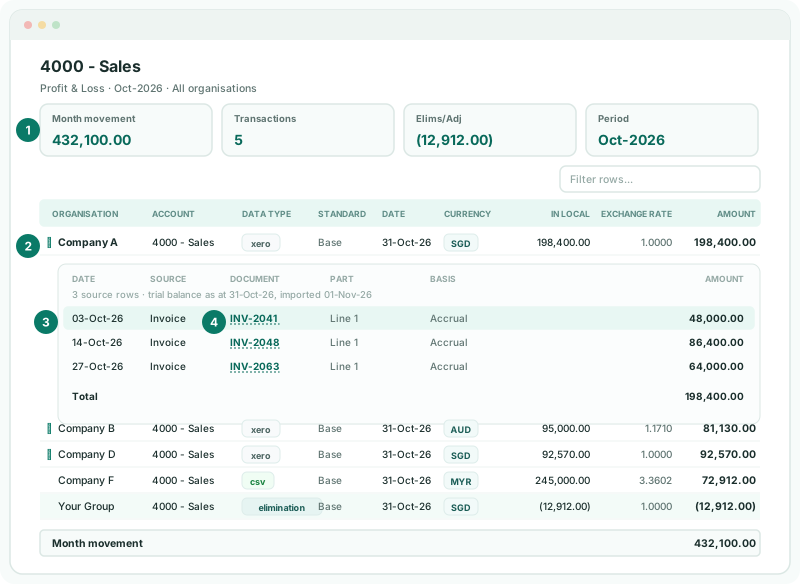
The grey line under the headings says how many source rows were found and when the trial balance was imported. Postings that cancel each other out — a purchase and the payment that settles it, say — are hidden; click Show N postings that offset each other to see them.
4Open the invoice
- Click the document number, INV-2041.
Documents opens on that invoice: the customer, the date, its status, and its lines with item, quantity, price and tax. A journal, payment or expense opens inline under the source row instead, with its lines.
Check
Company A’s source rows add up to its 198,400.00 in the drill panel. If not, a red line under the source table says how much of the movement is not reconciled to a document.
5Follow the group’s own entries
The elimination row is the group’s, not a company’s. Click it to open the elimination behind it: which companies it is between, the entries on each side, and — for an elimination built from documents — the invoices it matched.
The same trail starts from a dashboard chart, a custom report or a formula row. On a formula such as Gross Margin %, the drill first shows the parts of the formula; click one to see only its rows.
6Keep a copy
Use the Export to PDF or Export to Excel icon at the top of the drill to save what you found — for the audit file, or to answer the board’s question in writing.
7If something does not look right
| What you see | What to do |
|---|---|
| No ▸ caret on a company’s row | Its documents are not loaded. A notice above the table says what to load — for Xero, switch on additional access; for QuickBooks or MYOB, load the month before too. |
| …of the movement in the row above is not reconciled to a document here. | Part of the balance has no document behind it in what was loaded. It usually clears on the next load; if it does not, reload the month. |
| A company’s amount looks wrong in group currency | Check its Exchange Rate on the row, and the month’s rate on Exchange Rates. |
| The rows do not add up to what you expected | Look at Elims/Adj: the difference is often an elimination or a group journal, not a company. |
Want more detail? See the documentation