
Ownership and NCI · Track 1 · Tutorial 1 of 4
Read the Ownership page: direct, effective and NCI percentages
The Ownership page is where every percentage the consolidation uses comes from. Each company appears in the group structure, with percentages worked out from its dated ownership records. Learn to read it before you change it, so you can tell at a glance which companies carry an NCI, which are equity-accounted and which still need set-up.
1Open the page
- Select Your Group, the top of the hierarchy.
- Open Ownership & Equity → Ownership. The page is titled Ownership Structure.
On the left is Group structure: every company, indented under the company that holds it. On the right is the company you pick. Subsidiaries are consolidated and included in NCI, while JV / Associate companies are not consolidated and are posted by the equity method.
If a banner at the top says accounts are still to choose before this month can post, choose them first, as in Set up the NCI accounts.
2Read Group structure
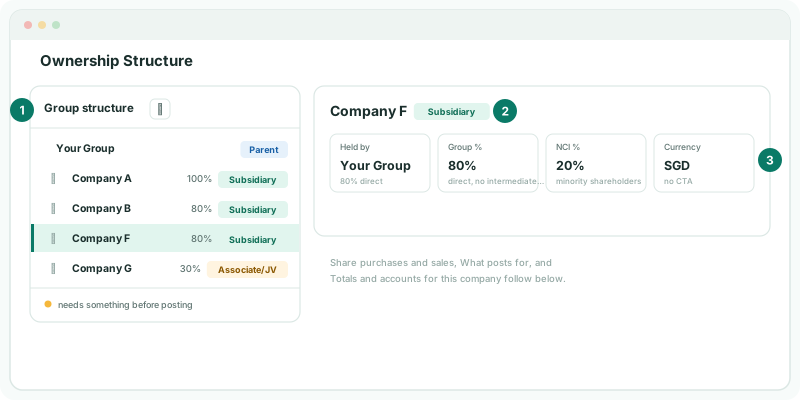
Every company below Your Group has a line, with the percentage its holder holds and a badge. Click a company to see its figures on the right.
| Item | What it tells you |
|---|---|
| Badge | Parent for Your Group, Subsidiary when the company is consolidated, Associate/JV when the group holds a stake without control, and Not consolidated otherwise. |
| Held by | The company that holds its shares, with the percentage it holds as direct. For most companies this is Your Group; for a company held through another company, it is that company. |
| Group % | The group’s share once the chain is followed. For a company held directly, it equals the direct % and the note under it reads direct, no intermediate parent. For a company held through another, it is the parent’s group % times the direct %, and the note shows the sum. |
| NCI % | 100% less the group %: the share that belongs to outside shareholders, noted minority shareholders, or none. |
| Currency | The company’s currency, noted CTA on when its translation reserve is calculated and no CTA when it isn’t. |
For an associate, the last two are Method, which reads Equity, and Holder account, the account that carries it in its holder’s books. Click Your Group itself to see how many Subsidiaries, Associates and Not consolidated companies it has, and its reporting Currency.
For Your Group, Company A is held 100%, so its NCI % is 0%, noted none: there is no NCI to post. Company B and Company F are each 80% held, so each has an NCI % of 20%. Company G is held 30% without control, so it is an Associate/JV and is not consolidated.
3Know where each percentage comes from
None of these percentages is typed in. Each comes from the company’s Share purchases and sales: every purchase and sale, with its month. The latest record up to a month decides the percentage for that month and every month after it, until a later record changes it.
| Percentages | Each Bought record adds its % transacted; each Sold record takes it away. From the second record on, each shows the change, such as 80% → 60%. |
|---|---|
| Consolidation | Each record carries a relationship, Subsidiary or JV / Associate, which applies from its month onward. It is your judgement of control at that date; BrizoConsol does not decide it from the percentage. |
So to change a percentage, you add a record for the month it changed. Editing an old record would rewrite every month since it.
4Read what still needs doing
A company with an amber dot beside its name needs something before posting. Open it to see what:
| What you see | Meaning |
|---|---|
| No dot | Nothing is missing. Its NCI posts. |
| Needs and a posting account, on a record | A group account that record uses isn’t chosen yet. Choose opens the posting accounts. |
| Needs Investment in subsidiary or Needs Goodwill | One of the company’s own accounts is missing: the investment, or the goodwill account when the purchase made goodwill. Choose opens Totals and accounts for this company. |
| NCI posting for this subsidiary is on hold until these acquisitions are completed. | A record is missing figures, which it names. Enter figures opens the record. |
| No share purchases or sales recorded. | The company has no record, so it is treated as wholly owned and nothing is posted for it. |
An associate is checked for Investment in the associate: the account that carries it in its holder’s books, since its cost is reclassified out of that account. Until it is chosen, the NCI posting can stop with a message naming the missing account, so fix it before you report.
5Open a company
- Click Company F in Group structure. Its name and badge head the right-hand side.
- Look at the three sections under its figures: Share purchases and sales, What posts for the current month, and Totals and accounts for this company.
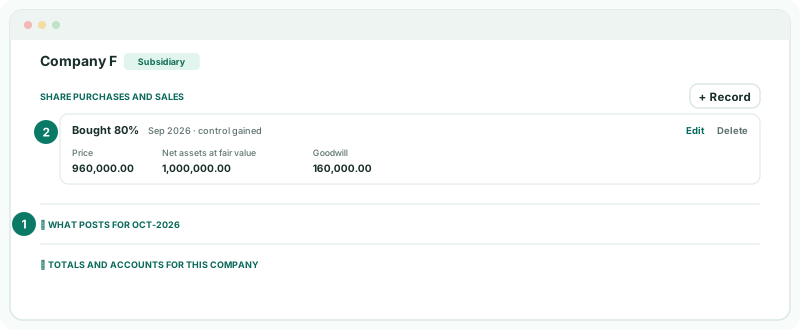
Share purchases and sales has a card for each record, oldest first: Bought or Sold and the % transacted, the month, and what happened to control: control gained, control kept, control lost or significant influence. Under it are the record’s Price or Proceeds, the Net assets at fair value, and the Goodwill, which BrizoConsol works out — a bargain purchase shows Gain on bargain purchase instead.
The other two sections are covered in Record an acquisition and its acquisition details and Read the acquisition entries line by line.
6Check the page against your group
Check
For each company, the Group % matches the share your group really holds, the badge matches whether it controls the company, and no company with an NCI has an amber dot. Company F’s record reads Bought 80%, matching the 80% beside it in Group structure.
7If something looks wrong
| What you see | What to do |
|---|---|
| A company is missing from Group structure | It isn’t below Your Group in the hierarchy, or it belongs to another subscription. Check Settings → Global Settings → Organisation Hierarchy. |
| No share purchases or sales recorded | The company has no record yet. Add one with + Record, as in Record an acquisition and its acquisition details. |
| The NCI % is wrong | A record’s % transacted or month is wrong. Click Edit on the record and correct it. |
| A company you control shows Associate/JV | Its latest record is set to JV / Associate. Edit the record and choose Subsidiary. |
| A company has an amber dot | Open it, and click Choose or Enter figures beside what it needs. |
| The page shows an upgrade message | NCI is not included in the Standard edition. |
Want more detail? See the documentation