
Ownership and NCI · Track 1 · Tutorial 3 of 4
Record an acquisition and its acquisition details
An acquisition is two things in BrizoConsol: an ownership record that says who bought how much, when, and for what, and the acquisition details that say which accounts the purchase posts to. With both in place, BrizoConsol eliminates the company’s equity, measures the goodwill and starts the NCI from the month of the purchase.
1Gather the figures
In September 2026, Your Group buys 80% of Company F for 960,000. Company F reports in SGD, like the group. The purchase price allocation values its identifiable net assets at 1,000,000. You need:
| Who bought | The group company that holds the shares: Your Group. |
|---|---|
| When | The month control passed: Sep-2026. |
| How much | The percentage bought: 80. |
| The price | The investment cost, 960,000. |
| The net assets at fair value | The whole company’s identifiable net assets at the date, 1,000,000: not the figure in its books, and not only the 80%. |
Both amounts are in the group’s currency. For a company in another currency, translate them at the rate at the date of the purchase before you enter them.
2Add the ownership record
- Open Ownership & Equity → Ownership, and click Company F in Group structure.
- Beside Share purchases and sales, click + Record, and under What happened? click Bought shares.
- In Add Ownership Record, choose Your Group as Parent entity, and Sep-2026 as the Month.
- Enter 80 in % transacted.
- Under Relationship type from this record date onward, choose Subsidiary.
- Enter the Investment cost (group currency), 960,000, and the Net assets at date (fair value), 1,000,000.
- Leave NCI measurement on Share of net assets (partial goodwill), and click Add Record.
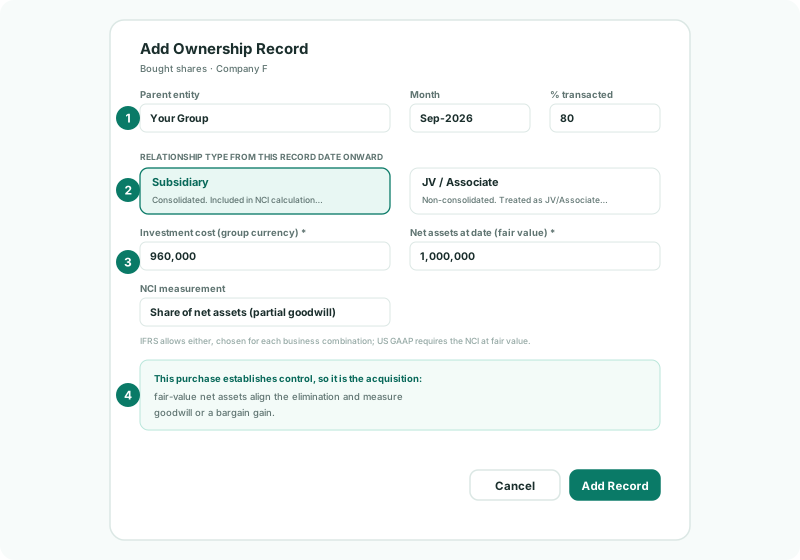
The notice under the amounts confirms how BrizoConsol reads the record: This purchase establishes control, so it is the acquisition, and the net assets at fair value align the elimination and measure goodwill or a bargain gain. A purchase in a company the group already controls says instead that it posts through the equity transaction reserve and creates no goodwill.
| Relationship | Your judgement of control at this date. Subsidiary: consolidated and included in the NCI from this month until a later record changes it. JV / Associate: not consolidated, and carried on the equity method. |
|---|---|
| NCI measurement | Shown only on the record that gives control. The NCI starts at its share of the net assets, or at its own fair value: see Choose how to measure the NCI. |
3Choose the acquisition accounts
- Open Totals and accounts for this company.
- Under Account mappings (specific to this subsidiary), choose the two accounts, or click + Create beside one to create it.
- Click Save.
| Account | What it does | Your Group |
|---|---|---|
| Investment in subsidiary - Company F | Carries the parent’s total cost, and is eliminated against Company F’s equity on consolidation. | 1610 Investment in Company F |
| Goodwill - Company F | The goodwill on this acquisition. It is only ever posted by the consolidation, never by a company. | 1810 Goodwill - Company F |
The goodwill account is needed only when the purchase makes goodwill. Each acquisition has its own, so the goodwill on each company can be followed and tested on its own.
4Read the summary
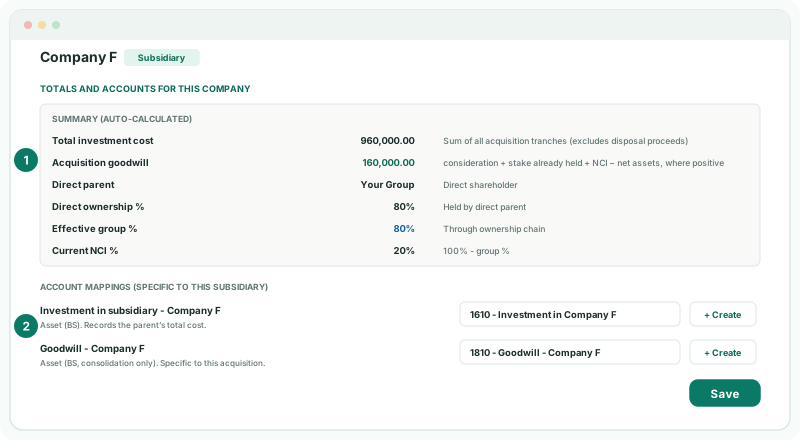
The Summary (auto-calculated) is read from the ownership records; you can’t type in it.
| Total investment cost | The sum of every Acquire record’s cost: 960,000. Sale proceeds aren’t in it; they show as Total disposal proceeds when there are any. |
|---|---|
| Acquisition goodwill | Consideration + stake already held + NCI − net assets: 960,000 + 0 + 200,000 − 1,000,000 = 160,000. The NCI is 20% of 1,000,000. |
| Bargain purchase gain | Shown instead when the same sum is negative, as in Recognise a gain on a bargain purchase. |
| Direct parent, Direct ownership %, Effective group %, Current NCI % | The same figures as in Group structure: Your Group, 80%, 80% and 20%. |
5Let the acquisition post
There is nothing to press. Saving the record and the accounts recalculates the group, and BrizoConsol posts the acquisition entries dated in the month of the purchase. Under Share purchases and sales, the record shows Goodwill 160,000.00.
Check
In Group structure, Company F shows 80% with no amber dot, and its NCI % is 20%. On Reports → Balance Sheet for Sep-2026 with Show Entities on, Company F’s assets and liabilities appear for the first time, with goodwill of 160,000, and the balance sheet still balances. In August, its column is empty.
What each entry is, line by line, is in Read the acquisition entries line by line.
6Finish a record that is on hold
If a record is missing a figure the acquisition needs, Share purchases and sales says NCI posting for this subsidiary is on hold until these acquisitions are completed, and lists each record with what it needs — for example the net assets at fair value.
- Click Enter figures beside the record.
- Enter what is missing, and click Save Changes.
The same applies when the purchase price allocation is finalised later: edit the record with the final figures, and click Save Changes: the goodwill and the acquisition entries are worked out again.
7Edit or delete a record
- To correct a record, click Edit on its card, change it, and click Save Changes.
- To remove one entered by mistake, click Delete on its card, and click Delete Record in Delete Ownership Record.
Don’t edit a record to show a later change in the stake. Add a new record for the month of the change, so the earlier months keep the percentage they had.
8If something goes wrong
| What you see | What to do |
|---|---|
| Net assets at date (fair value) is required for the acquisition that establishes control. | Enter the net assets at fair value from the purchase price allocation. |
| Transacted percent must be greater than zero. | Enter the percentage bought. |
| FV adjustment account must be configured… | The fair value differs from Company F’s book equity. Choose the FV Adjustment account in Posting accounts. |
| Goodwill account must be configured for acquisition posting with positive goodwill. | Choose Goodwill - Company F under Totals and accounts for this company. |
| Company F has an amber dot | Open it, and click Choose beside what it Needs. |
| The goodwill looks wrong | Check the price and the net assets at fair value are both in the group currency, and that the net assets are for the whole company, not the share bought. |
| Company F appears before September | The record’s Month is wrong. Edit it. |
Want more detail? See the documentation