
Ownership and NCI · Track 1 · Tutorial 2 of 4
Set up the NCI accounts
Every entry BrizoConsol posts for ownership goes to an account you choose once, for the whole group. Two are needed before anything posts. The rest are needed only when the group does something that uses them: reports in another currency, buys or sells part of a stake, loses or gains control, or holds an associate.
1Open Posting accounts
- Select Your Group, and open Ownership & Equity → Ownership.
- Click the Posting accounts gear beside Group structure, or Choose accounts on the banner at the top of the page.
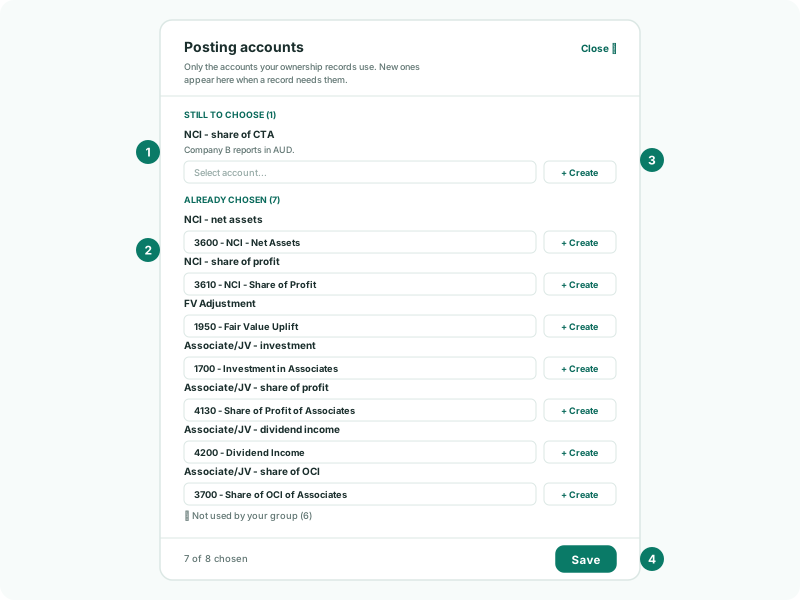
The panel shows Only the accounts your ownership records use. New ones appear here when a record needs them. While any of them is empty, a banner at the top of the Ownership page says how many are still to choose before this month can post. The accounts are the group’s own, at the top of the hierarchy: the companies never post to them.
2Choose the two accounts every group needs
| Account | What BrizoConsol posts to it | Your Group |
|---|---|---|
| NCI - net assets | The NCI’s share of each subsidiary’s net assets at the reporting date. Equity. | 3600 NCI - Net Assets |
| NCI - share of profit | The NCI’s share of each subsidiary’s profit for the year. | 3610 NCI - Share of Profit |
Nothing posts without these two, so they are always in the panel. Until both are saved, What posts for on a company says Choose the NCI net assets and share of profit accounts to see what posts.
3Choose the accounts your records need
The rest appear under Still to choose only when a record needs them, each with the reason: the company and the record. The record itself shows Needs and the account, with a Choose button that opens the panel. Until then they sit under Not used by your group, each with when it would be needed.
| Account | Needed when | Your Group |
|---|---|---|
| NCI - share of CTA | A subsidiary with minorities reports in another currency. The NCI’s share of the translation reserve goes here. | 3620 NCI - Share of CTA |
| NCI - share of other reserves | A subsidiary with minorities has other reserves, such as revaluation or hedging. | 3630 NCI - Share of Other Reserves |
| Equity transaction reserve | The group buys more of, or sells part of, a subsidiary and keeps control. The difference between the price and the NCI that changes hands goes here, in equity. If it is empty, BrizoConsol uses NCI - share of other reserves instead. | 3640 Equity Transaction Reserve |
| FV Adjustment | An acquisition’s net assets at fair value differ from the equity in the subsidiary’s books. It is an asset: reclassify it to the assets it belongs to, and depreciate it, by GAAP journal. | 1950 Fair Value Uplift |
| Gain on bargain purchase | A company is bought for less than its net assets are worth. Profit and loss. | 4910 Gain on Bargain Purchase |
| Disposal gain/loss (loss of control) | A sale takes a subsidiary out of consolidation. The gain or loss on the disposal goes here. | 4920 Gain/Loss on Disposal of Subsidiaries |
| Parent’s gain/loss on sale of shares (P&L) | Part of a subsidiary’s shares is sold. It is the account the parent records its own gain or loss on the sale in; BrizoConsol moves that gain out of group profit. | 4940 Gain/Loss on Sale of Shares |
| Gain/loss remeasuring the stake already held | A purchase gives the group control of a company it already part-owned. The stake it already held is remeasured to fair value here. | 4930 Remeasurement of Previously Held Interest |
4Choose the associate accounts, if the group has one
| Account | What it carries | Your Group |
|---|---|---|
| Associate/JV - investment | The investment: its cost plus the group’s share of profit, less dividends, plus the share of OCI. An asset. | 1700 Investment in Associates |
| Associate/JV - share of profit | The group’s share of the associate’s profit after tax, on one line. | 4130 Share of Profit of Associates |
| Associate/JV - dividend income | The income account the group company records the associate’s dividends in. They are taken out of it, because under the equity method they reduce the investment instead. | 4200 Dividend Income |
| Associate/JV - share of OCI | The group’s share of the associate’s other comprehensive income, in an equity reserve. | 3700 Share of OCI of Associates |
A group without associates never sees them. As soon as a company’s latest record is JV / Associate, all four appear under Still to choose, because a group with one needs all four: BrizoConsol posts nothing for the associate until they are set. Associates are covered in Account for associates and joint ventures.
5Create an account from the panel
- Click + Create beside the account. The dialog is named for it, such as Create NCI Net Assets Account.
- Check the Account class and Account type, which are filled in for that kind of account, and enter the Account code and Account name.
- Click Create Account. The new account is created in Your Group’s chart and chosen in the panel.
| Account | Filled-in class and type |
|---|---|
| NCI - net assets | EQUITY, NCI NET ASSETS |
| NCI - share of profit | EQUITY, NCI ALLOCATION |
| NCI - share of CTA | EQUITY, NCI CTA |
| NCI - share of other reserves | EQUITY, NCI OTHER RESERVES |
| Equity transaction reserve, Associate/JV - share of OCI | EQUITY, EQUITY |
| FV Adjustment | NON CURRENT ASSET, NON CURRENT ASSET |
| Gain on bargain purchase, Disposal gain/loss, Parent’s gain/loss on sale of shares, Gain/loss remeasuring the stake | REVENUE, REVENUE |
| Associate/JV - investment | NON CURRENT ASSET, NON CURRENT ASSET |
| Associate/JV - share of profit, Associate/JV - dividend income | REVENUE, OTHER INCOME |
The four NCI types are how the reports place the NCI lines. If you choose an existing account for one of the four NCI accounts instead, saving the setup gives it that type in Your Group’s chart.
6Save and check
- Click Save at the foot of the panel. Saved. appears beside it.
- Click Close ✕.
Check
The banner at the top of the Ownership page has gone. Reopen the panel with the Posting accounts gear: nothing is left under Still to choose, and the count at the foot of the panel is complete, such as 8 of 8 chosen.
Saving the setup recalculates the NCI for the whole group, so a changed account takes effect in every month at once.
7Set the accounts for each company
Two more accounts belong to each subsidiary, not to the group: its Investment in subsidiary and its Goodwill. You choose them under the company’s Totals and accounts for this company, as in Record an acquisition and its acquisition details. A sale that loses control also asks for the Retained interest account, and a purchase that gives control of a stake already held asks for the Previously held interest account, on the record itself.
8If something goes wrong
| What you see | What to do |
|---|---|
| A banner says accounts are still to choose before this month can post | Click Choose accounts, choose each account under Still to choose, and click Save. |
| A warning about a disposal that changed control | Choose Disposal gain/loss (loss of control), and click Save. |
| A record shows Needs and an account | Click Choose beside it, choose that account, and click Save. |
| Nothing posts for an associate | Choose all four Associate/JV accounts. |
Want more detail? See the documentation