
MYOB Groups · Track 2 · Tutorial 1 of 3
Close the books in MYOB, then reload
BrizoConsol re-reads your MYOB company files every night, so a month you have finished can still change if someone posts to it in MYOB. Lock the month in MYOB first, then take one last copy and check it.
1Know why the order matters
You are closing October 2026 for Your Group: Wattle Pty Ltd, Wattle Fitouts Pty Ltd and Kauri Ltd, each in its own MYOB company file.
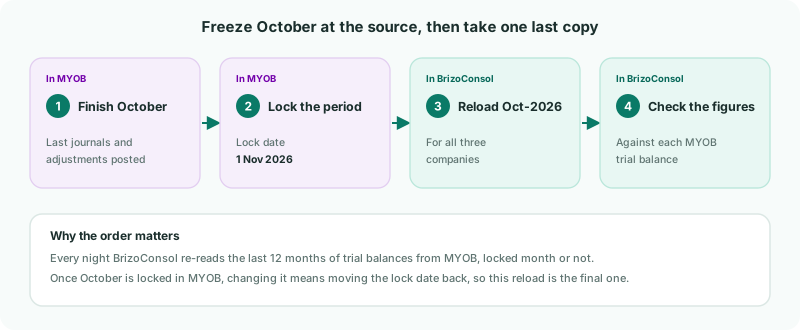
| Every night | BrizoConsol re-reads the last 12 months of trial balances and ledger lines from each MYOB company file, and the last 3 months of invoices and bills. |
|---|---|
| A lock in BrizoConsol | Stops group entries — journals, eliminations, exchange rates — but not these reads. A company’s October figures still change if its MYOB books change. |
| A lock date in MYOB | Protects the month at the source. BrizoConsol doesn’t read MYOB’s lock date, so it is up to you to set it. |
2Lock October in each company file
Do this once each company’s accountant has posted the last October entries.
- In MYOB, open Wattle Pty Ltd’s company file.
- Click the settings menu and choose Business settings.
- Under Lock date, select Prevent changes prior to the lock date, and set the lock date to 1 November 2026.
- Click Save.
- Repeat in Wattle Fitouts Pty Ltd’s and Kauri Ltd’s files.
The lock date itself stays open. MYOB blocks entries dated before the lock date, not on it. To lock everything up to 31 October, the lock date is 1 November.
In AccountRight on the desktop, the setting is under Setup → Preferences → Security, as Lock Periods: Disallow Entries Prior to.
3Reload October in BrizoConsol
Last night’s copy may be missing entries posted today. Reload the month now that it is locked:
- Select Wattle Pty Ltd in the entity selector.
- Open Settings → Organisation Settings → Data Loading.
- On the Oct-2026 row, click Reload.
- GL is ticked; tick Invoices and Bills too. If the profit and loss by job is switched on, tick P&L by Job too. Click Start Load.
- Repeat for Wattle Fitouts Pty Ltd and Kauri Ltd.
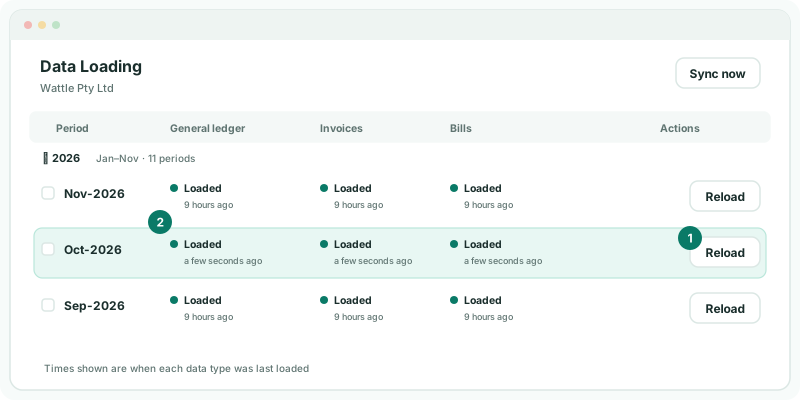
GL brings in the month’s trial balance and the ledger lines behind it, and Invoices and Bills bring in the payments made in the month. So this reload brings everything October needs for drill-down and settlements.
4Check each company against MYOB
- Select Wattle Pty Ltd, and open Reports → All Reports → Trial Balance for Oct-2026.
- Compare total assets, total liabilities and net profit with Wattle Pty Ltd’s trial balance in MYOB at 31 October.
- Repeat for the other two. Kauri Ltd’s report is in NZD, as in MYOB.
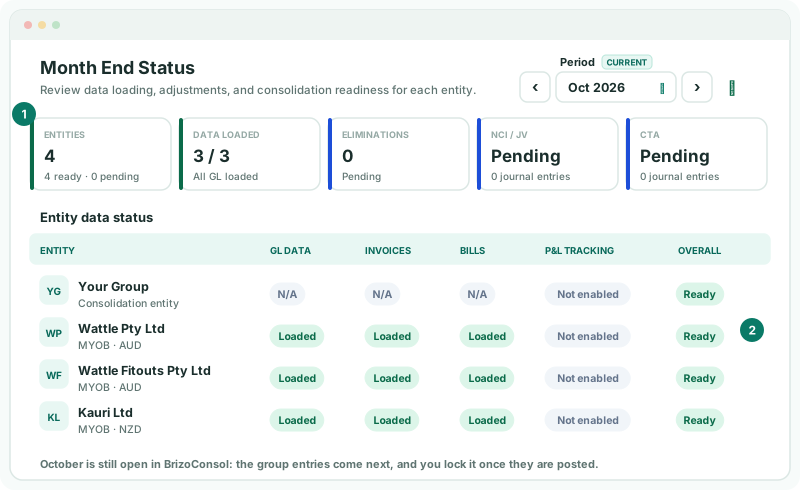
Then open Review → Month End Status for the group, on Oct 2026.
Check
Each company’s trial balance matches MYOB, and Month End Status shows 3 / 3 under Data loaded, with GL, Invoices and Bills Loaded and every company Ready.
Month End Status doesn’t expect a profit and loss by job from MYOB companies, so P&L tracking shows Not enabled whether or not you use jobs.
October is still open in BrizoConsol: the eliminations come next. Lock it there once the group entries are posted, as in Review everything before you report.
5If October has to change later
- In MYOB, move the lock date back to 1 October 2026, post the correction, and set the lock date to 1 November again.
- Reload Oct-2026 in BrizoConsol for that company, and check it again.
A correction posted in MYOB reaches the trial balance with the next nightly read even if you don’t reload — reloading brings it in now, so you can check it.
6If something goes wrong
| You can’t change the lock date | Setting it needs the administrator role in that MYOB company file. Ask an administrator. |
|---|---|
| A company’s figures differ from MYOB | Entries were posted after the last load. Lock the month and reload it. |
| Group figures changed after the close | Someone changed October in MYOB, or the lock date was moved back. Check the lock date in each file, and the Data Loading page for when October was last loaded. |
| The month stays Not loaded | Check the connection on Data Loading — a Token expired badge in the Organisation Hierarchy means it needs Reconnect Now. Reconnect, then load the month. |
| New accounts appeared in October’s load | Map them before going on, or their balances are left out of the group. See Build the group chart from a MYOB company file. |
Want more detail? See the documentation