
MYOB Groups · Track 1 · Tutorial 2 of 2
Build the group chart from a MYOB company file
If one of your MYOB company files already has the chart you want the group to report on, you don’t need to build a group chart from scratch. Copy that company’s chart into the Common COA, and that company is mapped in the same step. Only the other companies are left to map.
1Choose the company to copy from
Wattle Pty Ltd is the head company and has the most complete chart, so its chart becomes the group’s.
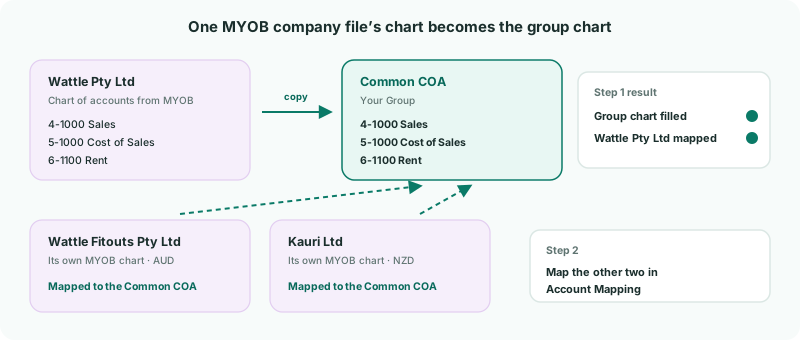
Copying is the quickest route when one company’s chart already suits group reporting. Two other options work differently:
| Start from Existing Organisation | Copies the chart of a company already in your group, and maps that company to it. Used in this tutorial. |
|---|---|
| Import from Connector | Signs in to MYOB and imports the chart of the company file you choose. Use it when the chart you want is in a company file that isn’t one of your companies here. It replaces the whole Common COA, imports the chart only, and maps nothing. |
| AI Suggest | Drafts a group chart from all your companies’ accounts when none of them has the right chart. See Map every company to one group chart of accounts. |
2Know how MYOB accounts come in
The copy takes Wattle Pty Ltd’s accounts as they came from MYOB, and is made once: it doesn’t follow later changes. Tidy the chart in MYOB first.
| Account numbers | Each account’s MYOB number, such as 4-1000, becomes its code, and its MYOB name its name. Header accounts, such as 1-0000 Assets, aren’t imported: they only group the chart and never hold a balance. |
|---|---|
| Retained earnings | An equity account whose name contains retained earnings or retained profit gets the type RETAINED EARNINGS, which the balance sheet’s retained-earnings section reads. |
| Current Year Earnings | The account MYOB links as current year earnings comes in as EQUITY, and its balance isn’t imported: BrizoConsol works out the year’s result itself, and its reports label that row with the account’s name. |
| Share capital | An equity account whose name contains share capital, ordinary shares, common stock or preferred stock gets the type SHARE. Other equity accounts come in as EQUITY. |
| GST | A liability account that one of the company file’s tax codes posts to, such as GST Collected, gets the type TAXES PAYABLE. |
| Interest and finance | An account whose name contains interest income, interest expense, interest cost, finance income or finance cost gets the matching type, for the finance lines of the income statement. |
Each MYOB account type comes in under a matching section — for example Income as REVENUE, Cost of Sales as DIRECT COSTS, Other Current Asset as CURRENT ASSET, Other Asset as NON CURRENT ASSET, Credit Card and Other Current Liability as CURRENT LIABILITY, and Long Term Liability as NON CURRENT LIABILITY.
Changes you make in MYOB arrive with the next load: the nightly refresh, or a load you start from Wattle Pty Ltd’s Data Loading page.
3Copy the chart into the Common COA
- Select Your Group in the entity selector.
- Open Settings → Global Settings → Common COA. While it is empty, it shows No accounts in your COA yet.
- Click Start from Existing Organisation.
- In Source organisation, choose Wattle Pty Ltd, then click Copy Accounts.
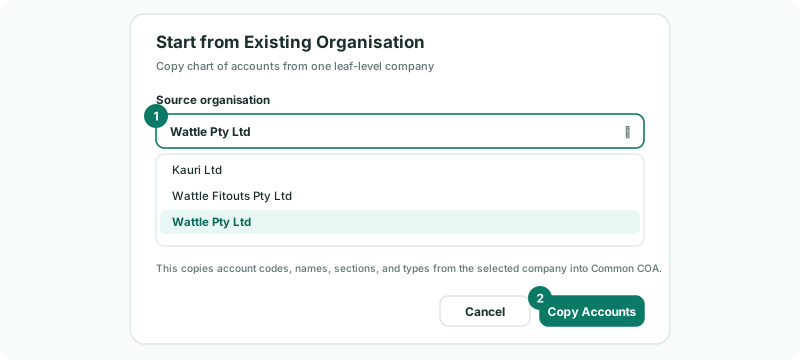
The copy brings across each account’s code, name, section and type, and its tags. In the same step, each of Wattle Pty Ltd’s accounts is mapped to its copy, so it needs no mapping.
A company that has no accounts yet is listed with (No COA) and can’t be chosen. Load it first.
4Check the group chart
The Common COA now lists Wattle Pty Ltd’s 44 accounts, with the same numbers and names it has in MYOB.
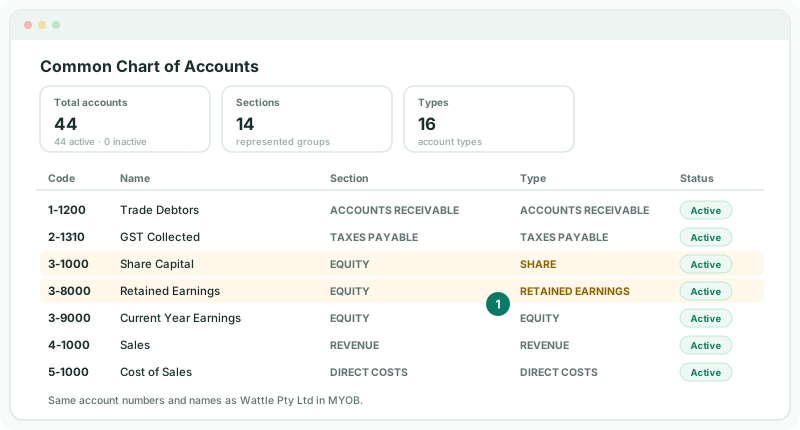
- Read down the Section column. Fix any account in the wrong section with the edit icon on its row — see Account Sections / Class.
- Add any account the group needs that Wattle Pty Ltd doesn’t have with the + button.
Check
The codes are MYOB’s account numbers, Share Capital shows the type SHARE, and Retained Earnings shows RETAINED EARNINGS.
5Map the other two companies
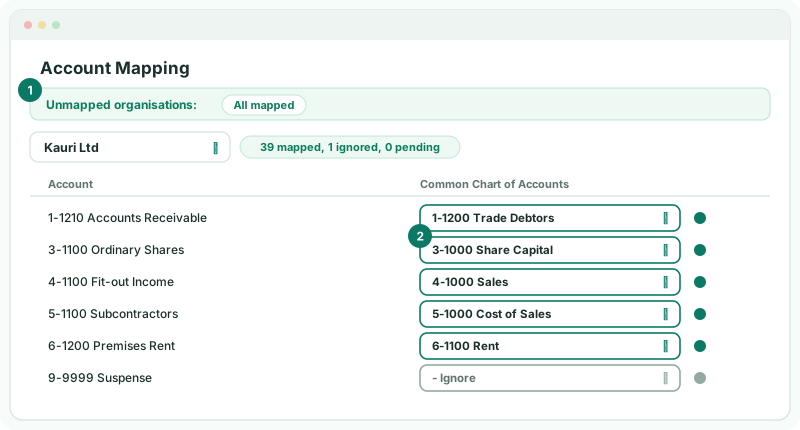
- Open Settings → Global Settings → Account Mapping. Unmapped organisations lists Wattle Fitouts Pty Ltd and Kauri Ltd, but not Wattle Pty Ltd.
- Choose Kauri Ltd. Click BrizoMap, then Get Suggestions; untick any wrong suggestion and click Confirm & Map.
- Tick Show unmapped only, choose a group account or - Ignore for each account left, and click Save.
- Repeat for Wattle Fitouts Pty Ltd.
Kauri Ltd’s chart was set up separately in New Zealand, with its own numbers and names — Accounts Receivable rather than Trade Debtors, Ordinary Shares rather than Share Capital — so check its Medium and Low suggestions carefully.
BrizoMap isn’t on the Standard edition. There, map each account from its dropdown.
Later, when you connect another MYOB company file, or a company’s load brings in accounts that aren’t mapped, Data Loading asks New accounts need mapping. Go to Mapping opens that company in Account Mapping.
Check
Unmapped organisations shows All mapped, and no account-type warning is shown.
6If something goes wrong
| Start from Existing Organisation is greyed out | No company has accounts yet. Load at least one company from MYOB first. |
|---|---|
| Common COA already has accounts. Clear existing accounts before copying from an organisation. | The copy only fills an empty Common COA. Delete the existing accounts, or keep them and map Wattle Pty Ltd in Account Mapping instead. |
| The selected company does not have accounts to copy. | That company’s chart hasn’t loaded. Open its Data Loading page and load a period. |
| Retained earnings typed EQUITY | Its name doesn’t contain retained earnings or retained profit. Set the type to RETAINED EARNINGS in the Common COA. |
| Share capital typed EQUITY | Its name doesn’t contain one of the words in step 2. Set the type to SHARE in the Common COA. |
| An account was renumbered in MYOB after the copy | The company’s own account takes the new number with its next load, but the Common COA keeps the number it was copied with. Edit the code in the Common COA if you want them to match. |
Want more detail? See the documentation