
Intercompany Eliminations · Track 4 · Tutorial 4 of 5
Eliminate outstanding trade balances from documents
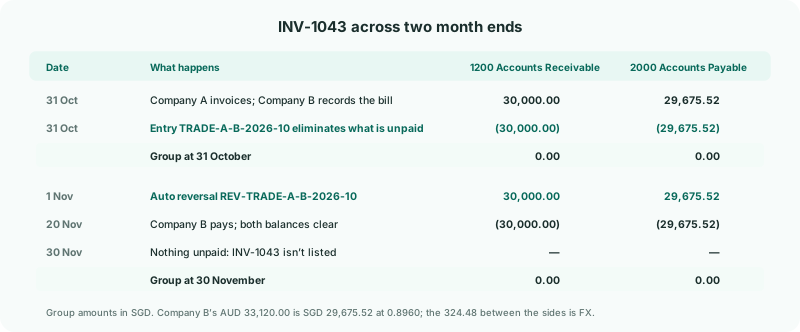
A rule can’t clear a receivables account that also holds outside customers. The unpaid invoices and bills between group companies can: build the month-end elimination from them, and BrizoConsol reverses it at the start of the next month, so each month end states its own unpaid balance.
1Know how a trade balance entry works
On 31 October Company A invoices Company B SGD 30,000 on INV-1043, and Company B records AUD 33,120 on BILL-778. Company A’s 1200 Accounts Receivable and Company B’s 2000 Accounts Payable also hold outside customers and suppliers, so only the documents can say which part is intercompany.
| What it eliminates | What is still unpaid on each document at the entry date, after the payments and credits recorded against it by then. |
|---|---|
| Which documents are listed | Those dated up to the entry date and no more than 90 days before it, with something still unpaid. A document paid in full by the entry date isn’t listed. |
| The reversal | The entry states a balance at one date, so BrizoConsol posts a mirror image of it on the first day of the next month. Next month’s entry then states that month end’s unpaid balance, from the same documents if they are still unpaid. |
2Choose the unpaid documents
- Select Your Group, open Intercompany → Trade Receivables / Payables, keep Actual and Oct-2026, and click + Add entry.
- Enter the Elimination ID TRADE-A-B-2026-10, keep the date 31 October 2026, and click Documents at the top of the dialog.
- On the invoice side, choose Company A and the Elimination account 1200 Accounts Receivable. On the bill side, choose Company B and 2000 Accounts Payable.
- Tick INV-1043 and BILL-778. The Outstanding column shows what is unpaid on each at 31 October, in the company’s own currency.
The match button between the lists pairs documents for you, as in Eliminate from invoices and bills. A tinted row names the other company as its contact.
3Review and confirm
The Elimination preview shows Company A’s SGD 30,000.00 and Company B’s AUD 33,120.00 at 0.8960, SGD 29,675.52, so the sides differ by 324.48.
- Click Confirm.
- Allocate the 324.48 to FX difference on 7200 FX Gain/Loss with a justification, and confirm. See Allocate a difference on a manual entry.
The list now shows TRADE-A-B-2026-10 and also REV-TRADE-A-B-2026-10, marked Auto reversal and dated 1 November 2026. It mirrors every line of the entry, the FX difference included. It isn’t counted as an entry, and you don’t edit it: editing the entry rewrites it, and deleting the entry removes it.
4Do the same each month end
- Move to Nov-2026 and add a new entry dated 30 November, from Documents.
- Tick what is listed. INV-1043 and BILL-778 appear again if anything on them is still unpaid at 30 November; once Company B has paid, they don’t.
A document can be used once in a month for each type: within October, INV-1043 can’t supply its 30,000 to two trade balance entries. It can still support a Sales / Purchases / Services entry in the same month, because that eliminates the income, not the balance.
Check
On the group Balance Sheet for October with Show Entities on, the eliminations take 30,000.00 out of the account 1200 is mapped to and 29,675.52 out of the one 2000 is mapped to, and the outside customers’ and suppliers’ balances stay in. For November, after Company B’s payment, neither account carries anything for INV-1043.
5If something goes wrong
| Period Nov 2026 is locked. Contact administrator. | The reversal would land in a locked month, so the October entry can’t be saved, changed or deleted. Ask an administrator to unlock November, or enter the balance before November is locked. |
|---|---|
| A document you expected isn’t listed | It is paid in full at the entry date, dated after it, or more than 90 days older. Check the payments in the company’s books. |
| payment history is missing or out of date | The payments behind the unpaid amount aren’t loaded. Reload the month with invoices and bills. |
| already eliminated in full by another entry | Another trade balance entry of the same month has used it. Open that entry if it is the wrong one. |
| account does not suit this elimination type | Choose the receivable or payable account the document went to, not its income or expense account. |
| The balance is still eliminated after the documents were paid | The entry was made as a GL entry, which isn’t reversed. Delete it and enter the balance from Documents. |
Want more detail? See the documentation