
Intercompany Eliminations · Track 4 · Tutorial 2 of 5
Allocate a difference on a manual entry
The two sides of an intercompany item rarely agree to the cent once they are translated into the group currency. A manual entry can’t be confirmed until you say what the difference is. Say it accurately: the treatment decides where the difference ends up.
1Know what each treatment does
| Treatment | Use it for | What is posted |
|---|---|---|
| FX difference | The sides agree in the companies’ own currencies, but not once translated. | The amount, to a profit and loss account of the group. |
| Timing difference | One company has booked something the other hasn’t yet. | Nothing extra. The line you choose on the larger side is eliminated for less, so the amount stays on that company’s account until the other company books it. |
| Write off | A small difference nobody will chase, such as rounding or a bank charge. | The amount, to a profit and loss account of the group. |
A difference can have more than one cause, so you can split it across several treatments. A mistake — a wrong amount or account in a company’s books — isn’t a difference to treat: fix it in that company’s books and reload.
2Find the causes
Your Group clears the fees Company B owes Company A with a rule, as in Explain and clear intercompany differences. A group without that rule clears the same balances by hand, from Intercompany → Trade Receivables / Payables, like this.
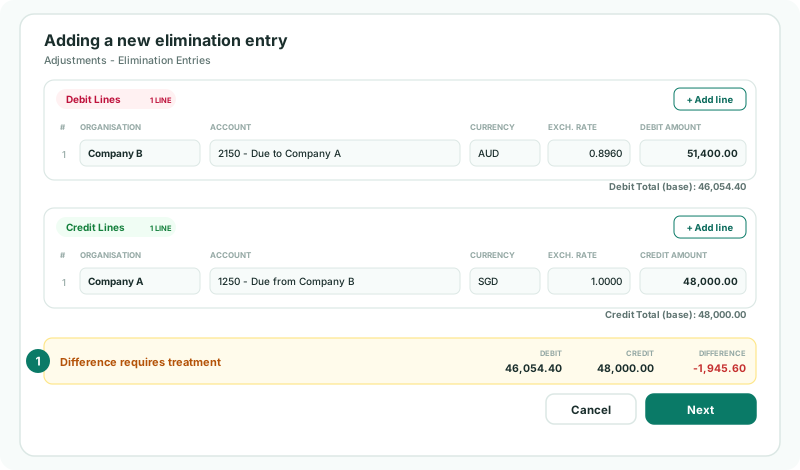
At the end of October, Company A shows SGD 48,000.00 on 1250 Due from Company B. Company B shows AUD 51,400.00 on 2150 Due to Company A, which is SGD 46,054.40 at 0.8960. The entry’s two sides differ by 1,945.60.
| Cause | Amount | Treatment |
|---|---|---|
| Company A invoiced October’s fee of 1,840.00 on 31 October. Company B records it in November. | 1,840.00 | Timing difference |
| The rest: Company B’s AUD balance translates to less than the SGD amount it settles. | 105.60 | FX difference |
3Allocate the timing difference
- With the lines entered, click Next. Allocate Difference Treatment opens with one FX difference for the whole 1,945.60.
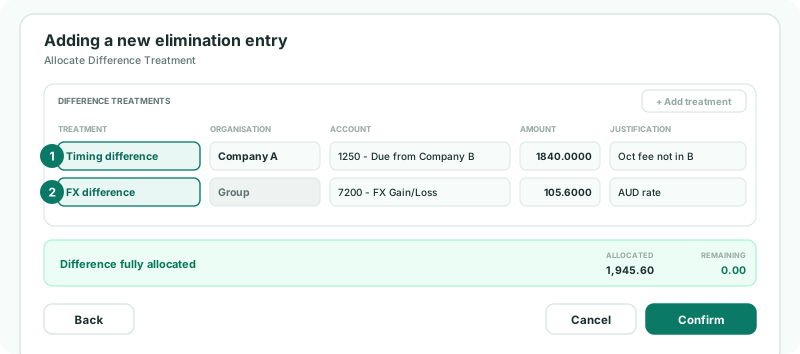
- Change its Treatment to Timing difference.
- Choose the Organisation Company A, and the Account 1250 - Due from Company B.
- Change the Amount to 1840, and enter the Justification October fee not yet recorded by Company B.
A timing difference can only use a company and account the entry’s lines already use, and it must be on the larger side — here Company A’s credit of 48,000.00, the side that has booked the fee.
4Allocate the rest
- Click + Add treatment. A new FX difference is added for what is left: 105.60.
- Keep FX difference, choose the group account 7200 FX Gain/Loss, and enter the justification AUD rate on the October balance.
- When the summary shows Difference fully allocated, click Confirm.
| Allocated, Remaining | The total of the treatments, and what is still to allocate. Confirm needs Remaining at 0.00. + Add treatment can’t be clicked once nothing remains. |
|---|---|
| FX and Write off | Always post to Group, on a profit and loss account the entry’s lines don’t use. Two treatments can’t use the same account. |
| Justification | Every treatment needs one. It stays with the entry, so write what a reviewer needs to know. |
5Check the result
- Open the group’s Balance Sheet and Profit & Loss for October with Show Entities on.
- Open the entry again from the list on Trade Receivables / Payables.
Check
In the group column, the account 2150 is mapped to is zero, the account 1250 is mapped to shows 1,840.00 — the fee Company B hasn’t recorded — and 7200 FX Gain/Loss holds 105.60. Reopened, the entry shows the full 48,000.00 on Company A’s line and both treatments, as you entered them.
In November, once Company B records the fee, the 1,840.00 is in both companies’ balances and November’s elimination clears it.
6If something goes wrong
| Timing treatment must reduce an account on the larger side of the entry. | The timing difference is on the smaller side’s line, or is larger than that line. Choose the company and account of the side that has booked more. |
|---|---|
| Timing difference treatments must use an organisation and account selected in the elimination entry. | Choose one of the entry’s own lines. |
| FX and write off treatments must use a P&L account. | Choose a profit and loss account of the group. |
| Treatment amount must equal the calculated difference. | Adjust the amounts until Remaining is 0.00. |
| Each difference treatment amount must be greater than zero. | Remove a treatment you don’t need, rather than setting it to 0. |
| Each difference treatment requires a justification. | Enter one on every treatment. |
| The FX amount is large | It is almost never exchange. Check each line’s rate and amount, and look for an item one company hasn’t booked. |
Want more detail? See the documentation