
Intercompany Eliminations · Track 4 · Tutorial 5 of 5
Import eliminations from a file
When your team works out the month’s manual eliminations in a spreadsheet, import them instead of typing each one in. The file is checked exactly as the entry dialog checks an entry, and nothing is imported unless every entry in it passes.
1Download the template
- Select Your Group, and open any type under Intercompany — here Intercompany Loans, on Actual and Oct-2026.
- Click Import from file. Import Intercompany Eliminations opens.
- Click Download the import template.
| Sheet | What it holds |
|---|---|
| Eliminations | The column headings. Fill this sheet in. |
| Lists | The elimination types, accounting standards, scenarios, and every company in the group with its account codes and names. |
| Instructions | What each column takes. |
On the Standard edition the template downloads as a CSV with the column headings only, and the import takes CSV files.
2Write one row per line
One row is one line of an entry. Rows with the same Elimination ID make up one entry. For Your Group’s October loan and fees balance:
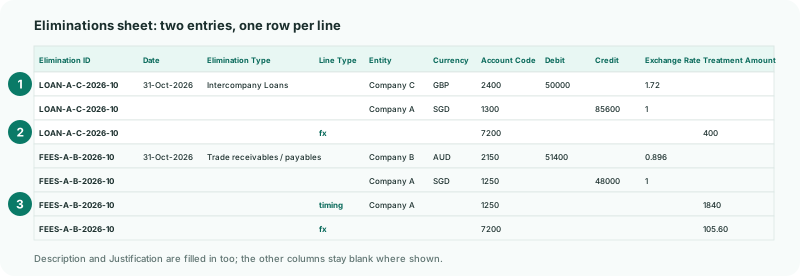
| Column | What to enter |
|---|---|
| Elimination ID | Required. It must not already exist in the group. |
| Date, Description, Elimination Type, Accounting Standard, Scenario, FX Account Code | Read once per entry, from the first row that fills them in, so fill them on the entry’s first row. A later row that gives a different value is refused. A blank Elimination Type uses the type you import from; a blank Scenario the scenario on screen; a blank Accounting Standard means Base. |
| Date | A real date cell, or text such as 31-Oct-2026 or 2026-10-31. Oct-2026 is read as the month end. Avoid 05/08/2026: it is read in your own date order. |
| Entity | The company, by its name or id from the Lists sheet. The account must be from that company’s own chart. Blank means the group. |
| Account Code | Required, from the entity’s chart. |
| Debit or Credit | A positive amount in the line’s currency, on one side only. |
| Currency, Exchange Rate | Optional. They default to the group’s currency and 1. The line’s group amount is the amount times the rate. |
3Add the difference treatments
An entry whose debits and credits differ in the group currency needs the difference allocated, as in the dialog. Add a row for each treatment:
| Line Type | fx, timing or write_off. Leave it blank on a debit or credit line. |
|---|---|
| Treatment Amount, Justification | The amount of the difference it explains, and why. No Debit or Credit on this row. |
| fx, write_off | Leave Entity blank, and give a profit and loss account of the group — 7200 FX Gain/Loss here. |
| timing | The entity and account of one of the entry’s lines on the larger side — Company A’s 1250 here. |
For an entry whose only difference is exchange, you can give FX Account Code on its first row instead: the whole difference is then posted there. Which treatment fits which cause is covered in Allocate a difference on a manual entry.
4Import the file
- Save the file as Excel, CSV or text.
- Click Import from file again, and drag the file onto the box, or click it to browse. One file at a time.
The file is checked before anything is written. If every entry passes, Imported 2 intercompany elimination entries. appears. If not, Nothing was imported lists each problem with its row number; fix them and import the whole file again.
Check
LOAN-A-C-2026-10 is listed on Intercompany Loans for Oct-2026, and FEES-A-B-2026-10 on Trade Receivables / Payables. Open each: the lines and treatments are as in the file, with Remaining 0.00.
5If something goes wrong
| an elimination with this ID already exists. Delete it first or use a different ID. | The entry was entered or imported before. Remove it from the file, or delete the existing one if the file replaces it. |
|---|---|
| entity … is not an organisation in this group. | Use the company name exactly as on the Lists sheet. |
| account code … does not exist in …’s chart of accounts. | The code isn’t in that company’s chart. Check the Lists sheet, and the Entity on the row. |
| … conflicts with … on the elimination’s first row. | Two rows of the same entry give a different date, type or description. Fill them on the first row only. |
| a line carries either a Debit or a Credit, not both. | Split the amount, or put it on its side only. |
| a timing line requires a Treatment Amount. | Enter the amount in Treatment Amount, not in Debit or Credit. |
| period … is locked. Contact administrator. | The month is locked. Ask an administrator to unlock it on Month End Status. |
| Timing treatment must reduce an account on the larger side of the entry. | Put the timing row on the larger side’s entity and account. |
Want more detail? See the documentation