
Intercompany Eliminations · Track 2 · Tutorial 5 of 8
Set the tolerance
The tolerance decides when a Method 1 rule stops trusting the From side. Too tight and every month lands in Elimination Review; too loose and real mistakes pass unseen. Set it from what the two sides actually look like.
1Know what the tolerance measures
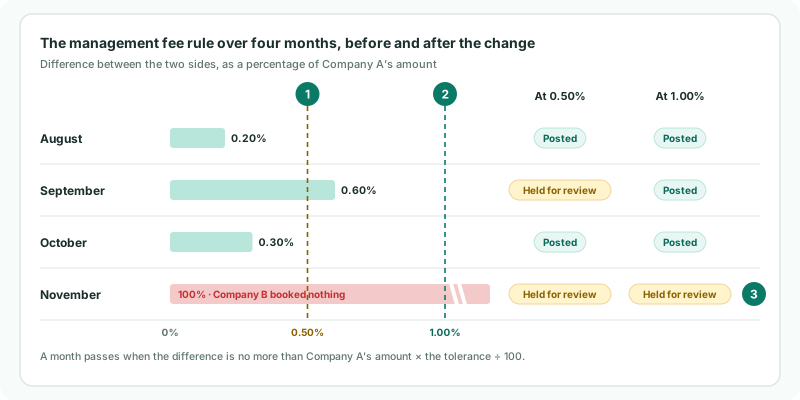
Each month, the rule takes the difference between the two sides in the group currency, ignoring which one is larger, and compares it with the From side’s amount for the month:
| Passes | The difference is no more than the From side’s amount × the tolerance ÷ 100. The month is posted at the From side’s amount. |
|---|---|
| Fails | The difference is larger. Nothing is posted for that month, and it is listed in Elimination Review with its difference and the warning The grouped scope exceeds the rule tolerance. |
If a side has more than one account, the rule compares the two sides’ totals. Only Method 1 uses the tolerance. Methods 2 and 3 post whatever the difference, and Method 4 sends every month for review, so for them the field has no effect.
2See what a month that fails looks like
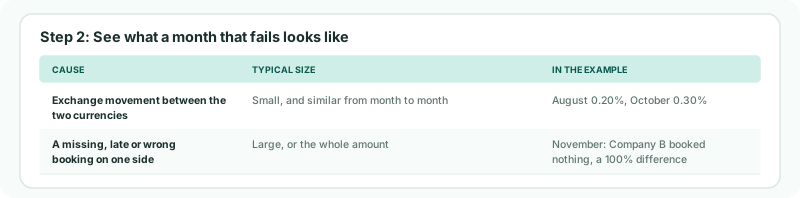
A month fails for one of two reasons, and the tolerance can only tell them apart if it is set well:
| Cause | Typical size | In the example |
|---|---|---|
| Exchange movement between the two currencies | Small, and similar from month to month | August 0.20%, October 0.30% |
| A missing, late or wrong booking on one side | Large, or the whole amount | November: Company B booked nothing, a 100% difference |
September’s 0.60% is the borderline case: probably exchange, but beyond 0.50%. If months like it are common, the tolerance is too tight for this pair of currencies.
3Measure the usual difference
- Open the group’s Profit & Loss with Show Entities on for each of the last few months.
- For the management fee, note Company A’s income and Company B’s expense in SGD.
- Work out each month’s difference as a percentage of Company A’s amount.
Ignore any month where one side is missing or clearly wrong: those are the months the tolerance should catch. The largest of the remaining percentages is the exchange movement the rule must let through.
4Set the tolerance
- Open Intercompany → Elimination Rules and click Edit on the management fee rule.
- In Tolerance, enter a percentage a little above the largest usual difference. For Your Group, 1.00.
- Click Confirm. The group is recalculated, and every month is checked again at the new tolerance.
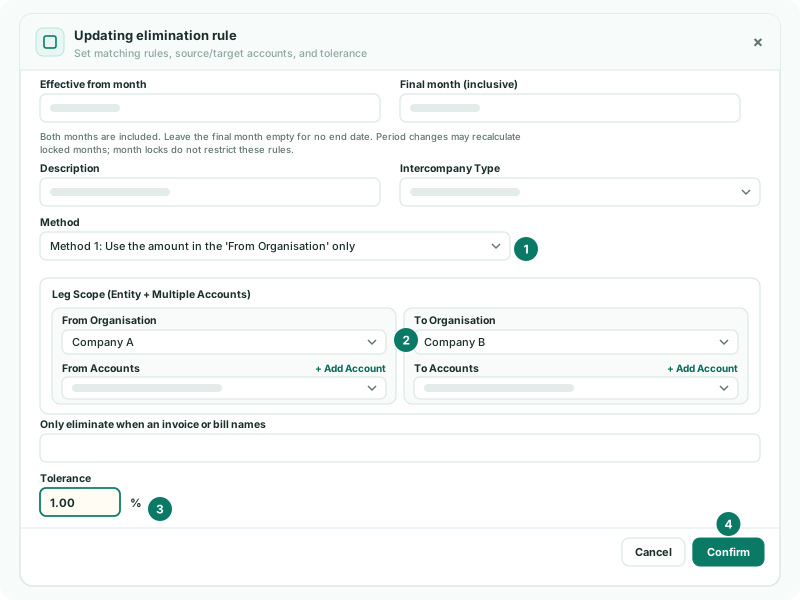
The field takes as many decimal places as your group’s percentage setting allows. A new rule starts at 0.50.
Check
Open Intercompany → Elimination Review for recent months. The months that differ only by exchange are no longer listed for the management fee rule; a month where one side is missing still is.
5Keep the tolerance honest
| Two currencies | Exchange movement varies with the market. Look again if the rule starts holding months back after a volatile period. |
|---|---|
| Same currency | When both companies keep the same currency as the group, the two sides should agree exactly. Keep the tolerance at or near zero, so any difference is a booking to look at. |
| Whatever passes stays | A difference within the tolerance is not posted anywhere: it stays on the To side’s group line. A generous tolerance leaves more there. |
If the difference is always exchange and you want it out of the expense line, Method 2 with FX posts it to an exchange account instead — see Method 2: use both amounts and treat the difference.
6If something goes wrong
| Every month is in Elimination Review | The tolerance is tighter than the usual exchange movement, or the two sides use different accounts from the ones in the rule. Check the accounts first, then the tolerance. |
| A wrong booking was eliminated without warning | The tolerance is wide enough to let it through. Lower it, and correct the booking in the company’s books. |
| Changing the tolerance had no effect | The rule is not Method 1. Only Method 1 uses the tolerance. |
Want more detail? See the documentation