
Row/Column Reports · Track 1 · Tutorial 4 of 7
Read accounts by accounting-standard tag
The lines of a standard’s statements, such as Administrative Expenses, are made of accounts you tagged on the Accounting Standard page. An account row can read a tag instead of an account, so the line in your report is the same line as on the statements, and a newly tagged account joins it on its own.
1Know what a tag row reads
A tag row adds up every account that carries the tag, for the period and data type of the report. In Your Group, IFRS Administrative Expenses is carried by 6300 Office Rent, 6400 Admin Salaries and 6500 Professional Fees, as set in Classify profit or loss and cash flow lines.
The tags offered are those of the standards switched on for the organisation, each named with its standard, such as IFRS — Administrative Expenses. A tag on no account reads 0.
2Add the tag row
- Open the Management P&L in the editor. Click the next blank row and choose Account.
- Set Source to Accounting-standard tag, and type Admin in the search box. Choose IFRS — Administrative Expenses.
- Type Administrative expenses in Row label, and click Add Row.
- Click Save.
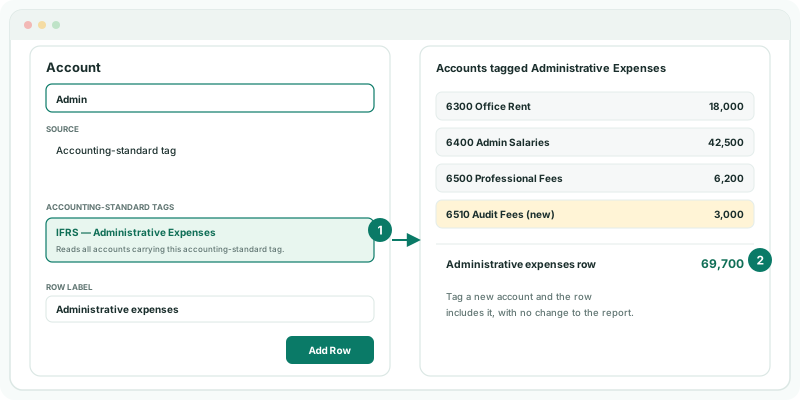
The row shows one figure per column, the total of the tagged accounts. Don’t also add a section or account row for those accounts, or the report counts them twice.
3Check it against the statement
- Click View, and choose By Month and the reporting month on the toolbar.
- Open Reports → All Reports → Consolidated Statement of Profit or Loss for the same month.
Check
The Administrative expenses row equals the Administrative Expenses line of the IFRS profit or loss. Tag another account, such as a new audit fees account, and reopen the report: the row includes it.
4If something goes wrong
| What you see | What to do |
|---|---|
| No tags in the list | No standard is switched on for the organisation, or you are searching the wrong words. Check the Accounting Standard page. |
| The row shows 0 | No account carries the tag. Tag the accounts on the Accounting Standard page. |
| The row is higher than the statement line | The report reads another period or data type. Check the toolbar. |
| Expenses appear twice in the report | A section or account row reads the same accounts as the tag row. Remove one. |
Want more detail? See the documentation