
Row/Column Reports · Track 1 · Tutorial 5 of 7
Build formula rows for margins and ratios
A formula row works out a figure from other rows of the report: a subtotal, a margin, a ratio. It recalculates for every column, so a margin is right for each month and for the full year.
1Add a subtotal
- Open the Management P&L in the editor. Click the blank row below Direct costs and choose Formula.
- Keep Formula Type on Custom Formula.
- In Add Row, choose REVENUE. Click the − operator, then choose Direct costs.
- In Description, type Gross profit, and click Add Row.
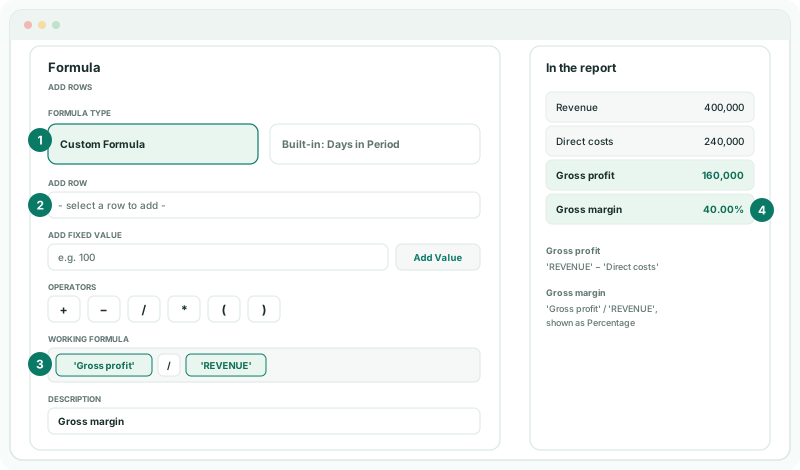
The picker lists the rows above and below by name. A section shown with its accounts is listed by its section, such as REVENUE, and reads the section total. Other rows are listed by their Row label or Description. The formula appears under Working Formula as you build it; drag a part to move it, or delete it.
2Add a margin as a percentage
- Click the next blank row and choose Formula.
- Choose Gross profit, click /, and choose REVENUE.
- Type Gross margin in Description.
- Under Display, click Percentage, and click Add Row.
Percentage shows the result times 100 with a % sign: 160,000 ÷ 400,000 shows as 40.00%. Without it, the row shows 0.40.
3Use fixed values and brackets
Type a number in Add Fixed Value and click Add Value to put it in the formula. Use the brackets to control the order: ( 'REVENUE' − 'Direct costs' ) / 'REVENUE' works out the margin without a Gross profit row.
For a figure per day, add a row with Formula Type Built-in: Days in Period. It shows the number of days in each column’s period, so 'REVENUE' / 'Days in period' gives average daily revenue for a month, a quarter or the year alike.
4Check the result
- Click Save, then View.
Check
In each month, Gross profit is Revenue less Direct costs, and Gross margin is Gross profit divided by Revenue. The full-year column works the margin out from the full-year figures, not by adding the months’ margins.
5If something goes wrong
| What you see | What to do |
|---|---|
| Description is required for formula row. | Type a Description. It is the row’s name in the report and in other formulas. |
| Unknown row reference: … | A row the formula used was renamed or deleted. Open the formula and choose the row again from the picker. |
| The margin shows 0.40 | Turn on Percentage under Display. |
| Gross profit is the sum, not the difference | Check the operator in Working Formula is −, not +. |
Want more detail? See the documentation