
Budgets and Forecasts · Track 2 · Tutorial 3 of 3
Load the budget from your own systems
Available on ProPremium
When the budget lives in a planning tool or your own system, that system can send it to BrizoConsol itself. It uses the same API call as the actuals, with the scenario set to Budget or Forecast.
1Know how it works
| The call | POST /api/v1/organisations/{id}/trial-balances, the same as for a month’s actuals, with scenario set to Budget or Forecast. |
|---|---|
| One month per request | Send one request for each month of the budget year. |
| What is replaced | Only the accounts in the request. The month’s other budget accounts keep their values. |
| When the group moves | The company’s month is stored when the request finishes. The group, with its eliminations, CTA and NCI, is rebuilt in the overnight run. |
2Tell your developer what to send
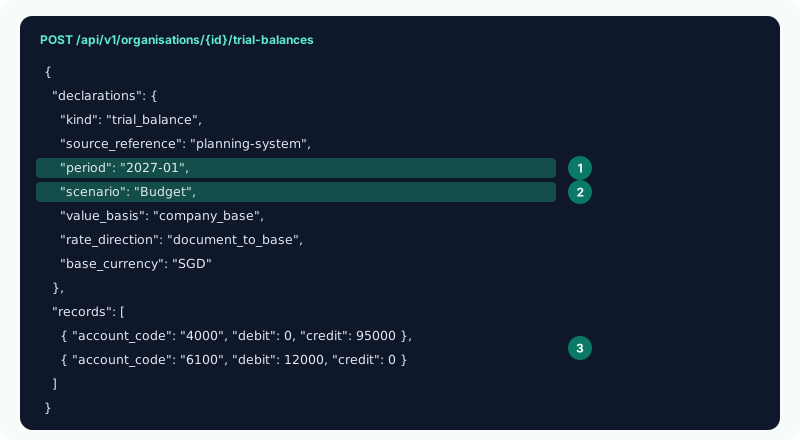
| scenario | Budget for the budget, Forecast for the forecast. Left out, the month is written as Actual. |
|---|---|
| period | The month, as YYYY-MM — 2027-01 for January 2027. |
| records | One per account: account_code, and the month’s debit and credit movement. Send only codes already in the company’s chart of accounts. |
| source_reference, base_currency, value_basis, rate_direction | As for actuals: see Send data from your own systems. |
Ask the developer to send January first to /trial-balances/validate, which checks the month without writing it. Budget months can be beyond the months your edition loads actuals for; a locked month is refused.
A Zap connected as in Automate monthly imports with Zapier can send the same month with its import_trial_balance tool and scenario Budget, once Trial balance is ticked under What they may write.
3Check the first month
- Select Demo Sales Company, open Budget → Profit & Loss, and choose 2027.
- The next morning, select Your Group and open Budget → Profit & Loss.
Check
Demo Sales Company’s January 2027 matches the planning system, account by account. After the overnight run, the group’s budget includes it.
4If something goes wrong
| What you see | What to do |
|---|---|
| Plan movement is entered at group level for this group, so a Budget month cannot be written to Demo Sales Company. | Budget & Forecast Input is Consolidated level only. Change it, or send the budget to the group instead. |
| Jan-2027 is behind a period lock. | The month is locked. Ask an administrator to unlock it, or leave it out. |
| An account is missing from the month | Its code is not in the company’s chart of accounts. Add the account, then send the month again. |
| The company’s month is right, but the group hasn’t changed | The group is rebuilt overnight. Send a consolidation request after the last month, and check the next day. |
Want more detail? See the documentation