
Foundations · Track 5 · Tutorial 4 of 4
Automate monthly imports with Zapier
Available on Premium
Zapier can connect to BrizoConsol the way Claude and ChatGPT do, and on the Premium plan it can also write. A Zap can then send figures to BrizoConsol whenever something happens in another app — a new row in a spreadsheet, a form, a file — with no code.
1Know what the Zap does
In the running example, Company A’s HR team keeps a Google Sheet called Headcount, with a Month and a Headcount column, and adds a row each month. The Zap writes each new row to BrizoConsol as operational data, where it can be reported with the rest of the group’s operational data.
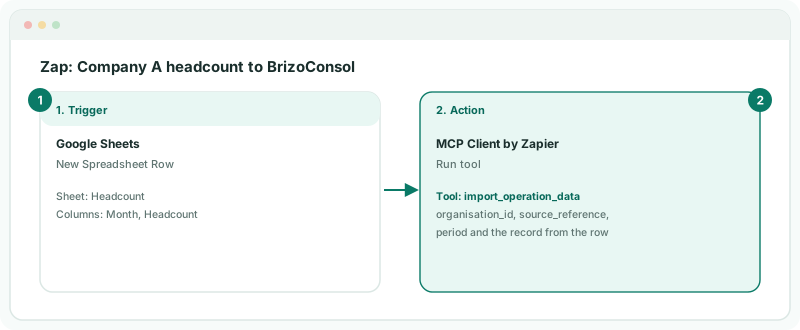
| How Zapier connects | Through MCP Client by Zapier, to the same MCP server Claude and ChatGPT use. |
|---|---|
| Who may write | Only the Zapier MCP client, only on Premium, only for the companies and data you allow. Claude and ChatGPT are never offered the write tools. |
| What it can write | Each kind of data has its own tool: import_operation_data here, and import_trial_balance, import_journal_lines, import_invoices, import_bills and import_accounts — plus trigger_consolidation. |
2Allow Zapier to write
- Select your group, and open Settings → Global Settings → Integrations → AI Access.
- Tick Allow AI connections, and choose at least one company and one item under Companies they may read and What they may read — Reference data lets the Zap look up company ids.
- Under Companies they may write, tick Company A. Under What they may write, tick Operational data.
- Click Save, then under MCP server, click Copy.
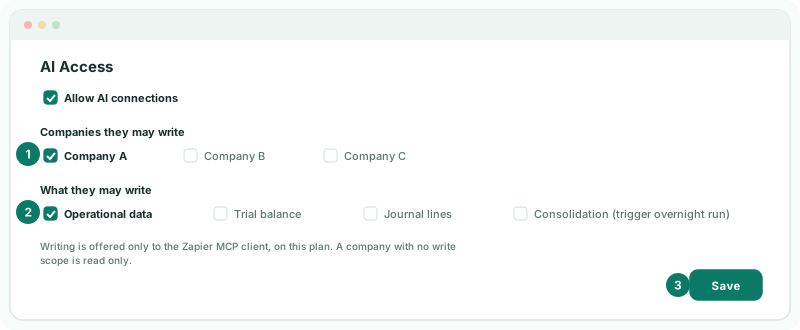
A write also needs the person who connects Zapier to have Administrator or Data Loading Admin access to Company A.
3Connect BrizoConsol in Zapier
- In Zapier, open Apps, click + Add connection, and choose MCP Client.
- Paste the address as the Server URL, choose Streamable HTTP as the transport, and Yes for OAuth.
- Continue. BrizoConsol opens in your browser: sign in as usual, including two-factor or passkey.
Check
Back on AI Access in BrizoConsol, the Zapier connection appears in the table of connections at the bottom of the page.
4Build the Zap
- Create a Zap. For the trigger, choose Google Sheets, New Spreadsheet Row, and the Headcount sheet.
- For the action, choose MCP Client by Zapier, Run tool, and the BrizoConsol connection.
- To find Company A’s id, choose the tool list_organisations and test the step once. Note Company A’s id.
- Change the tool to import_operation_data, fill in the fields below, test the step, and publish the Zap.
| Field | Value |
|---|---|
| organisation_id | Company A’s id. |
| source_reference | company-a-headcount. The same every month: it names the dataset and recognises a resend. |
| period | The Month column, as YYYY-MM. |
| value_basis, rate_direction, base_currency | company_base, document_to_base and SGD, Company A’s currency. |
| records | One record: the period again, dimension_1 Headcount, and the Headcount column as the value. |
Each month sent replaces that month from this feed, so HR can correct a figure by adding the row again.
5Check the figure arrives
- Add a row for October 2026 to the sheet, and wait for the Zap to run.
- In BrizoConsol, select Company A and open Reports.
Check
The Operational Data section lists API: company-a-headcount, and its report shows October’s headcount. On AI Access, the Zapier connection’s writes have gone up.
To send trial balances the same way, tick Trial balance and Consolidation (trigger overnight run) on AI Access, use import_trial_balance, and add a second Run tool step with trigger_consolidation so the group is rebuilt overnight. The fields are the same as for the API — see Send data from your own systems.
6If something goes wrong
| Zapier doesn’t list the import tools | The group isn’t on Premium, nothing is ticked under What they may write, or the person who connected Zapier doesn’t have Administrator or Data Loading Admin access. Fix it, then reconnect. |
| The tool answers not found | The organisation_id isn’t ticked under Companies they may write. |
| Another write is in flight for this organisation. Send this one again when that has finished. | Only one write runs at a time for a company, and several rows added together start several Zap runs. Add one row at a time, or replay the failed run. |
| Zapier asks to reconnect straight away | Check the Server URL, Streamable HTTP and OAuth Yes, then sign in again. |
| Every call is refused | Allow AI connections is off, or no company or read item is ticked. Choose at least one of each and save. |
Want more detail? See the documentation