
Budgets and Forecasts · Track 2 · Tutorial 2 of 3
Load the budget from a spreadsheet
Available on ProPremium
Most budgets are built in a spreadsheet. Download the template once, build or paste the budget into it, and load a company’s whole year in one upload.
1Download the template
- Select Demo Sales Company, open Budget → Profit & Loss, and choose 2027.
- In Chart of Accounts, choose the accounts the file will use.
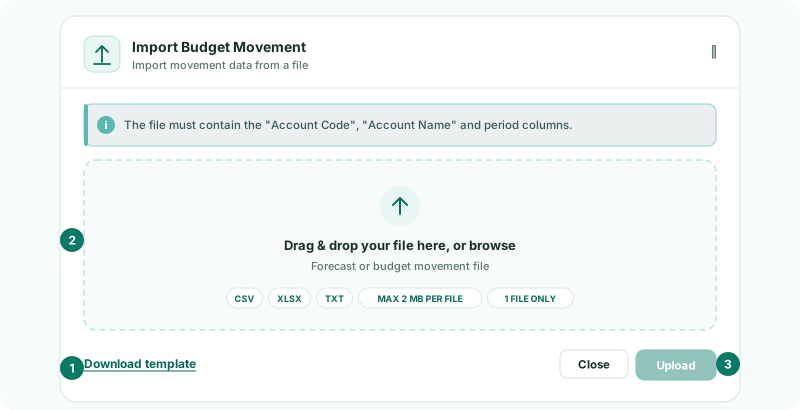
- Click the Import icon. Import Budget Movement opens.
- Click Download template.
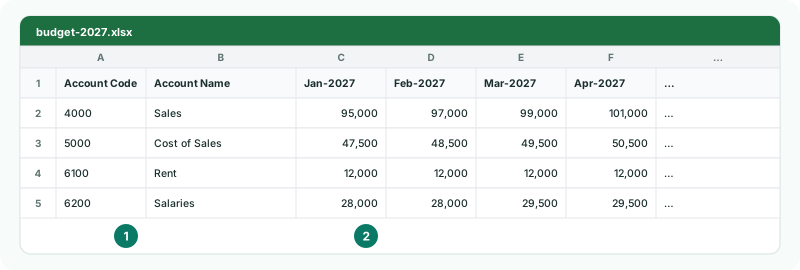
The template has an Account Code and an Account Name column, then one column per month of the year you chose, such as Jan-2027. It lists the statement’s accounts and is already filled with what the budget holds, so it also works as an export to edit and load again.
2Fill it in
Enter each account’s movement for each month, the way the report shows it. Keep the headers as they are.
| Blank or zero | The account is left out for that month. |
|---|---|
| A code not in the company’s chart | With Organisation Chart of Accounts, the account is added to the company’s chart, and BrizoConsol offers to open Account Mapping for it. With Common Chart of Accounts, the line is ignored and listed after the upload. |
| Balance sheet accounts | If you budget the balance sheet too, add its accounts to the same file. The Balance Sheet page’s template lists them. |
3Upload it
- Click the Import icon again, and drag the file onto Drag & drop your file here, or browse.
- Click Upload, and read the message.
CSV, XLS, XLSX, TXT and TAB files are accepted, one at a time. An upload replaces everything already in the budget for each month in the file, typed or uploaded, on every account; months not in the file are left as they are.
Check
The message reads Imported Budget movement for 12 period(s). The Profit & Loss shows the file’s figures in each month, and the FY-2027 column matches the file’s yearly totals.
4If something goes wrong
| What you see | What to do |
|---|---|
| The file must contain "Account Code" and "Account Name" columns. | Keep the template’s first two headers exactly as they are. |
| Unrecognised period header … Use a month and year such as "Jan-2026". | A month column has a header BrizoConsol can’t read. Use the template’s headers, such as Jan-2027. |
| The file must have at least one period column after Account Name. | Add the month columns after Account Name. |
| Period Jan-2027 is locked. Contact administrator. | A month in the file is locked, so nothing was loaded. Take that month out, or ask an administrator to unlock it. |
| … line(s) were ignored because this organisation has no mapped account for them | With Common Chart of Accounts, map a company account to those group accounts, then upload again. |
| The Import icon is greyed out | The level you are on is not allowed by Budget & Forecast Input. Hover over it to see where to enter. |
Want more detail? See the documentation