
Budgets and Forecasts · Track 4 · Tutorial 1 of 2
Eliminate intercompany in the plan
Available on ProPremium
If one company budgets a charge to another, the group budget must not count it twice. The elimination rules that clear the actuals run on the budget and forecast too, with nothing more to set up.
1Know what runs on the plan
| Elimination rules | Every active rule runs on the Budget and Forecast figures in its accounts, as well as the Actual ones: same method, tolerance and effective dates. Foreign amounts use that scenario’s rates. |
|---|---|
| When | Each time a company’s budget or forecast is saved, typed or uploaded. |
| Review | An entry a rule holds for a decision goes to Elimination Review, under the scenario it belongs to. |
| One-off entries | A GL entry can be posted to Budget or Forecast, as to Actual. |
Rules read each company’s own figures, so a plan entered only at consolidated level has nothing for them to eliminate.
2Budget both sides
Each company budgets its side of the charge on the accounts the rule uses, for the same months: Demo Sales Company the management fee income, Demo Service Company the expense. A side left out leaves nothing to match, or a difference.
3See the plan’s eliminations
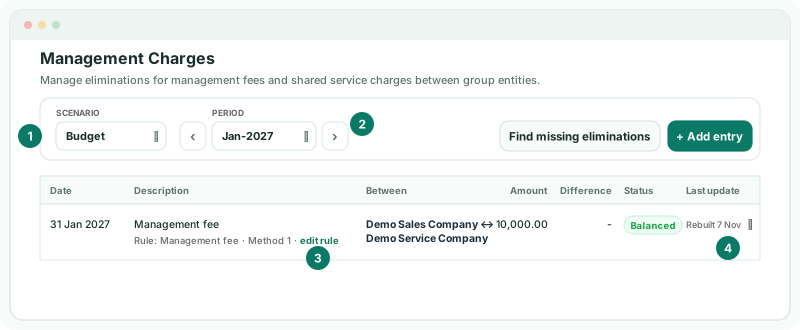
- Select Your Group, and open Intercompany → Management Charges.
- Set Scenario to Budget, and move to Jan-2027 with the period arrows.
Entries posted by a rule are marked as such. They are rebuilt each time the plan changes, so they can’t be edited here: change the budget, or the rule.
Check
Open Budget → Profit & Loss for Your Group, and choose 2027. The management fee income and expense no longer add to the group’s revenue and costs.
4Post a one-off plan elimination
- On the same page, with Scenario on Budget, click + Add entry.
- Enter the entry with GL entry, as in Post a GL elimination entry.
Documents can only be picked for Actual, so a plan entry is always a GL entry.
5If something goes wrong
| What you see | What to do |
|---|---|
| Nothing is eliminated in the budget | Check both companies budgeted the rule’s accounts for the month, at entity level, and that the month is inside the rule’s effective dates. |
| The rule’s entry waits in Elimination Review | The two sides differ by more than the rule allows, or the rule asks for a decision. Open Intercompany → Elimination Review with Scenario on Budget. |
| A foreign company’s side is eliminated at an odd amount | The Budget scenario has no rate, or the wrong one, for its currency and month. See Set rates for budgets and forecasts. |
Want more detail? See the documentation