
Budgets and Forecasts · Track 4 · Tutorial 2 of 2
Account for NCI and CTA in budgets and forecasts
Available on ProPremium
A group plan should show the minority’s share and the translation difference just as the actuals do. BrizoConsol posts both for the budget and the forecast, from the settings you already use for actuals.
You will needOwnership with an NCI and CTA set up for the actuals. Budgets entered at entity level. Budget rates for both rate types, as in <a href="/tutorials/fx-budget-rates">Set rates for budgets and forecasts</a>. An edition other than Standard.
By the endCompany B’s NCI and CTA in Your Group’s 2027 budget, checked on the NCI Report and the CTA Report.
1Know what is posted
| Budget | CTA and NCI are posted for every month of the budget. |
|---|---|
| Forecast | They are posted for the months after the reporting month. The months up to it are actuals, with the actuals’ own CTA and NCI. |
| Rates | Each scenario is translated at its own closing and average rates. |
| When | Each time a company’s budget or forecast is saved, typed or uploaded. |
Both are worked out from each company’s own figures, so a plan entered only at consolidated level has none.
2Check the NCI
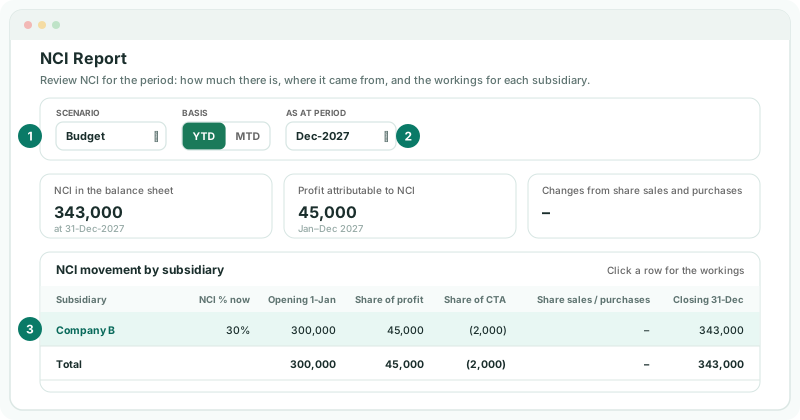
- Select Your Group, and open Ownership & Equity → NCI Report.
- Choose the Scenario Budget and Dec-2027 in As at period, then click Company B in the table.
Each NCI component shows its base, the NCI percentage, the amount and the account it is posted to, as for the actuals.
3Check the CTA
- Open Adjustments → Currency translation → CTA Report.
- Choose the Scenario Budget and Dec-2027 in As at period, then click Company B in the table.
Check
Both reports show figures for the Budget scenario. Open Budget → Balance Sheet for Your Group and choose 2027: the NCI and the translation reserve carry the amounts the reports show.
4If something goes wrong
| What you see | What to do |
|---|---|
| The reports are empty for Budget | Company B’s budget is not in, or was entered only at consolidated level. Check its own Budget pages. |
| There is no CTA for Company B’s budget, or it looks wrong | One of the two rate types is missing for the Budget month. Check both on Exchange Rates. |
| The forecast shows no NCI or CTA for October or earlier | Those months are actuals in the forecast. Look at the Actual scenario for them. |
Want more detail? See the documentation