
MYOB Groups · Track 3 · Tutorial 1 of 3
Bring in jobs and categories
Available on ProPremium
MYOB has no profit and loss report by job or category that BrizoConsol can read, so BrizoConsol works it out from the ledger lines it already loads. Switch it on once, load the months you report on, and every job and category is ready for dashboards and reports.
1Know what you get
Wattle Fitouts Pty Ltd fits out premises. In MYOB, it has a job for each project — J101 Harbour St Office and J102 Southbank Clinic under the header job J100 Commercial, and J201 Bondi Cafe under J200 Hospitality — and a category for each branch on its invoices and bills: SYD Sydney and MEL Melbourne.
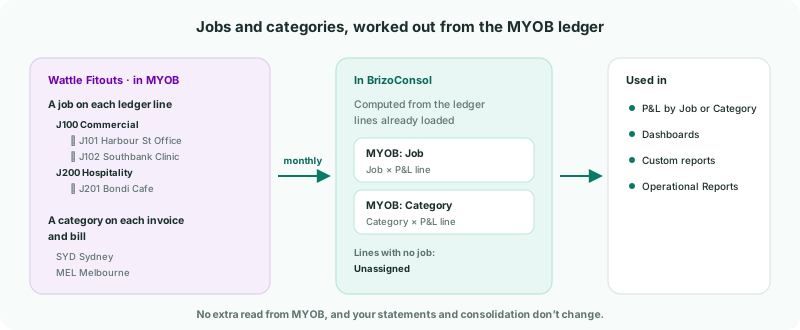
| Jobs | MYOB puts a job on each ledger line, so a month’s profit and loss by job comes from that month’s ledger lines on the profit and loss accounts. Lines with no job are kept under Unassigned, so the jobs and Unassigned add up to the month’s profit and loss. |
|---|---|
| Categories | MYOB puts a category on the invoice or bill, not on the ledger line. So a ledger line belongs to a category through the invoice or bill it comes from, and the month’s invoices and bills must be loaded too. Payments and general journals carry no category. |
| Where it goes | Two datasets, MYOB: Job and MYOB: Category, used in dashboards, custom reports and Operational Reports. |
| What it doesn’t change | Your statements and consolidation. Jobs and categories are reported on their own. |
2Switch on the profit and loss by job
- Select Wattle Fitouts Pty Ltd, and open Settings → Organisation Settings → Data Loading.
- Next to Additional reads, click Switch on P&L by job.
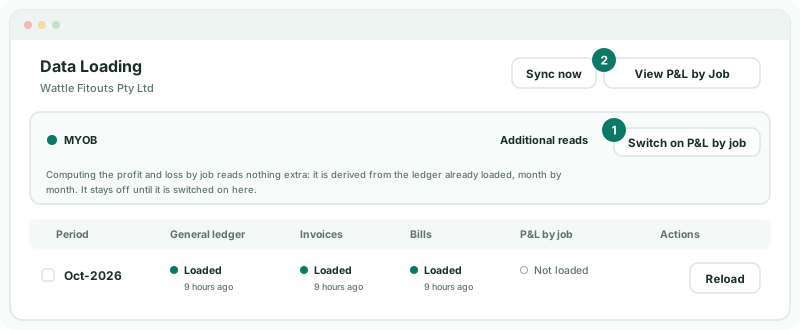
The page says Profit and loss by job is now computed for this connection. Reload the months you want it for. One switch covers both jobs and categories. It reads nothing extra from MYOB, and there is nothing to set up: jobs and categories are taken from the company file as they are.
3Load the months
- Tick each month you report on, and click Load selected.
- Tick GL and P&L by Job, and Invoices and Bills for the categories. Click Start Load.
The job figures are worked out from the ledger the same load reads, so GL must be ticked with P&L by Job. Each month’s P&L by job column shows Loaded when it is in. After that, the nightly read keeps the last 12 months up to date.
4Check a job against MYOB
- Click View P&L by Job at the top of Data Loading. The page is titled P&L by Job or Category.
- Choose the Job Job · J100 > J101, From Date 1 October 2026 and To Date 31 October 2026, and click Show the job report.
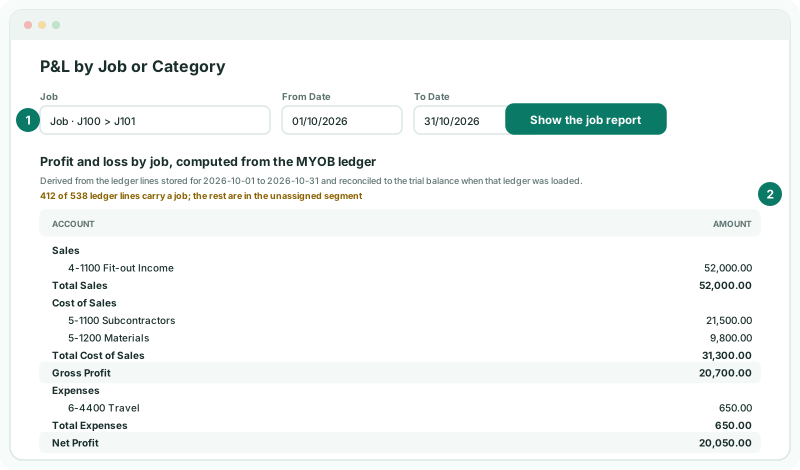
| The list | All jobs and categories first, then each Category · by its number and name, then each Job · by its path of job numbers. A header job and its sub-jobs are told apart by the path. |
|---|---|
| The coverage line | How many of the period’s ledger lines carry a job; the rest are in the unassigned segment. MYOB carries a job on only some postings. |
| A job with no postings | Reports zero rather than being left out. |
Check
Harbour St Office’s Net Profit for October is 20,050.00, matching what MYOB reports for job J101 over the same dates. Choose Category · SYD Sydney to see the Sydney branch’s sales and purchases the same way.
5If something goes wrong
| A data administrator must switch it on from a working connection. | Only a data administrator sees the switch. Ask one to switch it on. |
|---|---|
| Profit and loss by job: Available on Free, Pro and Premium. | The subscription is on Standard, which doesn’t include it. |
| No job report is stored for … Load those months again with the ledger read to compute it. | Load the months with GL and P&L by Job ticked. |
| No ledger lines are stored for this period, so there is nothing to compute from. | The month’s ledger isn’t loaded. Load it with GL ticked. |
| A category shows nothing | The month’s invoices and bills aren’t loaded, or none of them states the category. Load the month with Invoices and Bills ticked. |
| A large Unassigned amount | Many postings carry no job in MYOB — often payroll, overheads and journals. Add the job in MYOB where it belongs, and load the month again. |
| A job is missing from the list | It is inactive in MYOB. Inactive jobs and categories aren’t offered. |
Want more detail? See the documentation