
Multi-level groups · Track 2 · Tutorial 4 of 5
Post journals at the right level
A consolidation journal belongs to the group it is posted on. A journal on a sub-group is in its statements and the group’s; one on the group is in the group’s only.
1Know which statements a journal reaches
A consolidation journal belongs to the group selected when it is posted. It is in that group’s statements and in those of every group above it, and not in a group below or beside it.
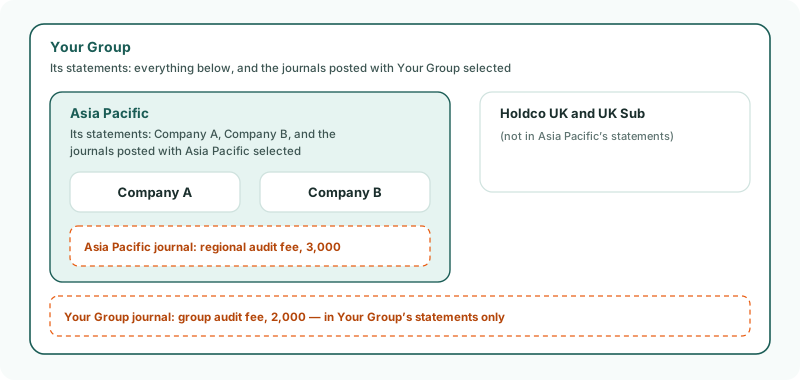
In the running example there are two for October: Asia Pacific’s regional audit fee, accrued at 3,000 for the audit of Asia Pacific’s own statements, and the group audit fee, accrued at 2,000 on Your Group.
2Post the journal on Asia Pacific
- Select Asia Pacific in the entity selector.
- Open Adjustments → Consolidation Journals, keep Actual, and move to Oct-2026.
- Click Add a new journal entry.
- Enter the Journal ID AP-AUDIT-2026-10, keep Other Consolidation Journals as the Journal Type, and enter the Description Asia Pacific regional audit fee, October 2026.
- Debit Audit fees 3,000 and credit Accrued expenses 3,000.
- When Difference shows +0.00, click Confirm.
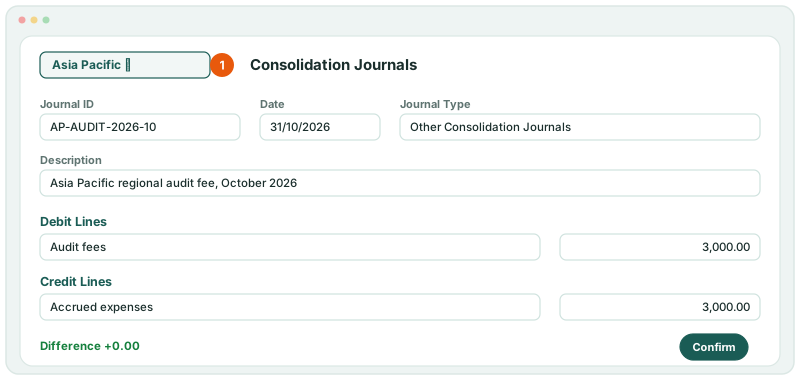
The lines use the accounts of your Common COA, as on Your Group: a sub-group has no chart of its own.
3Post the group’s journal on Your Group
Select Your Group, and post the group audit fee the same way: debit Audit fees 2,000 and credit Accrued expenses 2,000. How to make it recurring is in Post group adjustments.
4Check each level
- Select Asia Pacific, and open Reports → Profit & Loss for Oct-2026.
- Do the same with Your Group selected.
Check
Audit fees on Asia Pacific include the 3,000 but not the 2,000. On Your Group, they include both: 5,000 more than the companies’ own audit fees.
5If something goes wrong
| What you see | What to do |
|---|---|
| Asia Pacific’s statements don’t show the journal | It was posted with Your Group selected. Delete it there and post it with Asia Pacific selected. |
| Your Group’s statements don’t show Asia Pacific’s journal | Check the journal’s month and scenario, and that Asia Pacific is inside Your Group in the Organisation Hierarchy. |
Want more detail? See the documentation