
Intercompany Eliminations · Track 2 · Tutorial 1 of 8
Method 1: eliminate at the From side’s amount
A rule clears an intercompany item every month without anyone entering it. Method 1 is the simplest: it trusts one company’s figure and clears both sides at that amount, as long as the other side agrees within a tolerance. This tutorial also explains how every rule works, whichever method it uses.
1Know how every rule works
A rule names an account in one company — the From side — and an account in another — the To side. Each time the group is consolidated, every rule is run again for every month:
| What it reads | The amounts booked to the two accounts in each month, in the companies’ Base figures. Eliminations and journals are left out. |
|---|---|
| Which months | Every month in the rule’s effective period in which either side has an amount. |
| Effective period | From the rule’s Effective from month to its Final month (inclusive), if it has one — and never before the later of the two companies’ acquisition dates, or after either company leaves the group. |
| Currency | Each side is translated into the group currency: profit and loss accounts at the Average Rate, balance sheet accounts at the Closing Rate, for that month. |
| Where it posts | On the group accounts the two accounts are mapped to, under the rule’s Intercompany Type. |
The method decides what happens when the two translated amounts differ. Choose the From side carefully for every method: it is the side the rule starts from.
2Know when to use Method 1
Method 1 clears both sides at the From side’s amount. Use it when one company’s figure is the reliable one and the other company books the same amount, give or take small differences you are happy to leave in the group figures.
Your Group’s management fee fits: Company A invoices it every month, Company B books Company A’s invoice, and the only difference is the exchange rate between Company B’s AUD and the group’s SGD. Company A, which issues the invoice, is the From side.
3Add the rule
- Select Your Group and open Intercompany → Elimination Rules.
- Click Add an Auto Elimination Rule. Adding a new elimination rule opens.
- Set Effective from month to the first month the fee should be eliminated. It starts at the current month, so change it if earlier months need the rule too. Leave Final month (inclusive) empty.
- In Description, enter Company A management fee to Company B. This is the name the elimination carries in reports.
- In Intercompany Type, choose Management Charges.
- In Method, choose Method 1: Use the amount in the ‘From Organisation’ only.
- Under Leg Scope (Entity + Multiple Accounts), choose Company A as From Organisation and its 4900 Intercompany management fee – Company B under From Accounts.
- Choose Company B as To Organisation and its 6420 Intercompany management fee – Company A under To Accounts.
- Leave Tolerance at 0.50 and click Confirm.
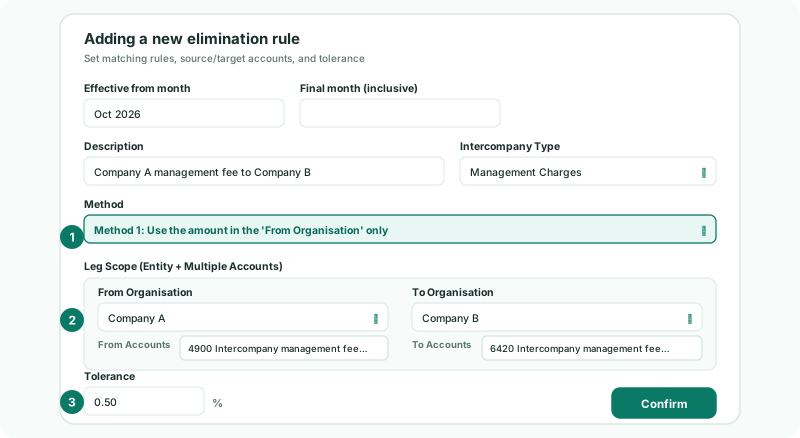
Each account list offers the company’s accounts as code – name. If a side books the item to more than one account, click + Add Account on that side: the rule adds that side’s accounts together before comparing. The type list shows only the types switched on in Intercompany Types, with your own types under the type they work like.
Saving recalculates the group, so the rule clears every month in its effective period at once, not only the current one. Month locks don’t stop this: the rule’s effective period decides which months it reaches.
4See what the rule posts
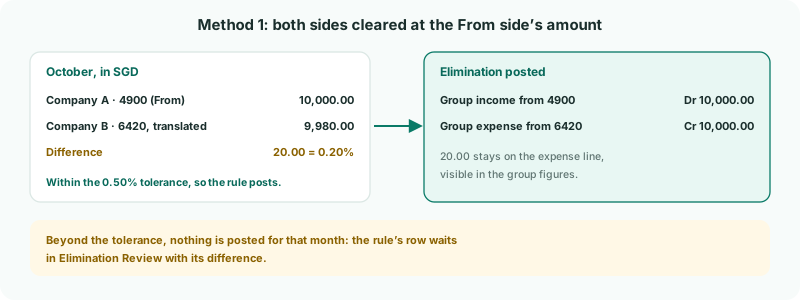
For each month the rule compares Company A’s amount with Company B’s, both in SGD:
| If the difference is | The rule |
|---|---|
| Within the tolerance | Posts the elimination: Company A’s amount off both group accounts. Company B’s small difference stays on its group line, visible in the figures. |
| Beyond the tolerance | Posts nothing for that month. The month is listed in Elimination Review with its difference and the warning The grouped scope exceeds the rule tolerance., for someone to look at. That includes a month where only Company B has booked the fee. |
The tolerance is a percentage of the From side’s amount for the month. Setting it well is covered in Set the tolerance.
5Check the result
- Open the group’s Profit & Loss for October with Show Entities on.
- Find the management fee income and expense lines.
Check
The rule is listed on Elimination Rules as Method 1. In the October Profit & Loss, the group column shows nothing on the management fee income line, and at most the small exchange difference on the expense line. Nothing for this rule is waiting in Elimination Review.
6If something goes wrong
| A month is not eliminated and is listed in Elimination Review | Company B’s amount differs by more than the tolerance. Find out why: if Company B has not booked the fee yet, reload it once it has; if the difference is always exchange, consider Method 2 with FX. |
| A month is not eliminated and is not in Elimination Review | The month is outside the rule’s effective period, or neither company has anything on the accounts that month. Check Effective from month. |
| Months before the rule was added are not eliminated | Effective from month starts at the month you add the rule. Edit the rule and set it earlier. |
| Leg 1: both sides post to the same group account | 4900 and 6420 are mapped to one group account. Map them to different ones, as in Name and map intercompany accounts. |
| Please choose one from organisation with one or more accounts, and one to organisation with one or more accounts. | A side has no account, or both sides are set to the same company. Choose a different company and an account on each side. |
| The type you want is not in Intercompany Type | It is switched off. Switch it on in Intercompany Types. |
| Add an Auto Elimination Rule can’t be clicked | The group has no Common COA yet. Set it up first, as in the Foundations series. |
Want more detail? See the documentation