
Manufacturing Groups · Track 1 · Tutorial 1 of 2
Set up intercompany types for a manufacturing group
Before you clear anything, give each item that moves between your companies a type of its own, so it is filed and checked where your team expects it. This is the set-up that suits a manufacturing group.
1Know what moves between your companies
A manufacturing group usually has a holding company, a procurement company that buys raw materials, factories, distribution companies, and an IP company that owns patents and brands. These are the items that move between them:
| From | To | What |
|---|---|---|
| Procurement company | Factories | Raw materials at a mark-up |
| Factory | Factory or distributor | Components and finished goods at a transfer price |
| Holding company | Factories | Management fees |
| IP company | Factories | Royalties for patents and processes |
| Factory | Group company | A machine sold between companies |
Each item should have a type of its own, so it is filed, listed and checked where your team expects it. Your group may not have all of them, or may have others: adjust the steps below to what your companies actually book.
2Switch types on and off
- Select the group, and open Settings → Global Settings → Intercompany Types.
- Click the switch on each type below that needs changing. Each switch is saved the moment you click it.
| Type | Change | For |
|---|---|---|
| Inventory Transfers | Keep on | Materials and components. |
| Sales / Purchases / Services | Keep on | Finished goods sold to distributors. |
| Unrealised Profit | Switch on | The margin in stock still held by the buyer. |
| Management Charges | Keep on | Management fees, and the base for Royalties. |
| Trade Receivables / Payables | Keep on | Unpaid invoices. |
| Fixed Assets | Switch on | Machines and tooling sold between companies. |
| Intercompany Loans | Switch on | Funding from the holding company. |
A new group starts with Trade Receivables / Payables, Sales / Purchases / Services, Inventory Transfers and Management Charges switched on. Other Eliminations is always on. See Switch on and add intercompany types.
3Add types of your own
- Click Add type.
- In Type name, enter Raw Materials.
- In Accounting treatment, choose Inventory Transfers, and click Save type.
- Add the others the same way.
| Type name | Accounting treatment | For |
|---|---|---|
| Raw Materials | Inventory Transfers | Materials from the procurement company, kept apart from components between factories. |
| Royalties | Management Charges | Royalties charged by the IP company. |
The accounting treatment decides how the type behaves and which accounts its entries accept. A type of your own is in the menu only while the built-in type it works like is switched on.
4Arrange the menu
- Click Manage menu.
- For each group below, enter its Group name and click Add group.
- Drag each type onto its group, and click Save menu.
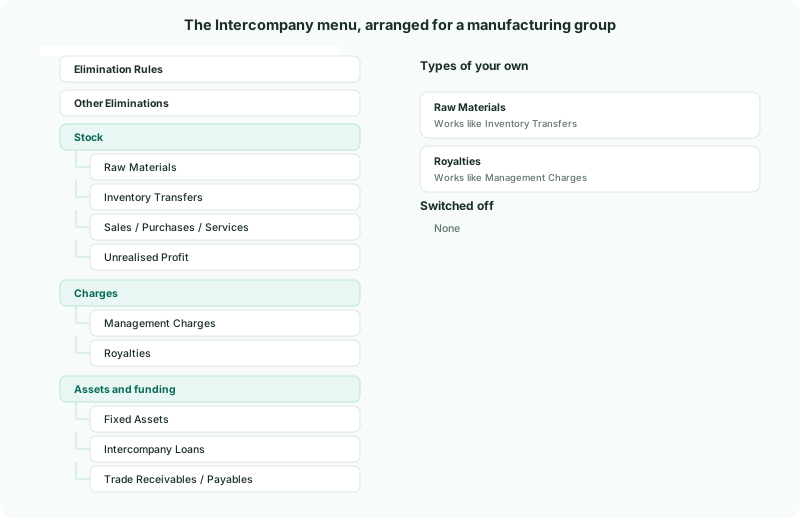
| Group | Types in it |
|---|---|
| Stock | Raw Materials, Inventory Transfers, Sales / Purchases / Services, Unrealised Profit |
| Charges | Management Charges, Royalties |
| Assets and funding | Fixed Assets, Intercompany Loans, Trade Receivables / Payables |
See Arrange the Intercompany menu for moving, renaming and removing groups.
Check
Intercompany in the sidebar shows the groups above, and each type of your own is listed on Intercompany Types with Kind Custom and status Active.
5If something goes wrong
| A type of your own isn’t in the menu | The built-in type it works like is switched off. Switch it on. |
|---|---|
| … cannot be used in this elimination type. | The type’s accounting treatment doesn’t accept that account. Check the table in Switch on and add intercompany types, and choose the treatment whose accounts fit. |
| The arrangement was lost | The dialog was closed without Save menu. Arrange it again and save. |
Want more detail? See the documentation