
Manufacturing Groups · Track 2 · Tutorial 1 of 3
Translate a factory in another currency
A factory abroad keeps its books in its own currency, and the group reports in another. Each part of its figures is translated at a different rate, and the difference has to go to the CTA reserve, not to profit.
1Know the treatment
Your Group reports in SGD. Company A, the holding company, keeps its books in SGD. Company M, a factory in Malaysia, keeps its books in MYR, and sells its goods to Company D, the group’s distributor in Singapore, in SGD. The figures are illustrative.
Company M’s functional currency is MYR: it pays its workers and suppliers and sets its prices in MYR. IAS 21 translates its figures into the group’s SGD like this:
| Assets and liabilities | The closing rate of each month: the plant, the stock and the payables. |
|---|---|
| Income and expenses | Each month’s average rate. |
| Share capital and reserves | The rate of the day each amount came in. A factory funded in tranches as it is built has a rate for each tranche. |
| The difference | Translated at these different rates, the balance sheet no longer balances. The difference goes to a CTA reserve in equity, through other comprehensive income. |
2Check the currency and the rates
- Select Company M, and open Settings → Organisation Settings → Organisation Details. Check its currency is MYR.
- Select Your Group, and open Settings → Global Settings → Exchange Rates. Check MYR has a rate for every month, for the average and the closing rate, in the Actual scenario.
Rates are units of MYR to 1 SGD. See Manage closing and average exchange rates.
3Choose the CTA reserve account
- Open Adjustments → Currency translation → Settings.
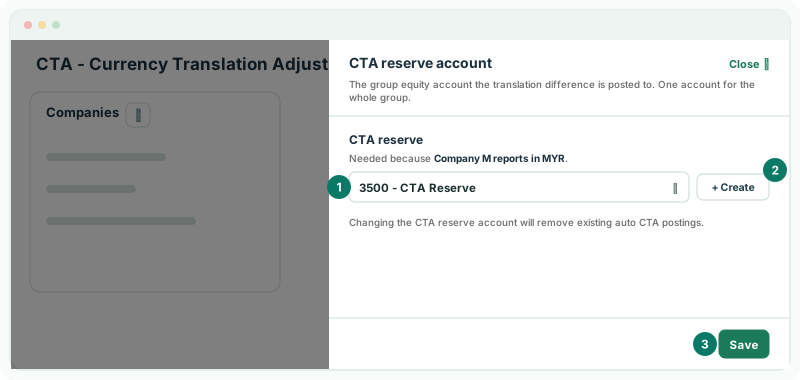
- Click the CTA reserve account icon beside Companies.
- In CTA reserve, choose the group equity account, such as 3500 CTA Reserve, or click + Create to add one. Click Save.
One account takes the CTA for the whole group. Changing it later removes the auto CTA postings already made.
4Translate the factory
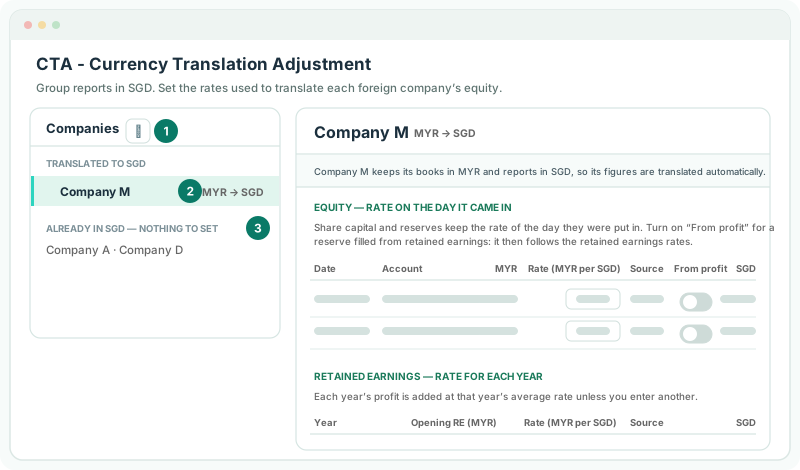
- Under Companies, click Company M. It shows MYR → SGD.
- Read the note under its name: Company M keeps its books in another currency than the group’s, so its figures are translated automatically. There is nothing to switch on.
Companies already in SGD, such as Company A and Company D, are listed under Already in SGD — nothing to set.
5Give the equity its rates
Under Equity — rate on the day it came in, each row is a share capital or reserve account, with its Date, the MYR amount, the Rate (MYR per SGD), its Source and the SGD amount.
| Share capital | Check the row’s rate against the rate on the day the money came in. Type the rate from the share issue if it differs: the Source becomes Manual, and Reset to system undoes it. |
|---|---|
| A reserve filled from retained earnings | Turn on From profit. The reserve then follows the retained earnings rates. |
| A rate shows No FX Rate | Exchange Rates has no rate for that date. Add it there, or type the rate here. |
Under Retained earnings — rate for each year, each year’s profit is added at that year’s average rate unless you enter another. See Set historical rates for equity and retained earnings.
6Finish what the page asks for
While anything is missing, a note at the top says how many things are left to fix for CTA to post correctly, and names them: the CTA reserve account, a rate, or an equity account to map.
- If Equity accounts to map appears for Company M, choose the Group account each listed account rolls into, and click Save mapping.
There is no button to post. BrizoConsol posts the CTA itself, one entry a month, and posts it again when a setting changes.
7Check the translation
- Open Adjustments → Currency translation → CTA Report. Choose Actual, YTD and Oct-2026 as As at period, and click Company M’s row under CTA by company.
- Open Adjustments → Currency translation → CTA / FCTR for Actual and Oct-2026.
Check
On the CTA Report, Company M’s Closing rate and Average rate are October’s MYR rates on Exchange Rates, and This year shows the CTA posted for the year. On CTA / FCTR, Company M’s row under Auto CTA Journals has a Diff of 0.00. On the group’s Balance Sheet for October, NET ASSET equals EQUITY.
To follow each component of the CTA, see Follow a foreign company’s translation line by line.
8If something goes wrong
| What you see | What to do |
|---|---|
| No posted CTA calculation lines found for this selection. | No CTA is posted for Company M in that month. Check that nothing is left to fix on the CTA settings. |
| Company M is listed under Already in SGD — nothing to set | Its currency is SGD on Organisation Details. Correct it to MYR. |
| The translated figures are far too big or small | A rate was entered the wrong way round. Rates are units of MYR to 1 SGD. |
| CTA Report and CTA / FCTR aren’t in the menu | The group has no company in another currency yet. Check Company M’s currency. |
Want more detail? See the documentation